

- Category Business
- Available on PC, Mobile, Surface Hub, HoloLens
- OS Windows 10 version 17763.0 or higher
- Keyboard Integrated Keyboard
- Mouse Integrated Mouse
- languages English (United States)
Introducing Go Action Camera App for Windows: Your Reliable Companion for Action Footage
Go Action Camera App for Windows, crafted by ABR Software, is designed to streamline the way enthusiasts and professionals manage and enhance their action camera footage directly from their PCs. Whether you're editing mountain climbing clips or surfboarding captures, this app aims to bring convenience and efficiency to your creative process.
Key Highlights and Target Audience
Developed by ABR Software, a team dedicated to providing user-friendly multimedia tools, this application offers notable features such as seamless media transfer, intuitive editing options, and collaborative tools aimed at enhancing team workflows. Its core strengths include easy device management, straightforward editing functions, and features that facilitate teamwork among content creators. The ideal users are action camera enthusiasts, vloggers, adventure sports fans, and small production teams seeking an integrated solution for managing their footage.
Vivid Beginnings: Why This App Catches the Eye
Imagine standing at the edge of a mountain summit, camera in hand, eager to capture the breathtaking view. Now picture being able to instantly transfer, preview, and organize all those adrenaline-packed clips on your Windows PC, with a click, instead of fumbling with cables and complicated software. That's the essence of Go Action Camera App — it's like having a trusted assistant dedicated to elevating your footage workflow. The app doesn't just transfer videos—it simplifies your entire post-capture experience, making editing and sharing as effortless as a breeze across snow-capped peaks or rolling waves.
Streamlined Device Management and Media Import
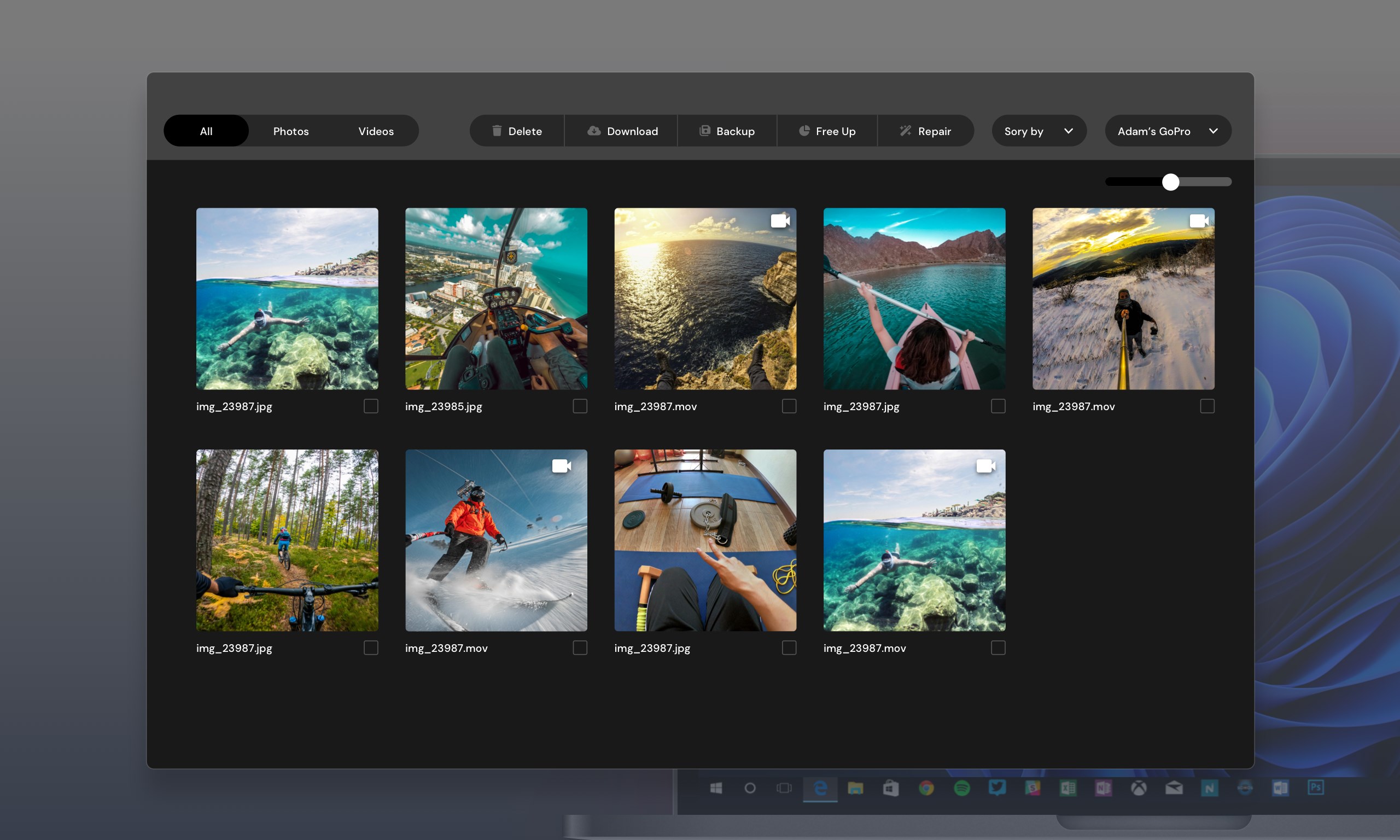
The app's primary feature is its ability to connect easily with action cameras and manage media swiftly. Upon launching, it automatically detects connected devices over Wi-Fi or USB, displaying thumbnails of your videos and photos in a clean, organized interface. This makes it easy to browse through massive footage libraries without the typical hassle of file transfers through cluttered file explorers. Plus, its dual connectivity options ensure flexibility whether you prefer cable or wireless transfer, much like choosing between a dependable relay race or a swift drone delivery—both reliable, both efficient.
This feature is particularly advantageous for users who work in fast-paced environments or have lots of footage to process quickly. For example, a vlogger capturing multiple sessions can batch transfer content seamlessly, saving valuable editing time.
Intuitive Editing and Organizational Tools
Beyond mere transfer, the app offers an array of basic editing tools—cropping, trimming, rotation, and simple filters—that allow users to prepare clips directly within the app. Think of it as putting a splash of salt or a dash of paprika on your dish; it adds flavor without overwhelming the main ingredients. The interface is thoughtfully designed with drag-and-drop functionality, making editing accessible even for beginners while still offering enough depth for more seasoned editors. Navigation feels smooth; transitions between tasks are effortless, akin to guiding a well-paved mountain trail. The learning curve is gentle, enabling rapid mastery and quick turnaround from footage to shared content.
Innovation in Collaboration and Task Management
What truly sets Go Action Camera App apart from other similar solutions is its focus on collaborative work features and task management. Unlike basic media apps that just facilitate transfers, this application provides tools for team members to annotate, comment, and organize footage collectively—think of it as the Google Docs of action footage management. You can assign tasks, track editing progress, and share media within a shared workspace, which is a game-changer for freelancing videographers or small teams working on a project together.
This collaborative edge helps maintain clear communication and streamlines workflows, making it not just a media management tool but a small but mighty team hub. It ensures everyone involved stays on the same page, reducing miscommunication and accelerating project timelines.
Final Verdict: Who Should Give It a Try?
All in all, Go Action Camera App for Windows is a solid option for amateur and semi-professional users seeking a straightforward, effective way to handle their action footage. Its standout features—the seamless transfer system and collaborative workspace—make it particularly appealing for those involved in team projects or content creation on the go. While it may not yet match the depth of professional editing suites, its focus on ease of use and teamwork makes it a worthwhile addition to your workflow toolkit.
We recommend it for adventurers, sports enthusiasts, and small production teams who need a reliable app that simplifies media management and promotes collaboration. For users looking for a feature-rich editing platform or advanced post-processing tools, this app might serve as a complementary solution rather than a standalone powerhouse. Overall, it's a friendly, professional, and practical tool worth exploring.
Pros
- Intuitive User Interface
- High-Quality Video Recording
- Real-Time Preview Feature
- Built-in Editing Tools
- Stable Connection with Go Action Camera
Cons
- Limited Customization Options
- Occasional Connectivity Dropping
- Battery Drain During Long Use
- App Crashes Occasionally on Older Devices
- Limited Support for External Microphones











