

- Category Productivity
- Available on PC, Mobile, Surface Hub, HoloLens
- OS Windows 10 version 14393.0 or higher
- languages Chinese (Simplified), Dutch, English (United States), French, German, Italian, Japanese, Korean, Portuguese, Russian, Spanish
Meet GT Auto Clicker: Your Reliable Partner for Automated Clicking on Windows
Imagine a tool that takes the monotonous task of clicking and transforms it into a seamless, automated process—saving you time, effort, and potential wrist strain. That's precisely what GT Auto Clicker offers. As a free application designed specifically for Windows users, it streamlines repetitive clicking tasks, making it an invaluable assistant whether you're gaming, testing, or automating other workflows. Developed by GTSW Tools, this lightweight yet powerful app stands out for its simplicity and efficiency.
Core Features That Make It a Standout
Rapid and Precise Auto Clicking
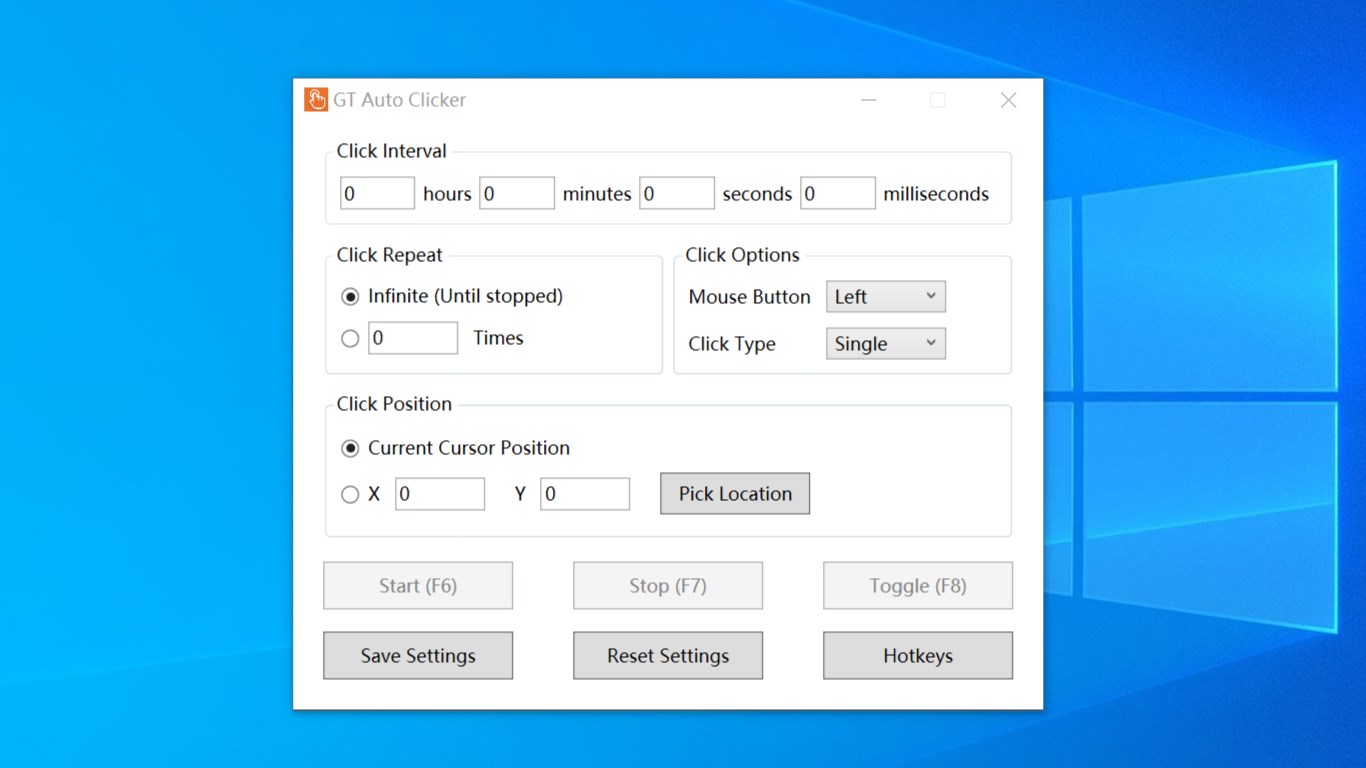
The primary feature of GT Auto Clicker is its ability to simulate mouse clicks accurately and at customizable intervals. Whether you need fast clicks for gaming or timed clicks for data entry, the app allows a high degree of precision with user-defined settings, including click rate, location, and click type (single or double). This flexibility ensures it can handle various scenarios with minimal setup time.
Ease of Use with Minimal Setup
One of GT Auto Clicker's greatest strengths is its user-friendly interface. Upon launching, users are greeted with a clean, intuitive dashboard that requires no complex configuration. You can quickly set click positions, define the number of clicks, and choose hotkeys for instant activation or pausing. This minimal learning curve means even beginners can start automating clicks within minutes, turning a potentially intimidating process into a walk in the park.
Flexible Hotkey and Control Options
Another highlight is the application's flexible control mechanisms. Hotkeys enable users to toggle automation on and off without interrupting other activities—think of it as having an invisible hand on your mouse, ready to spring into action whenever needed. This feature is particularly advantageous during gaming sessions or long-term testing, where rapid start-stop control enhances workflow efficiency.
Design, User Experience, and Workflow Integration
Despite being a straightforward tool, GT Auto Clicker sports a sleek, uncluttered interface that makes navigation feel like a breeze. The controls are logically organized, with sliders and checkboxes that are easy to understand even for first-time users. The app's responsiveness is impressive; clicks are executed smoothly without lag or stutter, maintaining a sense of naturalness akin to manual clicking. Its minimalistic nature contributes to a low cognitive load—users don't need to wrestle with overly complex settings, which keeps focus on the task at hand rather than the tool itself.
In terms of workflow integration, GT Auto Clicker excels by focusing solely on core clicking automation, avoiding the bloat often found in more feature-heavy utilities. Unlike comprehensive macro or scripting tools, it doesn't burden users with excessive options, making it less intimidating and easier to incorporate into daily routines. The design effectively balances simplicity with enough customization to adapt to various needs, allowing users to automate repetitive actions without the headache of managing complex workflows or juggling too many features at once.
Unique Selling Points and Final Recommendations
The most striking aspect of GT Auto Clicker is its laser focus on core clicking automation. Its ability to provide smooth, precision clicking with an ultra-clean, easy-to-use interface sets it apart from more cluttered or overly complex alternatives. The hotkey controls further elevate its practical utility, enabling you to automate actions discreetly and efficiently—almost like having an extra set of hands working tirelessly behind the scenes.
Compared to other productivity apps, GT Auto Clicker's strength lies in reducing cognitive load. It strips away unnecessary complexity, presenting only what you need for effective automation. This makes it highly suitable for both casual users wanting to improve their gaming experience and professionals seeking to streamline testing or repetitive data entry tasks.
Given its straightforwardness, reliability, and dedicated focus, I highly recommend GT Auto Clicker for anyone looking to automate mouse clicking tasks on Windows. It's particularly useful if you value simplicity and efficiency above all else—no fuss, no frills, just consistent clicking at your command. Whether for quick gaming boosts or long-term automated testing, this application adapts seamlessly into your workflow with minimal effort.
Pros
- User-friendly interface
- Free to use
- Customizable click intervals
- Supports multiple click modes
- Lightweight application
Cons
- Limited advanced features
- Potential for accidental clicks
- No built-in subscription management
- Limited customization options for click patterns
- Compatibility issues with certain applications










