

- Category Developer tools
- Developer InstallAware Software
- Available on PC
- OS Windows 10 version 0.0 or higher
- languages English, English (Afghanistan), English (Åland Islands), English (Albania), English (Algeria), English (American Samoa), English (Andorra), English (Angola), English (Anguilla), English (Antarctica), English (Antigua and Barbuda), English (Armenia), English (Aruba), English (Australia and New Zealand), English (Australia), English (Azerbaijan), English (Bahamas), English (Bangladesh), English (Barbados), English (Belarus), English (Belize), English (Benin), English (Bermuda), English (Bhutan), English (Bolivia), English (Bonaire, Saint Eustatius and Saba), English (Bosnia and Herzegovina), English (Botswana), English (Bouvet Island), English (British Indian Ocean Territory), English (British Virgin Islands), English (Brunei), English (Bulgaria), English (Burkina Faso), English (Burundi), English (Cambodia), English (Cameroon), English (Canada), English (Cape Verde), English (Caribbean), English (Cayman Islands), English (Central African Republic), English (Chad), English (Christmas Island), English (Cocos (Keeling) Islands), English (Comoros), English (Congo (DRC)), English (Congo), English (Cook Islands), English (Côte d'Ivoire), English (Croatia), English (Curaçao), en-cz, English (Djibouti), English (Dominica), English (Dominican Republic), English (Eastern Africa), English (Equatorial Guinea), English (Eritrea), English (Estonia), English (Ethiopia), English (Falkland Islands), English (Faroe Islands), English (Fiji), English (French Guiana), English (French Polynesia), English (French Southern and Antarctic Lands), English (Gabon), English (Gambia), English (Georgia), English (Germany), English (Ghana), English (Gibraltar), en-gr, English (Greenland), English (Guadeloupe), English (Guam), English (Guernsey), English (Guinea-Bissau), English (Guinea), English (Guyana), English (Haiti), English (Heard Island and McDonald Islands), English (Honduras), English (Hong Kong SAR), en-hu, English (Iceland), English (India), English (Indonesia), English (Iraq), English (Ireland), English (Isle of Man), English (Israel), English (Jamaica), English (Jersey), English (Jordan), English (Kazakhstan), English (Kenya), English (Kiribati), English (Kyrgyzstan), English (Laos), English (Latvia), English (Lesotho), English (Liberia), English (Libya), English (Lithuania), English (Macao SAR), English (Macedonia, FYRO), English (Madagascar), English (Malawi), English (Malaysia), English (Maldives), English (Mali), English (Malta), English (Marshall Islands), English (Martinique), English (Mauritius), English (Mayotte), English (Micronesia), English (Moldova), English (Monaco), English (Mongolia), English (Montserrat), English (Mozambique), English (Myanmar), English (Namibia), English (Nauru), English (Nepal), English (Netherlands Antilles (Former)), English (Netherlands), English (New Caledonia), English (New Zealand), English (Nicaragua), English (Niger), English (Nigeria), English (Niue), English (Norfolk Island), English (Northern America), English (Northern Mariana Islands), English (Oman), English (Pakistan), English (Palau), English (Palestinian Authority), English (Papua New Guinea), English (Philippines), English (Pitcairn Islands), English (Puerto Rico), English (Qatar), English (Reunion), English (Romania), English (Rwanda), English (Saint Barthélemy), English (St Helena, Ascension, Tristan da Cunha), English (Saint Kitts and Nevis), English (Saint Lucia), English (Saint Martin (French Part)), English (Saint Pierre and Miquelon), English (Saint Vincent and the Grenadines), English (Samoa), English (San Marino), English (São Tomé and Príncipe), en-sa, English (Senegal), English (Seychelles), English (Sierra Leone), English (Singapore), English (Sint Maarten), English (Slovakia), English (Slovenia), English (Solomon Islands), English (Somalia), English (South Africa), English (South Georgia and the South Sandwich Islands), English (Southern Africa), English (Sri Lanka), English (Sudan), English (Suriname), English (Svalbard and Jan Mayen), English (Swaziland), English (Tajikistan), English (Tanzania), English (Thailand), English (Timor-Leste), English (Togo), English (Tokelau), English (Tonga), English (Trinidad and Tobago), English (Turkey), English (Turkmenistan), English (Turks and Caicos Islands), English (Tuvalu), English (U.S. Minor Outlying Islands), English (U.S. Virgin Islands), English (Uganda), en-ae, English (United Kingdom), English (United States), English (Uzbekistan), English (Vanuatu), English (Holy See (Vatican City)), English (Vietnam), English (Wallis and Futuna), English (Western Africa), English (Zambia), English (Zimbabwe)
Innovative Windows Virtualization with InstallAware: An In-Depth Review
Imagine having a Swiss Army knife tailored for Windows virtualization—powerful, versatile, and user-friendly. That's what InstallAware Virtualization for Windows promises to its users. Developed by InstallAware Software, this tool aims to simplify the complex world of application virtualization, providing both developers and IT professionals a robust platform to streamline deployment, testing, and management of virtual applications.
About the Developer and Core Features
InstallAware Software, a well-established name in the software deployment domain, brings its expertise into the virtualization arena with this product. Its main features include seamless application virtualization, simplified management of virtual environments, and a focus on security and compatibility. The tool is designed to minimize conflicts, reduce deployment times, and enhance performance, all within an accessible user interface. Its target users range from software developers looking to package applications efficiently to system administrators managing complex Windows environments.
Engaging Introduction: Unlocking Windows Virtualization's Potential
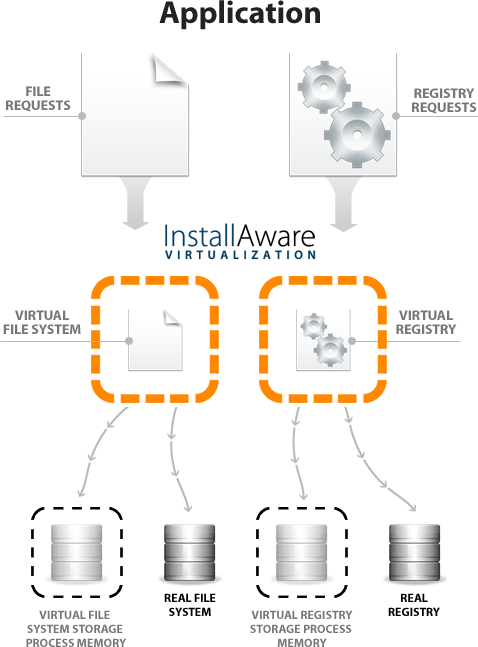
Picture a bustling office where multiple versions of the same app cause headaches—crashes, compatibility issues, endless troubleshooting. Enter InstallAware Virtualization for Windows: a digital architect's toolkit that transforms this chaos into a well-orchestrated symphony. The software acts like a transparent bubble around your applications, letting them run isolated yet seamlessly integrated into the Windows environment. It's like having a magic box that makes app conflicts vanish into thin air, allowing your workforce to focus on productivity rather than technical hiccups. Whether you're a developer wanting to test app compatibility or an admin deploying apps en masse, this tool promises a smoother journey into virtualization.
Core Functionality Breakdown
Seamless Application Virtualization
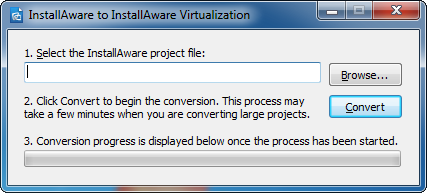
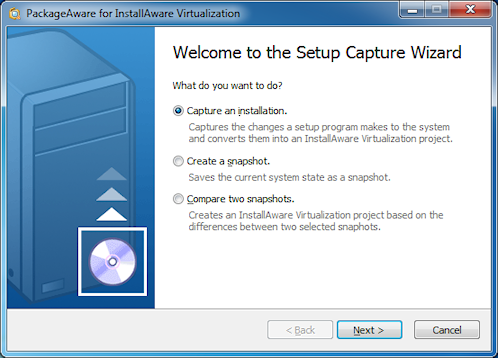
The standout feature is its ability to package applications into virtualized instances that run independently of the underlying OS. This means conflicting DLLs or registry entries are no longer stumbling blocks—your apps behave like VIP guests who don't interfere with each other. The process is straightforward: select your application, configure virtualization settings, and deploy. The result is a neatly contained environment that simplifies testing, updates, and rollback procedures.
Centralized Management and Deployment
Manage multiple virtual applications effortlessly through an intuitive dashboard. This centralized control panel allows you to monitor, update, and troubleshoot virtualized apps in real-time. Its deployment wizard minimizes manual intervention—think of it as a GPS guiding you through the complex terrain of application deployment, ensuring you reach your destination smoothly without detours or dead-ends.
Compatibility and Security Focus
Designed with broad compatibility in mind, InstallAware Virtualization supports a wide range of Windows systems. Its security features add peace of mind—isolating applications minimizes the risk of malware propagation and system conflicts. It's like giving each app its own safety bubble, so even if one gets compromised, the rest of your system remains unaffected.
Evaluating User Experience: Interface, Performance, and Learning Curve
The interface is modern and clean, with a layout that feels more like a well-designed toolkit than a complex software maze. Navigation is intuitive enough for newcomers, yet packed with advanced options for seasoned professionals. Operation runs smoothly, with quick response times during packaging and deployment tasks—no lagging or stuttering. The learning curve is moderate; users familiar with basic virtualization concepts will find it accessible, while others might need a brief exploration to unlock its full potential.
What Sets It Apart from Competitors?
While many virtualization tools focus on either ease of use or advanced customization, InstallAware Virtualization strikes a notable balance. Its unique advantage lies in its robust integration with deployment workflows and its ability to manage virtualized apps centrally. Unlike some competitors that require complex scripting or fragmented management interfaces, this solution offers a cohesive experience that appeals both to novices seeking simplicity and experts wanting fine-grained control. Its reliable performance and security features give it a distinct edge in environments that demand stability.
Final Recommendations: Who Should Consider This Tool?
Based on its features, performance, and user-centric design, InstallAware Virtualization for Windows is highly recommended for organizations aiming to streamline app deployment and reduce conflicts. It's well-suited for corporate IT departments, software developers testing multiple environments, and educational institutions managing diverse software stacks. For those seeking a reliable, easy-to-understand virtualization solution with professional-level features, this product warrants serious consideration. However, users expecting a free or open-source alternative might need to evaluate licensing details and overall cost-performance balance.
--- If you'd like me to refine or expand any section or focus on particular features, feel free to ask!Pros
- User-Friendly Interface
- Seamless Integration with Microsoft Ecosystem
- Robust Virtualization Capabilities
- Efficient Resource Management
- Regular Updates and Support
Cons
- Limited Customization Options
- Initial Setup Can Be Complex
- Performance Slightly Varies Depending on System Hardware
- Occasional Compatibility Issues with Third-Party Software
- Lacks Advanced Automation Features











