

- Category Productivity
- Developer Cyan Soft
- Available on PC, Mobile, Surface Hub, HoloLens
- OS Windows 10 version 17763.0 or higher
- languages English (United States)
Streamlining Your Document Workflow with iPrint and Scan
Imagine transforming your cluttered paper piles into organized digital files with a few simple taps—this is precisely what iPrint and Scan offers. Designed to bridge the gap between traditional document handling and modern digital workflows, this app makes scanning, printing, and saving documents an effortless experience on Windows.
Meet Cyan Soft's Handy Digital Companion
Developed and published by Cyan Soft, iPrint and Scan is a versatile Windows application tailored for professionals, students, and busy households alike. Its core mission is to enable users to digitize, edit, and print documents swiftly, without the hassle of switching between multiple tools. The app shines brightest with its intuitive interface, high-quality scan output, and seamless integration into daily tasks.
Core Features that Make a Difference
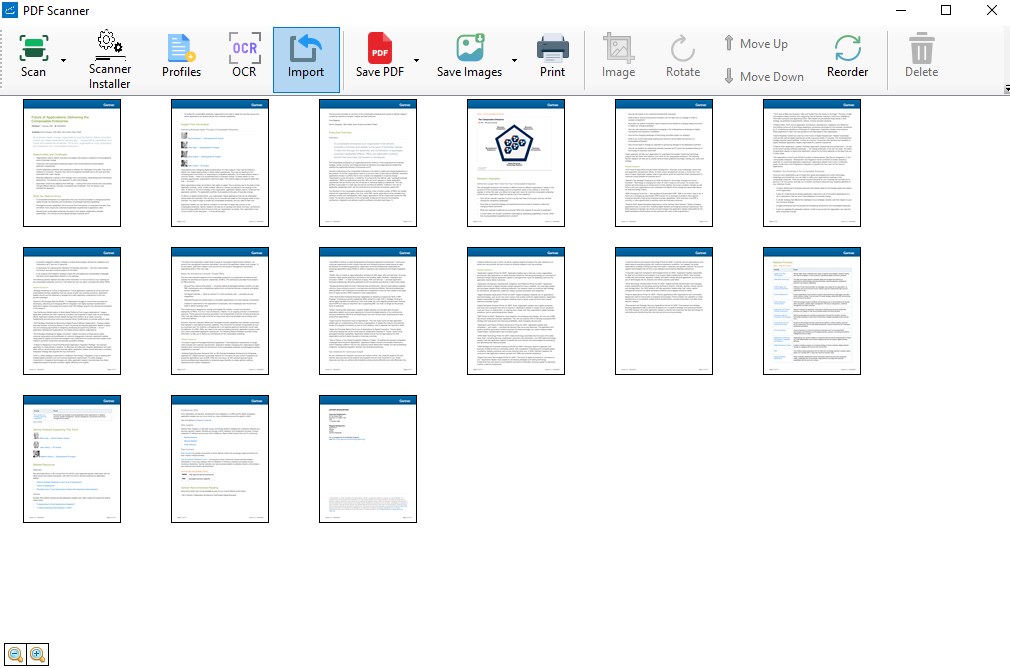
Firstly, the app's primary highlight is its high-precision scanning capability. Whether you're capturing receipts, notes, or multi-page documents, iPrint and Scan ensures clarity and readability, thanks to its advanced image processing algorithms. Secondly, the built-in OCR (Optical Character Recognition) feature transforms scanned images into editable text, dramatically reducing manual retyping and increasing productivity. Lastly, it provides straightforward printing options directly from the app—perfect for quickly turning digital documents back into physical copies or creating print-ready files.
Vivid User Experience: Seamless, Intuitive, and Efficient
From the moment you launch iPrint and Scan, the user experience feels like a well-organized workspace. The interface is sleek, clean, and easy on the eyes, akin to opening a tidy desk drawer—everything has its place. Operation flows smoothly, with minimal lag or delays, which is crucial when you're in a rush to digitize multiple documents. The app's learning curve is gentle—think of it as learning to ride a bicycle: intuitive enough for most to pick up in a few minutes, but with enough depth for advanced users to explore its full potential.
Unique Advantages Over Other Productivity Apps
Unlike many scanning or document tools that add layers of complexity, iPrint and Scan excels in reducing cognitive load by offering a unified and straightforward interface. Its standout feature is the integration of printing, scanning, and editing within a single app, which significantly streamlines workflows. While other apps might require external OCR tools or separate printing utilities, this app's all-in-one approach ensures that you spend less time managing multiple apps and more time focusing on your work. This efficiency-centric design makes it particularly appealing to users who value practical simplicity over an overwhelming array of features.
Recommendation and Usage Scenarios
If you're seeking a reliable, user-friendly solution for digitizing documents, iPrint and Scan deserves serious consideration. It's especially well-suited for students, small business owners, and anyone who regularly handles paper documents but prefers digital storage and management. For environments where speed and simplicity matter most, this app stands out as a practical tool that doesn't sacrifice quality for usability.
In conclusion, iPrint and Scan is akin to having a portable office assistant—helpful, efficient, and easy to use. It's not just another scanner app; it's a thoughtfully designed tool that elevates your document handling experience without overwhelming you with features. Definitely recommend giving it a try if you're looking to tidy up your workflow with minimal fuss while ensuring high-quality results.
Pros
- High-Quality Scanning
- User-Friendly Interface
- Multiple Export Options
- OCR Functionality
- Efficient Batch Scanning
Cons
- Limited Editing Tools
- Occasional Glitches
- Watermark on Free Version
- Limited Compatibility with Some Devices
- Lack of Cloud Storage Integration











