

- Category Personalization
- Developer Finalhit Ltd.
- Available on PC
- OS Windows 10 version 0.0 or higher
- languages English
Introduction to Live Screensaver Creator for Windows
Live Screensaver Creator for Windows is a dedicated application designed to transform your screens into dynamic, personalized displays. By offering a range of customization options, it turns ordinary idle moments into visually engaging experiences, making your desktop truly come alive. Developed by Finalhit Ltd., this tool is ideal for users looking to add a touch of creativity and interactivity to their everyday computing environment.
Core Features That Bring Your Desktop to Life
Dynamic Screensaver Creation with Ease
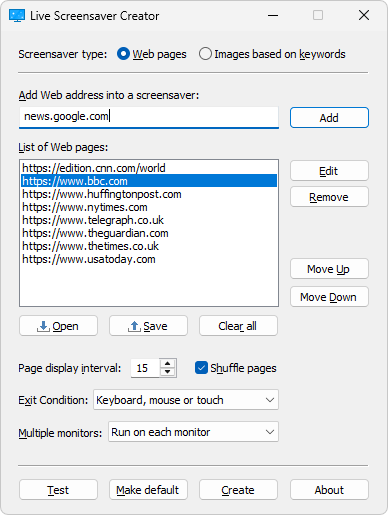
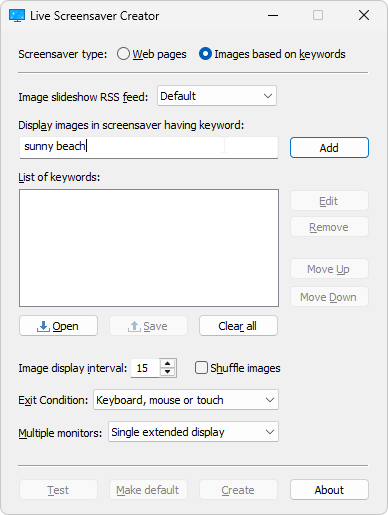
The standout feature of Live Screensaver Creator is its intuitive interface that allows users to craft animated screensavers effortlessly. Whether you want to showcase family photos, favorite artwork, or animated scenes, the app supports various media types, making the creation process smooth and accessible—no advanced design skills needed. Its built-in editor offers a simple drag-and-drop experience, akin to arranging pictures in a photo album but with animated flair.
Rich Customization Options and Theme Compatibility
One of the application's most compelling aspects is its extensive customization toolkit. Users can tweak animation styles, transition effects, and display timings to match their preferences. Moreover, Live Screensaver Creator seamlessly integrates with different Windows themes, ensuring that your screensaver complements your overall desktop aesthetic. This feature sets it apart from more generic solutions, empowering users to craft a truly personalized experience.
Interactive and Responsive Design Elements
The app excels in adding interactive elements that respond to user actions or system triggers. For example, you can set animations to activate during certain times of the day or when specific programs are launched. This dynamic responsiveness enhances user engagement, turning your screensaver from a static background into an interactive centerpiece. The smoothness of animations and the application's responsiveness demonstrate its high-quality performance and thoughtful design.
Evaluating User Experience and Differentiation
From a design perspective, Live Screensaver Creator presents a clean and user-friendly interface that feels more like browsing a digital art gallery than wrestling with complex software. Navigation is logical, and the learning curve is gentle—ideal for both novices and seasoned tech enthusiasts. The app performs fluidly, with animations running seamlessly, without noticeable lag or stuttering, even on modest hardware configurations.
When comparing this application to other personalization tools, its standout feature is the depth of customization combined with theme compatibility. Many screensaver apps offer static images or limited options, whereas Live Screensaver Creator unlocks a world of animated possibilities that adapt seamlessly to your desktop theme. This integration ensures that the added animations feel cohesive rather than jarring, elevating the overall user experience.
Final Recommendations and Usage Suggestions
I recommend Live Screensaver Creator for Windows to anyone eager to spice up their desktop environment without diving into complex design software. It's especially suitable for users wanting personalized, animated screensavers that reflect their personality or mood. For best results, combine your favorite images and animations with the app's customization options to create a truly unique desktop showcase.
While the app is user-friendly and feature-rich, beginners might spend some initial time exploring its various options to fully appreciate its capabilities. Advanced users will likely appreciate the robustness of its customization toolkit and theme compatibility. Overall, it's a practical, creative, and enjoyable tool that transforms what might be a mundane screen into an interactive artistic display.
Pros
- Intuitive Screen Creation
- Wide Compatibility
- Rich Effect Library
- User-Friendly Interface
- Real-Time Preview
Cons
- Limited Export Formats
- Occasional Stability Issues
- Lack of Advanced Editing Tools
- Learning Curve for Beginners
- Limited Customer Support











