

- Category Productivity
- Developer StableCode
- Available on PC, Surface Hub
- OS Windows 10 version 17763.0 or higher
- languages English (United States)
An Essential Tool for Automation Enthusiasts
MadKey - (Key Presser/Auto Clicker) for Windows by StableCode is a straightforward yet powerful automation utility designed to streamline repetitive keystrokes and mouse actions, making it an appealing choice for gamers, testers, and productivity buffs alike.
Simplified Automation at Your Fingertips
Developed by StableCode, a team dedicated to crafting practical software tools, MadKey offers an intuitive way to automate key presses and mouse clicks without the complexity of traditional scripting. Its main highlights include customizable macro recording, variable timing options, and flexible activation methods. Whether you're automating tasks for hours of gameplay, repetitive testing, or workflow optimization, MadKey aims to fill that niche effectively.
Engaging and Intuitive User Experience
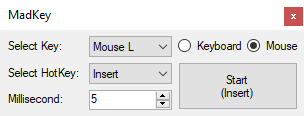
From the moment you launch MadKey, its interface resembles a friendly dashboard rather than a cluttered control panel. The design is clean, with clear labels and minimal distractions, allowing users to quickly set up automation routines. The process of creating macros feels like arranging a series of blocks—think of it as choreographing a dance, step by step. This straightforward approach minimizes the learning curve, making it accessible even for those less familiar with automation software.
Core Functionalities That Stand Out
- Customizable Auto-Pressing and Auto-Clicking: MadKey allows users to record sequences of key presses and mouse clicks, then replay them at configurable intervals. This is particularly useful for repetitive tasks like grinding in games or filling out forms in bulk.
- Flexible Activation Modes: You can toggle automation via hotkeys, scheduling, or on-screen buttons. This flexibility ensures that automation integrates smoothly into your workflow without disruption.
- Timing Precision and Variability: The app provides options to set precise delays and introduce randomness, mimicking human-like behavior or optimizing timing to avoid detection in gaming environments.
Unique Strengths in Workflow Integration
Unlike many competing auto clickers that focus solely on basic automation, MadKey emphasizes reducing cognitive load by offering an uncluttered, easy-to-setup interface that seamlessly integrates into your existing workflow. Its macro recorder is simple enough to operate without scripting knowledge, allowing users to focus on their tasks rather than wrestling with complex configurations. The app's ability to combine multiple automation routines with minimal effort is a key differentiator, making it stand out among productivity tools that often burden users with overly complex features.
Final Verdict and Recommendations
Overall, MadKey emerges as a reliable, accessible automation companion that balances functionality with user-friendliness. It is especially recommended for casual users, gamers, or professionals who seek to reduce repetitive manual input without diverting attention or complicating their setup. Its focused features serve well for targeted automation, avoiding the “jack of all trades, master of none” trap common among bloated automation suites.
If you value simplicity, efficiency, and seamless workflow integration, MadKey is worth trying out. Its straightforward design means you'll spend less time setting up and more time benefiting from automation. On the other hand, power users seeking advanced scripting or complex automation scenarios may find it somewhat limited, but for most daily repetitive tasks, it hits the sweet spot.
Pros
- User-friendly interface
- High customization options
- Lightweight and efficient
- Supports multiple hotkeys
- Reliable automation
Cons
- Limited advanced features in free version
- Basic logging and analytics absent
- Potential compatibility issues with certain games or applications
- Manual configuration required for complex tasks
- Lack of mobile support











