

- Category Social
- Available on PC, Mobile, Surface Hub, HoloLens
- OS Windows 10 version 17763.0 or higher
- languages English (United States)
A Clear Shortcut to the World of QR Codes: An Introduction
Imagine having a digital magic wand at your fingertips—instantly decoding QR codes and seamlessly connecting to the information hidden within. That's exactly what the "QR Code Reader & Scanner for Windows" by Gentle Dan promises to deliver. Whether you're scanning a menu, a ticket, or a business card, this app aims to make the process quick, straightforward, and reliable.
Sleek, User-Friendly Interface That Welcomes You
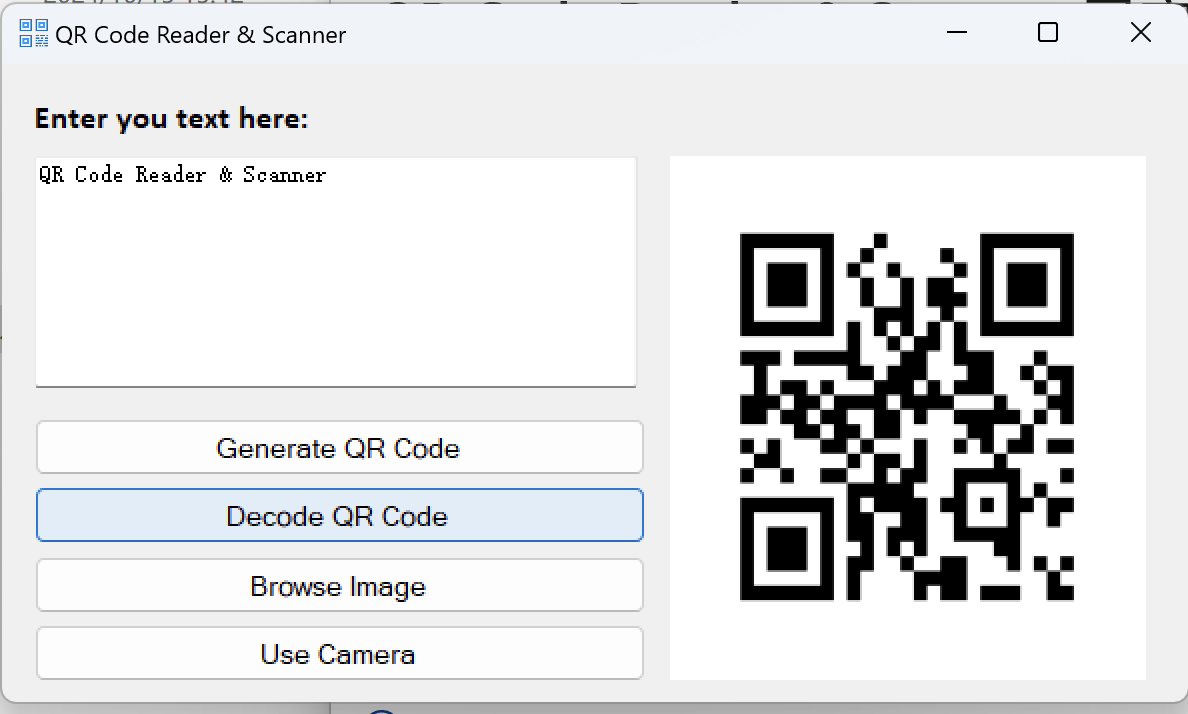
The application's design strikes a perfect balance between simplicity and functionality. Upon opening, users are greeted with a clean, uncluttered interface where the camera viewfinder takes center stage. Navigation feels intuitive; with a single click, you're ready to scan. The app's layout minimizes distractions, allowing users to focus solely on capturing QR codes effortlessly. The responsive design ensures smooth operation across various Windows devices, and the learning curve is gentle—most users will be navigating and scanning within minutes. Overall, the interface enhances user experience by being both approachable and visually appealing.
Core Features That Make Scanning a Breeze
Fast and Accurate QR Code Detection
This app's standout feature is its quick response time combined with high accuracy. As soon as you position your camera over a code, it promptly recognizes and decodes the information. Whether it's a URL, contact details, or Wi-Fi credentials, the app reliably extracts data with minimal delay. This makes it ideal for everyday uses like scanning product codes, tickets, or coupons on the move.
Batch Scanning and History Archive
Beyond single scans, the app offers a handy batch scanning feature, allowing users to process multiple codes in succession—perfect for inventory management or event setups. Additionally, it keeps a comprehensive history log, enabling you to revisit previous scans without needing to re-capture the code. This function is helpful for users who need to cross-check details or manage large volumes of QR data efficiently.
Enhanced Connectivity & Customization Options
What sets this app apart is its focus on connection discovery. It intelligently recognizes different types of QR codes, including Wi-Fi setup codes and contact cards, streamlining device setup and networking processes. Furthermore, although not as feature-heavy as some social applications, "QR Code Reader & Scanner" offers limited profile customization for frequent users and supports authentic verification of codes, ensuring the information you access is trustworthy—a critical aspect amidst QR scams.
Experience and Recommendations: Is It Worth Your Download?
Overall, "QR Code Reader & Scanner for Windows" combines reliable performance with an elegant, no-fuss user experience. Its standout capabilities—particularly rapid detection speed and smart connection discovery—make it a top choice for both casual users and professionals. If you've ever experienced the frustration of frozen apps or convoluted interfaces, this application's smooth operation and straightforward design will be a breath of fresh air.
While it doesn't boast elaborate social profile customization, its emphasis on authentic QR code verification and seamless connectivity makes it excel in practical everyday scenarios. For those who need a dependable scanner without unnecessary clutter, I highly recommend giving this app a try. It's a simple, effective tool that feels like having a pocket-sized scanner right on your desktop.
In conclusion, whether you're scanning for work, travel, or everyday convenience, "QR Code Reader & Scanner for Windows" offers a balanced mix of performance and usability. Just point, scan, and connect—it's that easy.
Pros
- Fast and accurate scanning
- User-friendly interface
- Supports various QR code formats
- No internet required for scanning
- Built-in save and share features
Cons
- Occasional false positives during scans
- Limited editing options post-scan
- Ads may appear frequently in free version
- Photo-based QR code scanning may struggle with poor lighting
- Limited customization options for the interface










