

- Category Education
- Developer Scratch Foundation & MIT Media Lab
- Available on PC
- OS Windows 10 version 14316.0 or higher
- Keyboard Not specified
- Mouse Not specified
- languages English (United States)
Introduction to Scratch 3 for Windows: A Creative Coding Companion
Scratch 3 for Windows is an intuitive, visually engaging programming environment designed to introduce learners to the fundamentals of coding through interactive storytelling, animations, and games. This app seamlessly blends the power of block-based programming with a user-friendly interface, making it an ideal gateway for aspiring young coders and educators alike.
Developed by the Scratch Foundation & MIT Media Lab
Created by the collaborative efforts of the Scratch Foundation and MIT Media Lab, this application benefits from cutting-edge research and a community-driven approach to democratizing programming education. Their shared goal is to foster creativity and computational thinking across diverse user groups.
Key Features that Spark Inspiration
- Interactive Block-Based Coding: Drag-and-drop interface that simplifies complex programming concepts, allowing users to focus on creativity rather than syntax.
- Rich Library of Resources and Extensions: Access to a wide range of sprites, sounds, and extensions that boost project diversity and customization.
- Community Sharing and Collaboration: Users can share their projects with a global community, receive feedback, and collaborate on new ideas.
- Offline Accessibility: Fully functional without an internet connection, enabling learning anytime, anywhere.
A Fun and Friendly Coding Playground
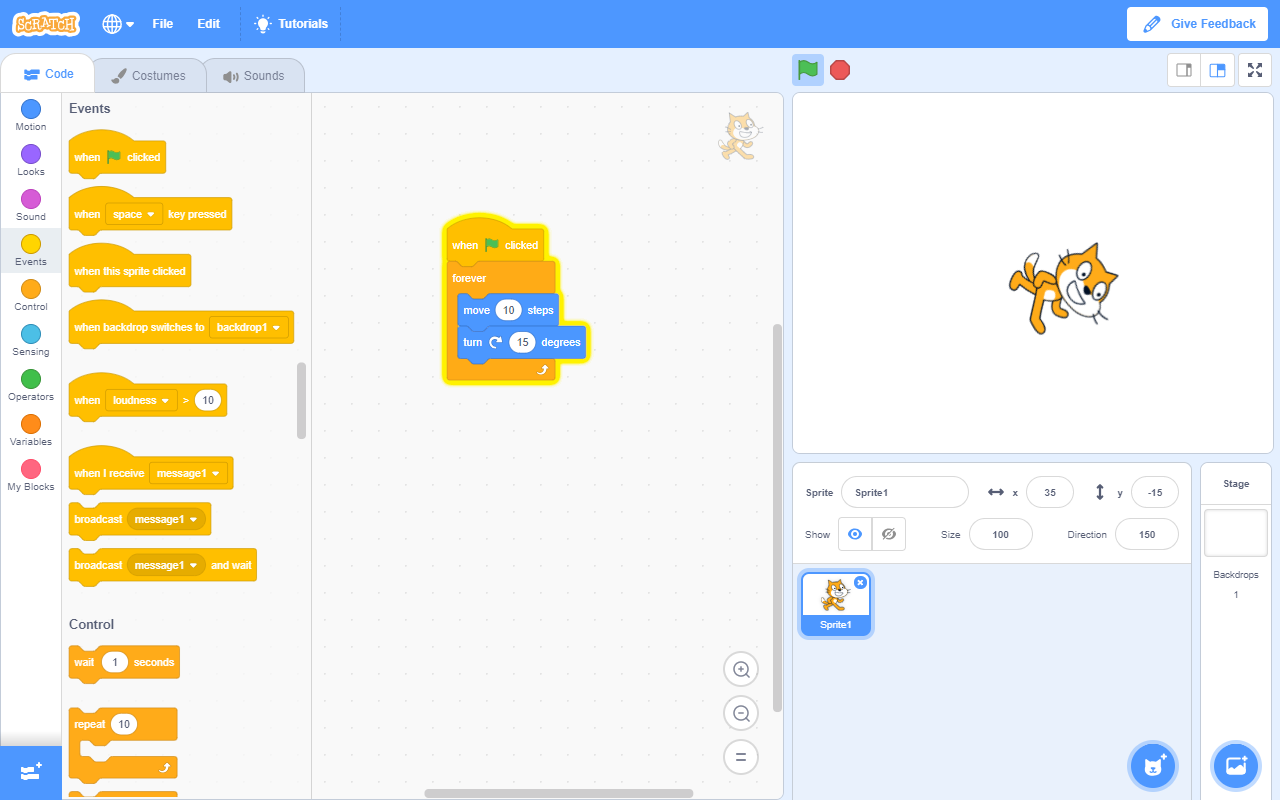
Imagine stepping into a colorful workshop bustling with potential—Scratch 3 transforms your Windows PC into a vibrant canvas for digital creation. Its lively interface, full of playful icons and drag-and-drop blocks, invites users into a world where programming feels less like a chore and more like storytelling. Whether you're crafting a quirky animation or a simple game, the app's approachable design lays a sturdy foundation for coding adventures. The interface's intuitive layout ensures that both beginners and intermediate users can navigate effortlessly, with minimal steep learning curves, making it accessible for all ages.
Core Functionality Deep Dive
Block-Based Programming Made Simple
The heart of Scratch 3 lies in its visual programming blocks. Instead of typing lines of complicated code, users assemble colorful puzzle-like pieces to define actions, events, and logic. This feature lowers the barrier for absolute beginners, allowing for immediate experimentation and iterative learning. Its smooth dragging and snapping operation creates an experience akin to constructing your own digital Lego set, fostering a sense of achievement and curiosity.
Expansive Library & Extension Ecosystem
Scratch's extensive library of sprites, sounds, and backgrounds offers vast creative possibilities. More impressively, the app supports extensions—add-ons that connect Scratch projects to external hardware like LEGO robots or incorporate new functionalities such as text-to-speech. This flexibility turns simple projects into complex, interactive experiences, supporting personalized learning pathways that cater to user interests and progression.
Community and Sharing
One standout feature is the integrated online community. Once users complete a project, they can upload it to Scratch's platform, sharing their work with a global audience. This fosters collaboration, inspiration, and constructive feedback, turning solitary coding into a social activity. For educators and learners, this community engagement adds motivation and enhances learning through peer interaction.
User Experience and Differentiation
Scratch 3 for Windows combines an engaging visual design with responsive performance, providing a seamless experience that feels more like playing than coding. The interface's clarity minimizes distractions, allowing users to focus on building their projects. Compared to other educational coding apps, Scratch's notable strength lies in its balanced integration of content accuracy and authority—backed by MIT's educational research—and personalized learning paths through accessible tutorials and project ideas. Its capacity to evolve from simple demos to sophisticated programs makes it particularly suited for both classroom instruction and independent exploration.
Final Thoughts and Recommendations
Overall, Scratch 3 for Windows stands out as a thoughtfully designed platform that encourages creativity, logical thinking, and community engagement. Its unique blend of user-friendly interface, rich resources, and the ability to support personalized learning makes it an excellent choice for beginners and educators keen on nurturing future coders. For those looking to foster a playful yet educational coding environment, I recommend giving it a try—especially since its offline functionality ensures learning doesn't have to stop when the internet is unavailable. Whether you're a parent, teacher, or student, Scratch 3 on Windows is a solid, engaging tool that unlocks the endless possibilities of digital storytelling and programming.
Pros
- User-friendly interface
- Extensive tutorials and community resources
- Wide variety of coding blocks
- Cloud backups and project sharing
- Supports cross-platform access
Cons
- Limited offline functionality
- Occasional lag with complex projects
- Learning curve for advanced features
- Limited debugging tools
- Occasional interface glitches










