
- Category Productivity
- Developer Le Liu
- Available on PC
- OS Windows 10 version 15063.0 or higher
- Keyboard Not specified
- Mouse Not specified
- languages Arabic (Jordan), Chinese (Simplified), Chinese (Traditional), Czech, Dutch, English (United States), French, German, Greek, Italian, Japanese, Korean, Lithuanian, Polish , Portuguese (Brazil), Portuguese (Portugal), Russian, Spanish (Mexico), Swedish, Turkish, Vietnamese
Snipaste for Windows: A Precise and User-Friendly Screen Snipping Tool
Snipaste is a versatile screenshot utility designed to streamline the way users capture, annotate, and manage screen images on Windows. Its intuitive interface and powerful features aim to turn tedious screenshot tasks into quick, seamless activities—much like having a digital sketchpad at your fingertips.
About the Developer and Core Features
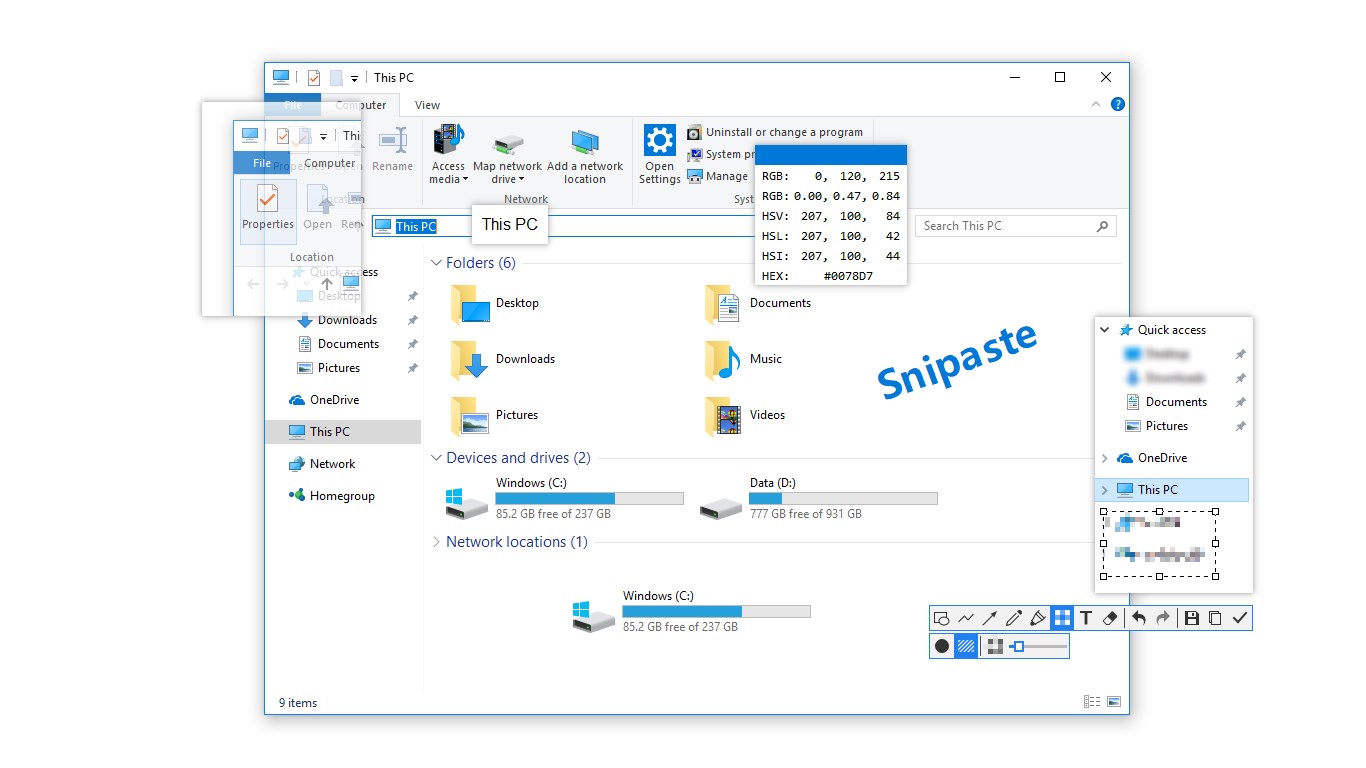
Developed and published by Le Liu, Snipaste stands out as a dedicated tool for efficient screen capturing. Its key features include customizable snip regions with one-click capture, pinning snapshots directly onto the desktop for easy reference, and built-in annotation tools that enrich images without needing external software. Designed with productivity in mind, Snipaste targets users ranging from students and educators to professionals who require quick visual documentation.
Bringing Screens to Life: An Engaging Introduction
Imagine you're in the midst of a bustling work session, trying to share a tricky error message with a teammate, or gather a series of visual notes for your next project. Snipaste transforms this scenario into a smooth, almost fun experience. Its straightforward workflow means no more jumping between multiple apps or fussing over complicated options. Instead, it acts as your digital sketchbook, ready to capture, highlight, and pin your ideas—almost as if you're sticking sticky notes directly onto your screen to keep your thoughts organized and accessible.
Snipaste's Core Functionalities: Precision Snipping and Persistent Annotations
Accurate and Customizable Snipping
At the heart of Snipaste is its precise snipping capability. Instead of forcing users into rigid templates, it offers adaptive capture modes: rectangular, freeform, window, and full-screen—all accessible with just a few clicks or hotkeys. Think of it as having a magic lasso that can quickly grab any part of your screen and turn it into a snapshot. Compared to generic screenshot tools, Snipaste excels in its speed and flexibility, allowing users to effortlessly tailor captures to their exact needs.
Sticky Snaps and Annotation Tools
The feature that truly sets Snipaste apart is its ability to pin snapshots directly onto your desktop—imagine leaving a virtual sticky note on your workspace. This persistent annotation workspace enables users to add comments, arrows, highlights, and other markings seamlessly. Such persistent “stickies” function is particularly advantageous for ongoing projects or collaborative discussions, reducing the cognitive load of retrieving important information. Unlike many apps that require external editors, all editing occurs within the same streamlined environment, fostering a more efficient workflow.
User Experience: Intuitive Design and Smooth Operation
Snipaste boasts a clean, uncluttered interface that invites even novice users to pick it up easily. Its operation feels fluid—hotkeys are responsive, and the snipping process flows like a well-rehearsed dance. Users report a gentle learning curve; even first-time users can quickly master essential functions without sifting through a labyrinth of menus. With minimal lag and clear visual cues, the app ensures that capturing and annotating screens feels more like a creative act than a chore.
Differentiation and Unique Advantages
Compared to typical productivity tools or basic snipping utilities, Snipaste's standout features lie in its persistent pinning capability and streamlined annotation process. While many apps focus on capturing images, Snipaste emphasizes integrating these snapshots into your workflow—by allowing pins that stay on-screen until dismissed, it reduces the cognitive load of searching for important visuals later. Additionally, its minimalistic design reduces feature clutter, thus lowering the mental effort required to operate and remember complex command sets. This approach effectively reduces cognitive fatigue, making it ideal for users who value efficiency over feature bloat.
Final Recommendations and Usage Tips
If you're someone who frequently needs to create visual reminders, provide quick feedback, or organize snippets without distraction, Snipaste is a highly recommended tool. Its intuitive interface and focus on workflow integration make it a natural addition to your productivity arsenal. For optimal efficiency, personalize hotkeys and experiment with the pinning feature to create an on-screen repository of critical information. While it may lack some advanced editing features found in professional graphic tools, its core strengths lie in speed, simplicity, and seamless integration—perfect for casual users, educators, and professionals alike.
Pros
- Intuitive user interface
- High customization options
- Versatile screenshot modes
- Persistent floating window
- Cloud sync and storage
Cons
- Limited native editing tools
- Occasional lag with high-resolution images
- Limited advanced editing options
- Few customization options for annotations
- Some features require an upgrade to premium version











