

- Category Music
- Available on PC, Mobile, Surface Hub
- OS Windows 10 version 14393.0 or higher
- languages English (United States), German
A Fresh Approach to Digital Songbooks on Windows Tablets
For musicians, karaoke enthusiasts, or casual singers, navigating through countless songs across devices can feel like searching for a needle in a haystack. SongBook for Windows Tablets steps into this scene as a streamlined, user-friendly solution that redefines portable song management. Developed by LinkeSOFT GmbH, this app aims to bring the familiar comfort of traditional songbooks to the modern Windows tablet environment, combining practical features with an intuitive interface. Whether you're performing on stage or practicing at home, this application promises to be an accessible and reliable companion.
Core Features That Stand Out
Comprehensive Song Management with Easy Search & Organization
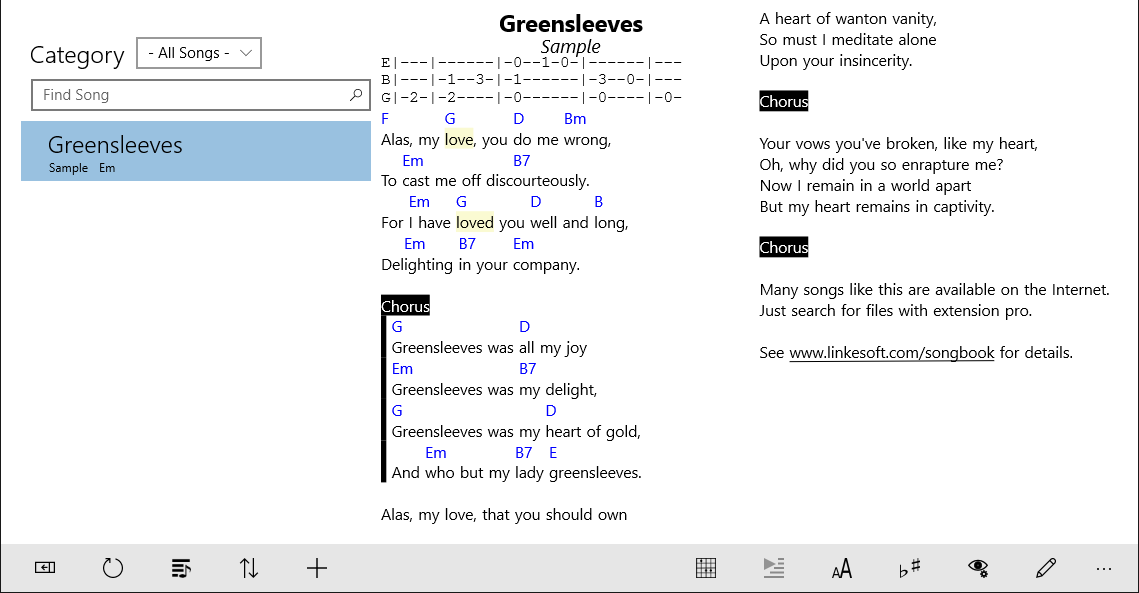
At its heart, SongBook offers an organized musical library where users can effortlessly add, categorize, and search for their favorite songs. The app's tagging and filtering options allow quick navigation, turning what could be a cluttered digital collection into a well-oiled machine. This feature is especially beneficial for performers with extensive repertoires, ensuring they can swiftly locate the perfect tune without fuss.
Rhythm Pattern Assessment & Playback
One of the app's most notable innovations is its capacity to assess rhythm pattern variety and provide playback options. Musicians can analyze rhythm patterns for authenticity or practice purposes, taking advantage of the app's ability to evaluate timing accuracy. This feature is particularly useful for band members or solo artists who want to refine their timing or learn complex rhythms, offering a deeper engagement compared to standard music apps.
Customizable Display & User Interface
The interface of SongBook combines a sleek appearance with functional design. Large, clear fonts and customizable backgrounds make reading and viewing lyrics comfortable, even on smaller screens. Navigation feels fluid, with touch gestures that respond swiftly, creating an experience akin to flipping through pages of a physical book—only digitally shinier. This high level of responsiveness craftily mitigates any potential learning curve, making the app accessible for users of varying technical skills.
Experience and Differentiation
Using SongBook on a Windows tablet is like having a portable concert hall at your fingertips. The app's responsiveness is impressive; songs open instantly, and the rhythm assessment tools function smoothly without lag, highlighting its optimized performance. The rhythm pattern evaluation, in particular, sets the app apart: while other songbooks simply display lyrics, SongBook actively assesses the complexity and variety of rhythm patterns, making it a valuable tool for musicians seeking to improve their timing and groove.
In comparison to other music apps, many focus solely on playback or simple library management. SongBook's unique feature of rhythm pattern assessment offers a more analytical and educational approach, blending traditional songbooks with interactive learning tools. Its adaptability for different user groups—from casual singers to professional performers—further enhances its appeal, making it not just a song holder but a practice partner.
Recommendations and Final Thoughts
Overall, I find SongBook for Windows Tablets a thoughtfully designed application that caters well to both casual users and serious musicians. Its standout rhythm pattern evaluation functionality provides a deeper layer of interaction absent in many comparable apps, making it particularly suited for song practice and refinement. The clean interface, combined with smooth operation and effective organization tools, positions this app as a reliable choice for anyone seeking a digital replacement for their traditional songbooks.
If you're someone who values both efficiency and a touch of musical intelligence in your app, I recommend giving SongBook a try. It strikes a fine balance between usability and advanced features, making it a versatile tool to enhance your musical journey on a Windows tablet. Whether for practice, performance, or just enjoying the music, this app deserves a spot in your digital toolkit.
Pros
- Intuitive Touch Interface
- Extensive Song Library
- Offline Accessibility
- User-Friendly Playlist Management
- Regular Updates with New Features
Cons
- Limited Customization Options
- Minor App Stability Issues
- Search Functionality Could Be Improved
- UI Design Feels Slightly Outdated
- Limited Social Sharing Features











