
- Category Security
- Developer e-motional.com Esm Software
- Available on PC
- OS Windows 10 version 0.0 or higher
- languages English
Unlock the Power of Privacy: An In-Depth Look at Transparent Screen Lock PRO for Windows
If you're someone who values quick access while safeguarding your workspace, Transparent Screen Lock PRO offers a novel approach to screen security. Think of it as a smart window curtain—gliding smoothly from transparency to complete concealment—giving you control over your screen's visibility with just a few clicks.
About the App: Simple, Yet Surprisingly Smart
Developed by Esm Software, Transparent Screen Lock PRO for Windows is designed to provide a quick and customizable method to lock your screen with transparent overlays or fully blacked-out screens. Its standout features include a sleek interface, fast toggling between states, and flexible locking options tailored for users who need instant privacy on demand.
Targeted primarily at professionals working in open office environments, developers testing sensitive data, or anyone needing rapid screen concealment, this app promises a straightforward yet effective privacy solution. The key features revolve around effortless toggling, customizable appearance, and compatibility across Windows devices.
Engaging and Practical: The User Experience
Imagine working on a bustling coffee shop table—your screen is your digital fortress, but sometimes you just need a quick hideaway. Enter Transparent Screen Lock PRO: a tool that's as intuitive as flipping a switch. Its interface is minimalistic but thoughtfully designed, so you're not caught up in complex menus. The main control buttons are straightforward, making the learning curve almost nonexistent for new users.
Performance-wise, the app is a smooth operator—once installed, toggling between transparent, blurred, or fully locked screens is instantaneous. This responsiveness ensures that users can switch privacy modes on the fly without distraction, enhancing productivity during quick interruptions or when sharing your screen temporarily.
Core Features That Stand Out
1. Dynamic Transparency and Locking Modes
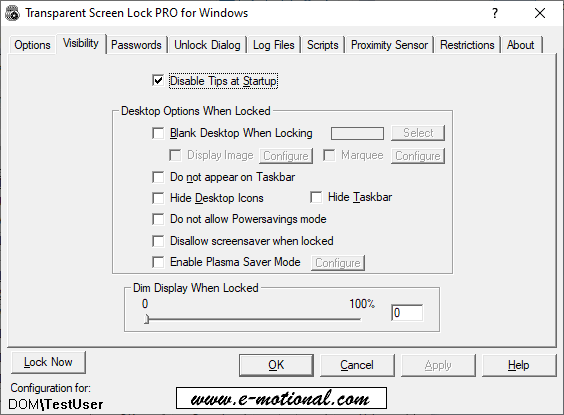
The app's most distinctive feature is its ability to instantly toggle your screen's visibility with various levels of transparency. Whether you need a partly see-through overlay to peek at notifications or a completely black screen to hide sensitive data, Transparent Screen Lock PRO makes it effortless. Unlike typical screen lockers that simply black out your display, this flexibility allows users to maintain situational awareness—a unique advantage especially useful in collaborative or on-the-go scenarios.
2. Customization and Quick Access
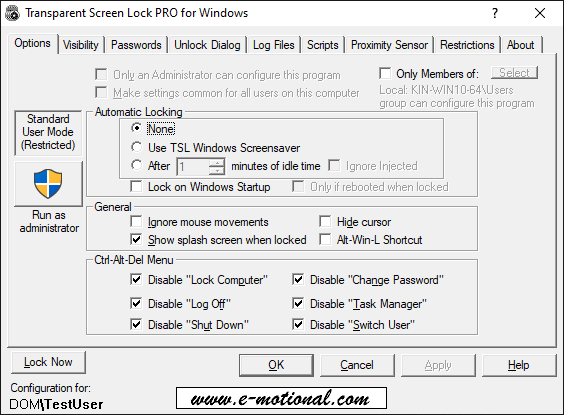
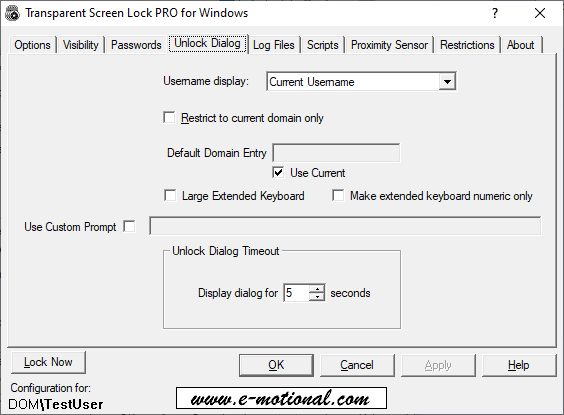
Tailoring the appearance and functionality is seamless, with options to assign shortcuts or hotkeys for rapid switching. You can even customize the overlay color and transparency level, creating a personalized privacy profile. This adaptability transforms the app from a simple lock to a versatile privacy shield fitting different needs and environments.
3. Seamless Integration and Reliability
Designed to integrate effortlessly into the Windows environment, the app runs unobtrusively in the background. Its stability ensures that when you activate the lock, your screen is secured instantly with no lag or glitches. This reliability is critical for professional settings where security should be airtight and interruptions minimal.
Design, Usability, and Value
The interface design is clean and modern, akin to the calm control panel of a cockpit—functional without unnecessary clutter. The overall user experience is smooth, with fluid transitions and clear controls making it suitable even for less tech-savvy users. While the initial setup requires no special learning curve, exploring the customization options can deepen your mastery over the app, transforming it into an extension of your privacy habits.
Compared to more generic security applications, Transparent Screen Lock PRO's key advantage lies in its visual flexibility. Instead of a rigid lock, it offers an elegant, non-intrusive way to obscure your screen—making it particularly appealing for those who dislike the starkness of traditional screen lockers and prefer aesthetic relevance combined with functionality.
Final Thoughts: A Privacy Ally Worth Considering
In conclusion, Transparent Screen Lock PRO for Windows stands out as a sophisticated yet accessible tool for quick screen privacy. Its crown jewel—dynamic transparency combined with instant toggling—sets it apart from standard security apps. For users who need both ease of use and visual flexibility, this app is a solid recommendation. It's especially suitable for casual professionals, remote workers, or anyone seeking a subtle yet effective privacy solution.
While it may not replace comprehensive security suites for sensitive data protection, its specialized focus on fast, reversible visual locking makes it a valuable addition to your digital toolbox. If quick privacy toggling aligns with your workflow and aesthetic sensibilities, give this app a try—your workspace's visual privacy will thank you.
Pros
- Enhanced Screen Privacy
- Customizable Lock Screen
- Easy Accessibility
- Low System Impact
- Compatibility with Multiple Devices
Cons
- Limited Customization Options
- Possible Lag During Activation
- Occasional Compatibility Issues with OS Updates
- No Biometric Integration
- Minor Visual Glitches











