

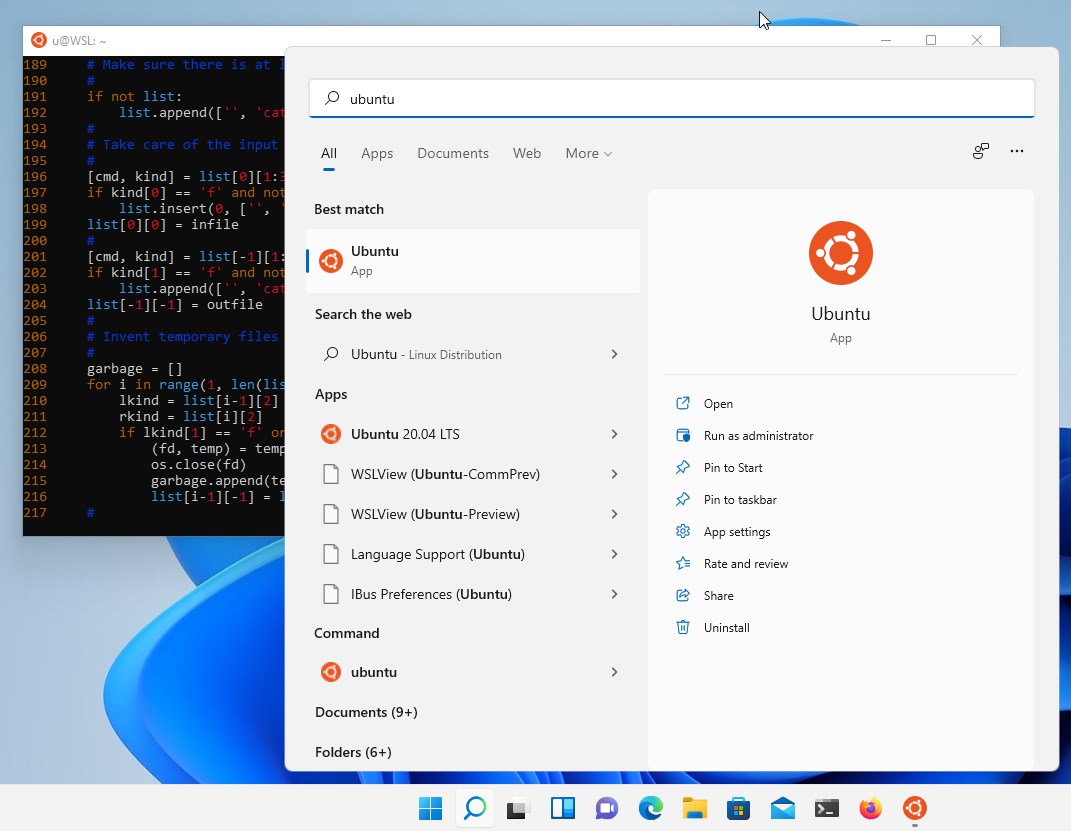
- Category Developer tools
- Developer Canonical Ltd. and the OpenSource community
- Available on PC
- OS Windows 10 version 16215.0 or higher
- Keyboard Integrated Keyboard
- Memory 4 GB
- languages English (United States)
Ubuntu for Windows: Bridging the Gap Between Windows and Linux
Imagine having a full-fledged Linux environment nestled comfortably within your Windows desktop—that's precisely what Ubuntu for Windows offers. It aims to bring the power and flexibility of Ubuntu Linux directly into your Windows experience, making cross-platform workflows seamless and efficient.
Developed by Canonical Ltd. and the Open Source Community
This application is brought to you by Canonical Ltd., the company behind Ubuntu, along with contributions from the vibrant open-source community. Their collaborative effort ensures continuous improvements, security updates, and a solid foundation for developers and enthusiasts alike.
Key Features That Make a Difference
- Seamless Integration with Windows: Ubuntu runs natively on Windows via the Windows Subsystem for Linux (WSL), allowing users to access Linux tools without dual-booting or virtual machines.
- Full Linux Environment in a Portable Package: Users can install and run Ubuntu, leveraging apt packages, running scripts, and managing files across platforms effortlessly.
- Regular Updates and Support: Being maintained by Canonical ensures users receive timely updates, security patches, and access to a vast repository of open-source software.
- Developer-Centric Toolbox: Ideal for developers needing a Linux shell for programming, testing, or automating tasks while remaining within the Windows ecosystem.
Engaging the User: A Fresh Take on Linux Inside Windows
Imagine opening a window into a bustling Linux world—Ubuntu for Windows feels like stepping into a digital wonderland where your familiar Windows environment and a robust Linux system coexist in harmony. Whether you're a developer, sysadmin, or hobbyist, this app invites you to explore Linux's extensive capabilities without leaving your comfortable Windows habitat.
Breaking Down Core Functionalities
1. Native Linux Shell Experience
What sets Ubuntu for Windows apart is its integration with Windows Subsystem for Linux, essentially running Linux commands directly within Windows. The terminal interface is sleek and responsive, offering a native feel that rivals standalone Linux installations. The learning curve remains gentle—installing Ubuntu is straightforward, and navigating its command-line tools becomes second nature, making this an indispensable tool for scripting, software development, or managing Linux-based environments.
2. App and Software Compatibility
Unlike traditional virtual machines, Ubuntu on Windows leverages WSL's capabilities to access Linux repositories and run hundreds of Linux-native applications seamlessly. Installing Git, Python, Node.js, or even Docker is as simple as a few commands. This compatibility feels like having a secret passage into a world where open-source software is readily at your fingertips, boosting productivity and experimentation.
3. User Interface & Experience
The interface adopts a minimalist, clean design that emphasizes function over form, much like a well-organized workshop. Although it's primarily terminal-based, Windows Terminal integration enriches the experience—allowing multiple tabs, color customization, and smooth cursor movements. The overall operation feels fluid and responsive, with minimal lag—almost like having a personal Linux assistant waiting in the wings. For newcomers, the transition is smooth, thanks to clear prompts and streamlined setup steps.
What Sets It Apart from Similar Tools?
Many developers turn to virtualization software like VirtualBox or Docker for Linux environments, but Ubuntu for Windows, powered by WSL, offers a more lightweight, performance-efficient alternative. Its biggest advantage? It enables true interoperability between Windows and Linux, allowing files and processes to communicate seamlessly. Unlike standalone distros or third-party emulators, Ubuntu on Windows benefits from direct integration with Windows, making it feel native rather than add-on. This synergy is particularly valuable for developers wanting to test, run, and compile Linux software without OS switching or resource-heavy virtualization.
Final Verdict and Recommendations
Overall, Ubuntu for Windows stands out as a pragmatic and robust tool for bridging two worlds. It's best suited for developers, testers, and power users looking for a streamlined, integrated Linux experience within Windows. While it may lack some advanced features of full Linux distributions or virtual machines, its ease of use, performance, and native integration make it a compelling choice.
We recommend giving this app a try if you're seeking to enhance your development environment or explore Linux tools without the hassle of separate installations. Especially if you rely heavily on Windows but crave the flexibility of Linux, Ubuntu for Windows may become an indispensable part of your toolkit.
Pros
- Seamless integration with Windows 10 and 11
- Access to a full Linux terminal
- Supports Ubuntu's large repository of software
- Quick setup with Windows Subsystem for Linux (WSL)
- Automatic updates via Microsoft Store
Cons
- Limited GUI support
- Potential performance issues for resource-intensive tasks
- Occasional compatibility problems with certain Linux distributions
- Limited network configuration options
- Requires WSL 2 for optimal functionality










