


- Category Photo & video
- Developer Kenji
- Available on PC
- OS Windows 10 version 17763.0 or higher
- languages English (United States)
Bringing Your Screen to Life: An Introduction to Video Screen Saver for Windows
If you're tired of static backgrounds and looking to add a splash of motion to your desktop, the Video Screen Saver for Windows by Kenji offers a fresh take. This app transforms your screen into a dynamic window filled with animated videos, turning what used to be a mundane space into an engaging visual experience.
Developer's Vision and Core Features
Who's Behind the Magic?
Developed and published by Kenji, a creator known for innovative desktop customization tools, this application embodies their dedication to enhancing user desktop environments with simple yet captivating visual elements.
What Makes It Stand Out?
There are several compelling features that set this screen saver apart:
- High-Quality Video Themes: The app offers a selection of beautifully curated videos that play seamlessly, creating a lively backdrop for your workspace.
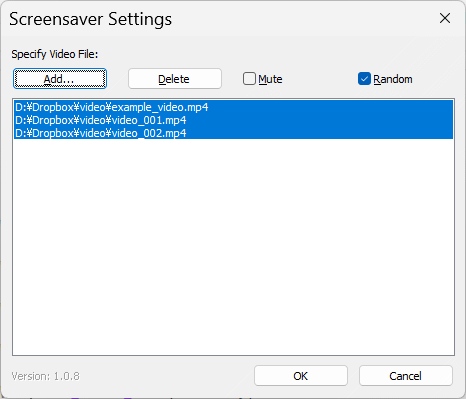
- Easy Customization Options: Users can easily select, arrange, and even add their own videos, making the experience highly personalized.
- Efficient Resource Usage: Despite displaying motion-rich videos, the app is designed to be resource-friendly, keeping your system responsive.
- Auto-Activation and Scheduling: Set your preferred videos to trigger automatically upon system idle, ensuring your desktop always looks lively without manual intervention.
Targeted mainly at tech enthusiasts, digital artists, or anyone wanting to spice up their daily computing environment, this application fits well into a personal or professional setting that values aesthetics and customization.
Immersive Visuals and User Experience
A Splash of Color and Motion
Imagine your desktop as a stage, and these videos as the lively performers that bring the backdrop alive. The app's interface mirrors this simplicity—clean, minimalistic, and akin to flipping through a sleek art gallery. Navigating the options feels intuitive, almost like strolling through a well-organized museum where each exhibit (video) is just a click away. During testing, transitions between videos are fluid, with no noticeable lag or stuttering, providing a smooth visual feast that doesn't distract but rather enhances your workspace.
Design, Usability, and Learning Curve
The setup process is straightforward; newcomers can pick up the app's features in minutes. The controls are snappy, and toggling between different video themes or adjusting playback settings is as simple as swiping through a photo album. The app's user interface is thoughtfully crafted to cater to both tech-savvy users and novices, making customization an enjoyable process rather than a chore.
What Sets It Apart from Other Visual Apps?
Unlike typical desktop wallpapers or static screensavers, this app's most unique attribute is its real-time video playback that maintains high resolution without taxing the system—crucial for those who dislike lag or slowdowns. Moreover, its flexibility to incorporate custom videos transforms it from just a preset visual tool into a personalized cinematic experience. This is a significant edge over conventional photo or video wallpapers, which often lack ease of customization or smooth playback, especially on mid-range hardware.
Final Thoughts: To Splash or Not to Splash? That is the Question
Based on its design, performance, and user-centric features, I'd recommend Video Screen Saver for Windows to anyone seeking to make their desktop environment more vibrant and personalized. It's particularly suited for users who appreciate aesthetics but don't want to compromise system performance. For those tired of static backgrounds or looking for a delightful way to express their creativity directly on their desktop, this app provides a balanced blend of simplicity and visual appeal.
Overall, Kenji's Video Screen Saver for Windows is a thoughtfully crafted addition to your system's visual arsenal—offering a lively, customizable, and efficient way to elevate your everyday computing experience.
Pros
- High-Quality Video Selection
- Easy-to-Use Interface
- Lightweight Application
- Automatic Screen Saver Activation
- Regular Content Updates
Cons
- Limited Customization Options
- Video Playback Controls
- Screen Resolution Compatibility
- Ads and Promotions
- Limited Language Support











