

- Category Developer tools
- Developer Microsoft
- Available on PC
- OS Windows 10 version 0.0 or higher
- Keyboard Integrated Keyboard
- Mouse Integrated Mouse
- languages English (United States)
Clean, Powerful, and Intuitive: Exploring Visual Studio Code for Windows
If you're treading the development waters and seeking a tool that balances simplicity with robust features, Visual Studio Code (VS Code) emerges as a compelling choice. Designed by Microsoft, this lightweight yet versatile code editor aims to be the Swiss Army knife for developers on Windows. Whether you're working on a small script or managing large-scale projects, VS Code positions itself as your reliable partner, blending sleek design with an array of powerful functionalities.
A Snapshot of the Application
VS Code is a free, open-source code editor tailored for Windows platforms, created by the Microsoft team. Its core promise is to streamline code writing, debugging, and version control within a customizable environment. The app's main features include an integrated terminal, extensive extension support, and intelligent code completion, which together craft a seamless coding experience.
- Developer: Microsoft
- Publisher: Microsoft Corporation
- Main Highlights: Fast and lightweight code editing; extensive marketplace for extensions; built-in debugging; customizable user interface.
- Target Audience: Software developers, students learning coding, hobbyists, and professional teams seeking a flexible development environment.
Snake-Like Ease Meets Swiss Army Precision: An Inviting Introduction
Imagine a tool that feels like your favorite notebook—familiar, yet equipped with every pen stroke seamless and swift. That's the smooth allure of VS Code. It's the dependable companion that transforms the sometimes overwhelming world of coding into an organized, approachable adventure. Whether you're tuning a Python script on a rainy afternoon or debugging a complex JavaScript app, VS Code's intuitive design makes every keystroke feel like a small victory, guiding you effortlessly through your workflow.
Core Features: Unlocking the Potential
1. The Customizable and Extensible Environment
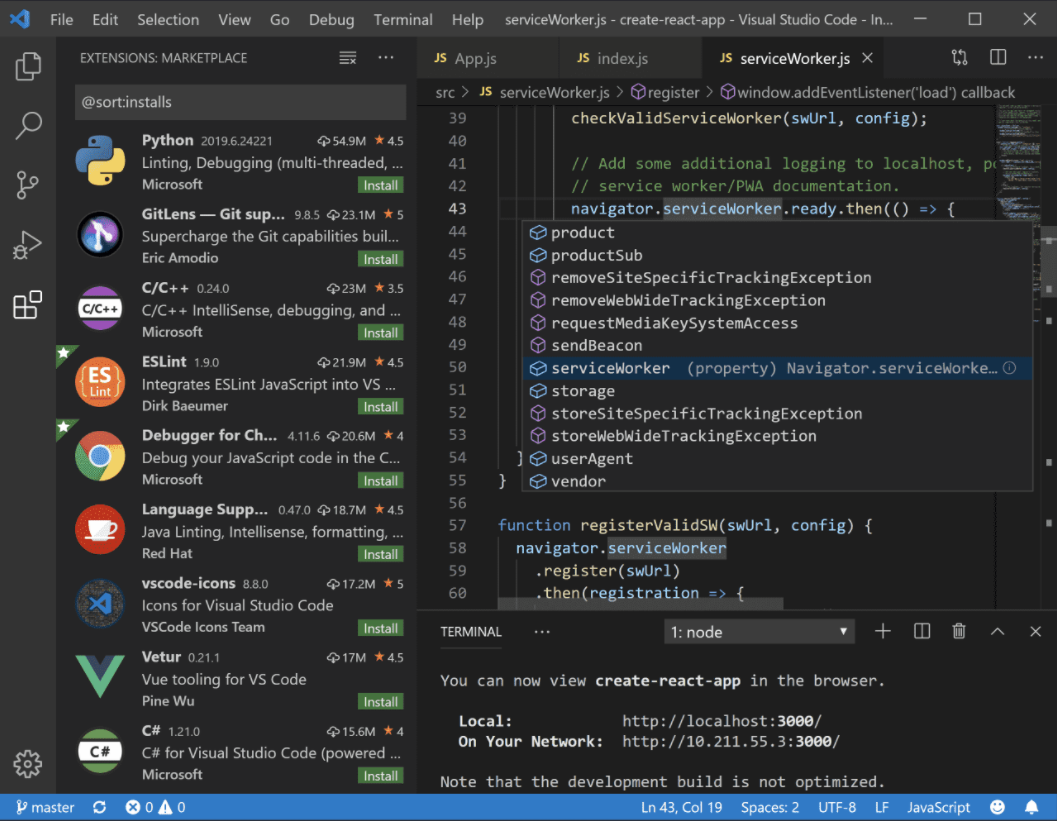
One of VS Code's most compelling strengths is its extension marketplace. Think of it as adding new gadgets to your toolbox—lithium-ion drill bits, precision screwdrivers, or a laser level. Developers can enhance their workspace with themes, linters, language support, and tools for version control like Git. Setting this up is straightforward: just a few clicks, and you're customizing your environment to match your project's needs. This modular approach ensures that VS Code remains lightweight while still being infinitely adaptable, setting it apart from heavier IDEs that come preloaded with everything but lack flexibility.
2. Intelligent Code Editing and Debugging
‘Smart' is an understatement when describing VS Code's code intelligence features. Its IntelliSense provides context-aware suggestions, autocompletions, and parameter info, acting like an attentive coding buddy who anticipates your needs. Paired with integrated debugging—visual breakpoints, call stacks, and real-time variable inspection—coding becomes a more controlled, less frustrating endeavor. This synergy transforms VS Code into a mini-IDE optimized for quick edits and steady progress, without the bulkiness of traditional integrated development environments.
3. Seamless Workflows and User Experience
The interface of VS Code is akin to a well-organized workshop—clean, flexible, and easy to navigate. The sidebar, panels, and command palette make switching between tasks smooth as gliding through different parts of a well-designed dashboard. Opening files, managing projects, or running scripts can be achieved with minimal effort, thanks to rich keyboard shortcuts and command palette commands. Despite its powerful features, the learning curve remains gentle—perfect for beginners yet sufficiently deep for experts seeking mastery.
Standout Edge: What Sets VS Code Apart?
While many code editors boast similar features, VS Code's real differentiator lies in its lightweight architecture combined with its vast extension ecosystem and intelligent features. Unlike bulkier IDEs that may feel sluggish, VS Code loads swiftly and stays responsive even when juggling multiple files. Its built-in support for Git, along with live sharing capabilities, fosters collaboration—making it not just a standalone tool but a team workspace. Moreover, the active Microsoft backing ensures rapid updates, security patches, and integration with other Microsoft services, seamlessly fitting into a developer's existing environment.
Recommendation and Usage Tips
Overall, Visual Studio Code for Windows merits a strong recommendation for a broad spectrum of users—from novice programmers to seasoned developers. It strikes a balance between power and simplicity, making it suitable for daily coding tasks and complex debugging. For best results, explore the extension marketplace to tailor the editor to your language preferences and workflow needs. If you prioritize speed, flexibility, and a supportive ecosystem, VS Code is an excellent choice that can grow with your skills and projects.
Pros
- Lightweight and fast performance
- Extensive extension ecosystem
- Built-in Git integration
- Customizable interface
- Cross-platform compatibility
Cons
- Limited project management features
- Can become resource-intensive with many extensions
- Default debugging setup can be complex for beginners
- Some extensions may have compatibility issues or lag behind updates
- Offline documentation is limited compared to other IDEs











