
- Category Productivity
- Developer Pishi Ltd, London, UK
- Available on PC
- OS Windows 10 version 0.0 or higher
- Keyboard Integrated Keyboard
- Mouse Integrated Mouse
- languages English, English (Afghanistan), English (Åland Islands), English (Albania), English (Algeria), English (American Samoa), English (Andorra), English (Angola), English (Anguilla), English (Antarctica), English (Antigua and Barbuda), English (Armenia), English (Aruba), English (Australia and New Zealand), English (Australia), English (Azerbaijan), English (Bahamas), English (Bangladesh), English (Barbados), English (Belarus), English (Belize), English (Benin), English (Bermuda), English (Bhutan), English (Bolivia), English (Bonaire, Saint Eustatius and Saba), English (Bosnia and Herzegovina), English (Botswana), English (Bouvet Island), English (British Indian Ocean Territory), English (British Virgin Islands), English (Brunei), English (Bulgaria), English (Burkina Faso), English (Burundi), English (Cambodia), English (Cameroon), English (Canada), English (Cape Verde), English (Caribbean), English (Cayman Islands), English (Central African Republic), English (Chad), English (Christmas Island), English (Cocos (Keeling) Islands), English (Comoros), English (Congo (DRC)), English (Congo), English (Cook Islands), English (Côte d'Ivoire), English (Croatia), English (Curaçao), en-cz, English (Djibouti), English (Dominica), English (Dominican Republic), English (Eastern Africa), English (Equatorial Guinea), English (Eritrea), English (Estonia), English (Ethiopia), English (Falkland Islands), English (Faroe Islands), English (Fiji), English (French Guiana), English (French Polynesia), English (French Southern and Antarctic Lands), English (Gabon), English (Gambia), English (Georgia), English (Germany), English (Ghana), English (Gibraltar), en-gr, English (Greenland), English (Guadeloupe), English (Guam), English (Guernsey), English (Guinea-Bissau), English (Guinea), English (Guyana), English (Haiti), English (Heard Island and McDonald Islands), English (Honduras), English (Hong Kong SAR), en-hu, English (Iceland), English (India), English (Indonesia), English (Iraq), English (Ireland), English (Isle of Man), English (Israel), English (Jamaica), English (Jersey), English (Jordan), English (Kazakhstan), English (Kenya), English (Kiribati), English (Kyrgyzstan), English (Laos), English (Latvia), English (Lesotho), English (Liberia), English (Libya), English (Lithuania), English (Macao SAR), English (Macedonia, FYRO), English (Madagascar), English (Malawi), English (Malaysia), English (Maldives), English (Mali), English (Malta), English (Marshall Islands), English (Martinique), English (Mauritius), English (Mayotte), English (Micronesia), English (Moldova), English (Monaco), English (Mongolia), English (Montserrat), English (Mozambique), English (Myanmar), English (Namibia), English (Nauru), English (Nepal), English (Netherlands Antilles (Former)), English (Netherlands), English (New Caledonia), English (New Zealand), English (Nicaragua), English (Niger), English (Nigeria), English (Niue), English (Norfolk Island), English (Northern America), English (Northern Mariana Islands), English (Oman), English (Pakistan), English (Palau), English (Palestinian Authority), English (Papua New Guinea), English (Philippines), English (Pitcairn Islands), English (Puerto Rico), English (Qatar), English (Reunion), English (Romania), English (Rwanda), English (Saint Barthélemy), English (St Helena, Ascension, Tristan da Cunha), English (Saint Kitts and Nevis), English (Saint Lucia), English (Saint Martin (French Part)), English (Saint Pierre and Miquelon), English (Saint Vincent and the Grenadines), English (Samoa), English (San Marino), English (São Tomé and Príncipe), en-sa, English (Senegal), English (Seychelles), English (Sierra Leone), English (Singapore), English (Sint Maarten), English (Slovakia), English (Slovenia), English (Solomon Islands), English (Somalia), English (South Africa), English (South Georgia and the South Sandwich Islands), English (Southern Africa), English (Sri Lanka), English (Sudan), English (Suriname), English (Svalbard and Jan Mayen), English (Swaziland), English (Tajikistan), English (Tanzania), English (Thailand), English (Timor-Leste), English (Togo), English (Tokelau), English (Tonga), English (Trinidad and Tobago), English (Turkey), English (Turkmenistan), English (Turks and Caicos Islands), English (Tuvalu), English (U.S. Minor Outlying Islands), English (U.S. Virgin Islands), English (Uganda), en-ae, English (United Kingdom), English (United States), English (Uzbekistan), English (Vanuatu), English (Holy See (Vatican City)), English (Vietnam), English (Wallis and Futuna), English (Western Africa), English (Zambia), English (Zimbabwe)
A Clean and Intuitive Voice-to-Text Solution for Windows
Voicy - Voice to Text for Windows is a straightforward, efficient transcription tool designed to convert speech into written text seamlessly, making it a valuable asset for professionals, students, and anyone who often transforms spoken words into digital content.
About the Developer and Core Features
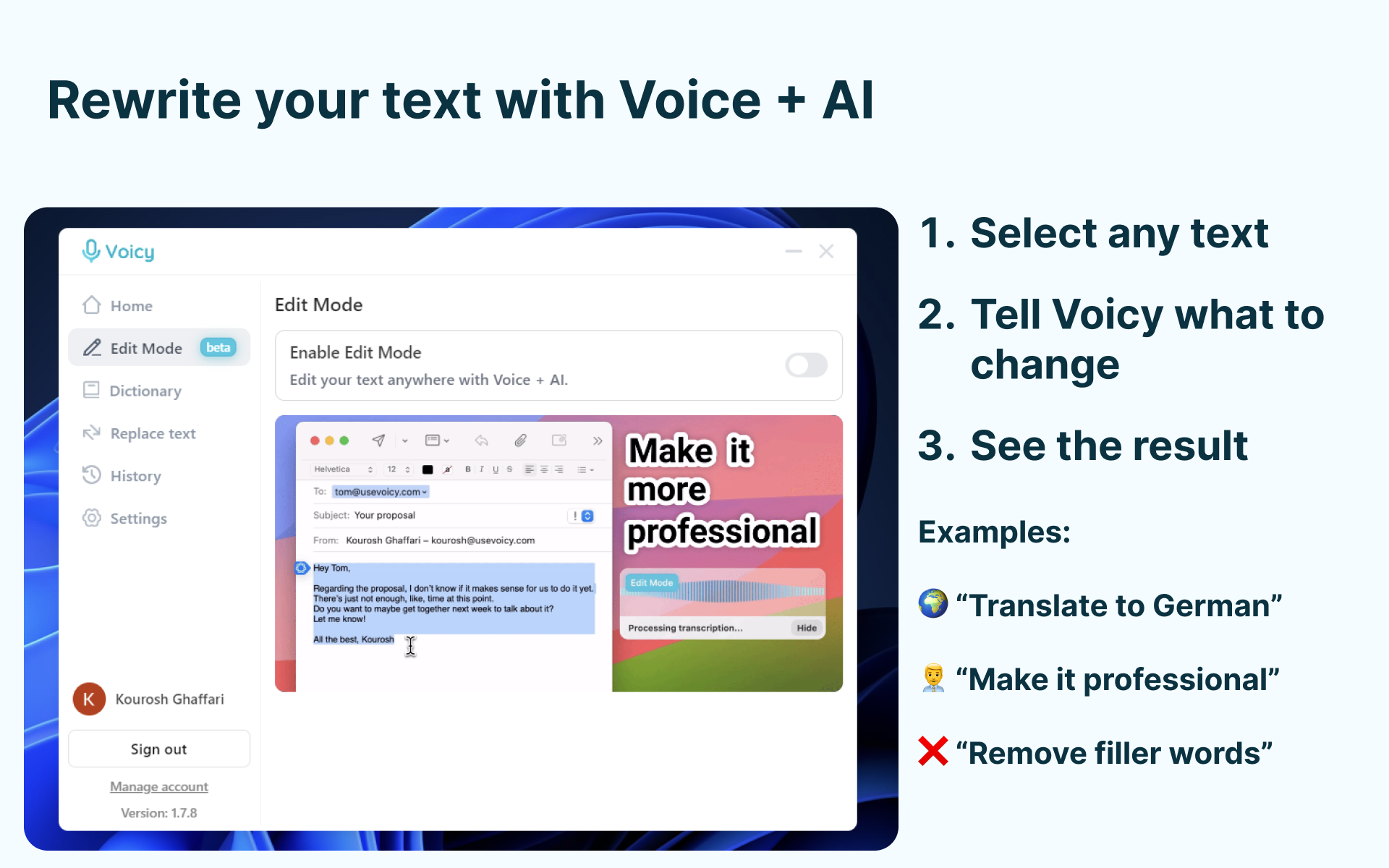
Developed by Pishi Ltd., based in London, UK, Voicy offers a streamlined voice recognition experience tailored for Windows users. Its key strengths lie in real-time transcription accuracy, easy-to-navigate interface, and smart learning capabilities. The app's primary features include high-precision voice recognition, customizable vocabulary, and an on-the-fly editing mode.
Targeting users ranging from content creators and journalists to busy professionals, Voicy aims to facilitate efficient workflow enhancements without the clutter or complexity often associated with more feature-rich solutions.
Engaging and Practical User Experience
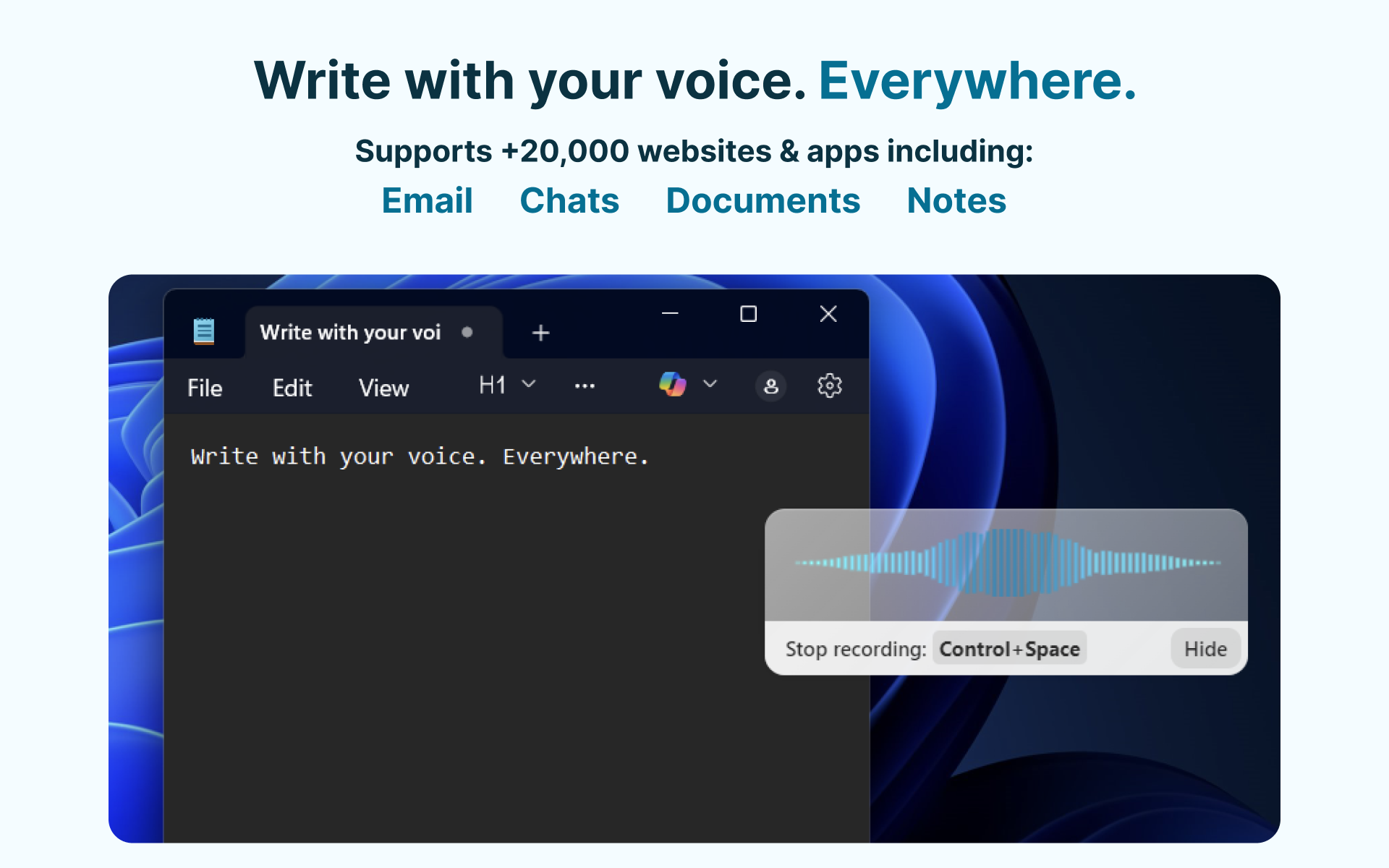
From the moment you launch Voicy, it's like stepping into a well-organized digital workspace—minimalist but thoughtfully designed, inviting you to start speaking without fuss. The clean interface, with its prominent microphone button and clear transcription window, makes capturing spontaneous thoughts or structured dictation effortless. Transitioning from verbal input to editable text is smooth, lag-free, and remarkably accurate—almost as if your words are being transcribed by a diligent handwriting assistant sitting right beside your computer.
The learning curve here is pleasantly gentle. Even tech novices will find themselves quickly comfortable, though power users can take advantage of customizable vocabulary settings to optimize transcription accuracy for industry-specific jargon or personal slang. This adaptability ensures users don't need to fight the tool; instead, they collaborate naturally with it.
Workflow Integration & Unique Selling Points
Unlike more complex productivity apps that require long setup times or cause cognitive overload with their myriad features, Voicy focuses sharply on enhancement of the core task: turning speech into text efficiently. Its standout feature is its **adaptive recognition engine**, which learns from your speech patterns over time, improving accuracy and reducing the need for manual corrections. This is akin to having a personal stenographer who gets better with each session, alleviating cognitive load and letting users concentrate on their ideas rather than battling software errors.
Additionally, Voicy's seamless integration with Windows clipboard and its ability to quickly export transcriptions to favorite writing applications positions it as a flexible tool within your existing workflow. Its minimalist design minimizes distractions, allowing users to maintain focus—something many verbose productivity tools struggle with. When contrasted with other voice-to-text products that often bombard users with settings and options, Voicy's approach embodies simplicity, reducing feature complexity to foster natural speech recognition—an elegant solution that truly streamlines your day-to-day tasks.
Recommendation & Usage Tips
Overall, Voicy is a highly recommended tool for anyone seeking a straightforward, effective voice-to-text app on Windows. Its learning capability and clean interface make it particularly appealing for users who prioritize workflow efficiency over feature bloat. For best results, ensure a quiet environment during initial training sessions so the app can build a robust vocabulary tailored to your speech style.
If you frequently dictate notes, compose emails, or draft documents, Voicy offers a distraction-free experience that feels like collaborating with a dedicated assistant—quiet, smart, and unobtrusive. While it may not replace specialized transcription services for complex audio files, for everyday speech-to-text needs, it delivers an impressive balance of accuracy and simplicity. Give it a try—you might find this lightweight app becomes your new digital writing companion.
Pros
- Accurate voice recognition even in noisy environments
- Supports multiple languages and accents
- Easy-to-use interface with quick start features
- Real-time transcriptions with minimal delay
- Option to export and share transcripts easily
Cons
- Limited free transcription time per day
- Occasional inaccuracies with complex technical jargon
- App performance can vary with device hardware
- Occasional difficulty understanding very fast speech
- Some features require a stable internet connection











