

- Category Business
- Available on PC, Mobile, Surface Hub, HoloLens
- OS Windows 10 version 17763.0 or higher
- Keyboard Integrated Keyboard
- Mouse Integrated Mouse
- languages English (United States)
Transforming Your Workspace: An Overview of VR Desktop for Windows
VR Desktop for Windows is a compelling application that bridges the gap between virtual reality and traditional desktop computing, offering users an immersive and enhanced working environment. Developed by Integrated Web Solutions, this app aims to redefine how professionals interact with their PCs through VR technology.
Core Features That Make VR Desktop Stand Out
Immersive Multi-Screen Experience
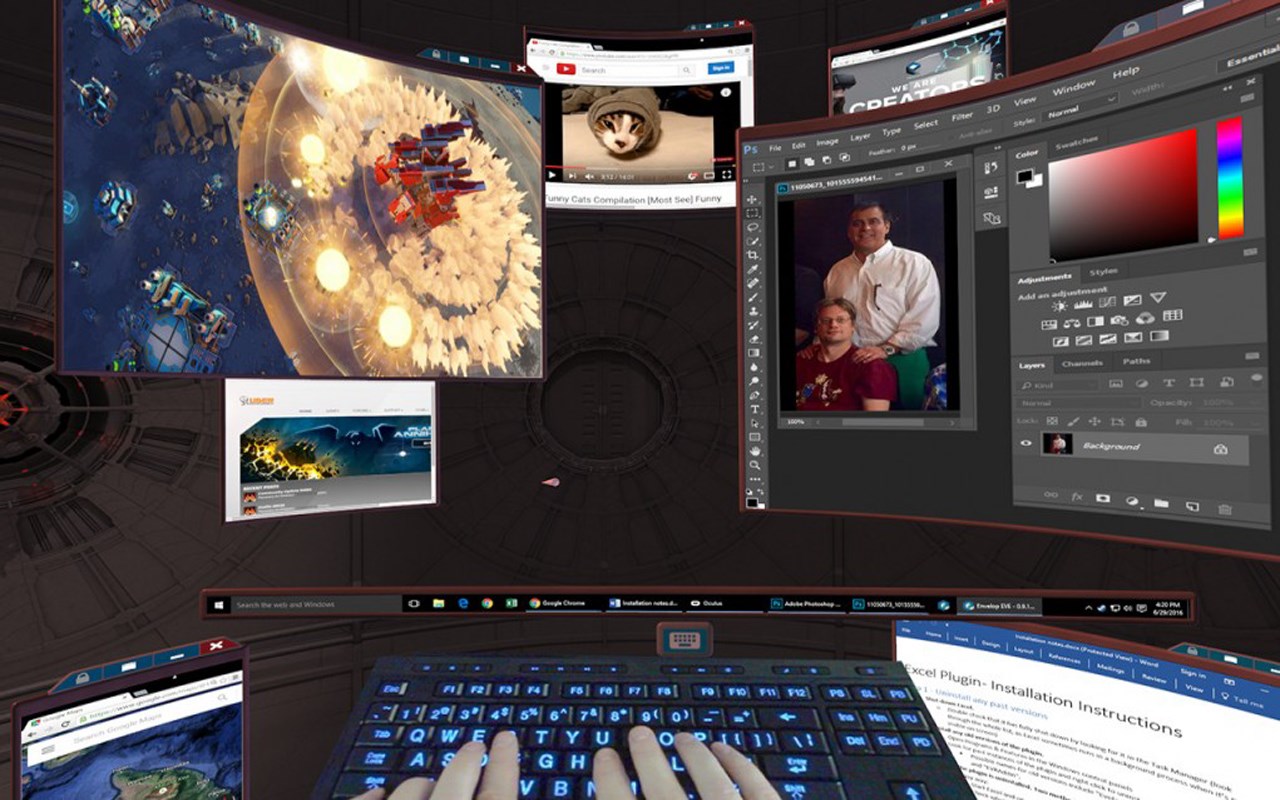
Picture this: you put on your VR headset and suddenly find yourself surrounded by a virtual office space, complete with multiple floating screens that you can resize, reposition, and interact with as if they were physical monitors. This immersive setup allows for more natural multitasking and can be customized to suit individual workflows. The app leverages VR to create a flexible, spacious environment where switching between multiple tasks becomes as simple as turning your head or gesturing with your hands.
Intuitive Task and Window Management
One of the highlights of VR Desktop is its advanced window management system. Users can effortlessly organize applications by dragging virtual windows into designated zones or snapping them to specific positions. The app also supports voice commands and hand gestures, making it easy to open, close, or switch between apps without breaking immersion. This functionality significantly enhances productivity, especially during collaborative projects or multitasking scenarios.
Seamless Collaboration in a Virtual Workspace
Unlike conventional remote desktop tools, VR Desktop offers collaborative features that allow multiple users to share, annotate, and interact within the same virtual environment. Imagine collaborating on a presentation or brainstorming ideas in a shared virtual conference room, with all participants having their personal virtual desktops. This feature is particularly valuable for remote teams seeking a more interactive and engaging way to work together, bridging geographic gaps with a sense of presence and immediacy.
User Experience: Interface, Performance, and Usability
The interface design of VR Desktop is sleek and modern, with floating panels and intuitive controls that mimic real-world interactions. Navigation within the app is smooth, thanks to optimized rendering and responsiveness, ensuring that users don't experience lag or disorientation — issues that can commonly hamper VR experiences. The learning curve is moderate; users familiar with VR interfaces will find it quite accessible, while newcomers might need a short acclimation period to master gesture controls and window management. Overall, the app provides a fluid experience that makes switching between tasks in VR feel natural and effortless.
What Sets VR Desktop Apart from Similar Business Applications?
Compared to other remote desktop or VR workspace solutions, VR Desktop shines in its dual ability to offer both immersive multi-monitor setups and integrated collaboration tools. Its unique task management via spatial arrangement—where virtual screens can be positioned and resized freely—creates a more organic and less constrained workspace environment. Moreover, the collaborative functionalities support real-time sharing and interaction, setting it apart from standard remote desktop applications. This spatial and social integration gives users a more human-centric approach to remote work, making virtual collaboration feel closer to in-person interactions.
Final Verdict and Recommendations
VR Desktop for Windows is a thoughtfully designed app that brings a new dimension to workspace management, especially for those who spend long hours working with multiple applications or remote teams. Its standout features—the customizable immersive environment and collaborative functionalities—offer tangible productivity improvements and creative interactions. While the setup requires a compatible VR headset and some initial learning, the fluid user experience and innovative tools justify the transition for forward-thinking users.
We recommend VR Desktop primarily for tech-savvy professionals, creative teams, or remote workers eager to explore spatial computing. It's not necessarily a replacement for traditional desktops but an exciting supplementary environment that can enhance how you work and collaborate virtually. For those ready to embrace a more dynamic and engaging workspace, VR Desktop presents a viable and intriguing solution worth trying out.
Pros
- Easy VR desktop access
- Supports multiple VR headsets
- Customizable virtual environments
- Smooth integration with Windows
- Enhanced multitasking capabilities
Cons
- Limited input device support
- Performance can be demanding
- Initial setup can be complex for beginners
- Occasional connectivity issues
- Limited multi-monitor support











