

- Category Productivity
- Developer Komarov Sergii Oleksandrovich, FOP
- Available on PC
- OS Windows 10 version 0.0 or higher
- Keyboard Integrated Keyboard
- Mouse Integrated Mouse
- languages English
Introduction: Simplify Your Data Management with xlCompare
Imagine effortlessly navigating complex Excel files, seamlessly comparing and merging data sets, all within a user-friendly environment—that's exactly what xlCompare for Windows offers. This professional-grade tool transforms the often tedious task of data reconciliation into a streamlined, efficient process, making it a must-have for data analysts, accountants, and anyone who works extensively with spreadsheets.
Core Functionality: Deep Dive into xlCompare's Power
Robust Data Comparison and Merging Made Easy
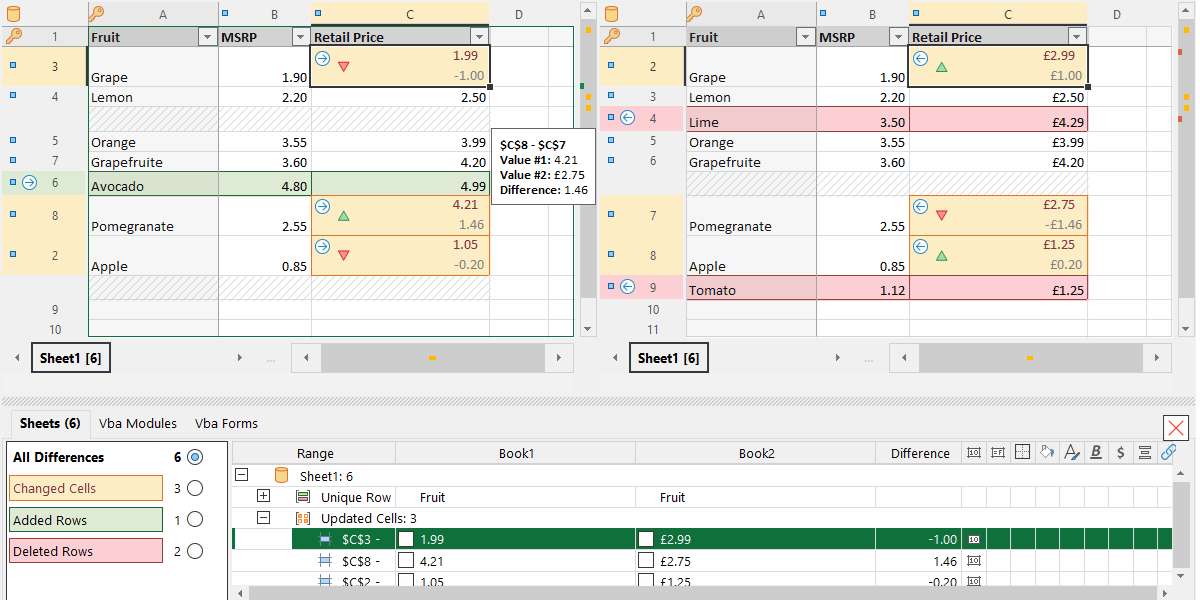
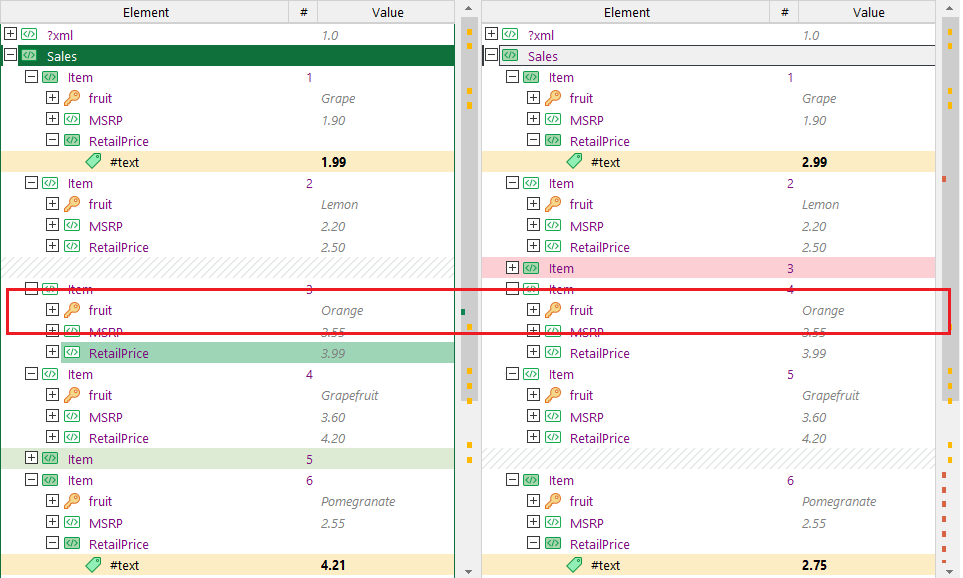
At its heart, xlCompare excels at pinpointing differences between multiple Excel files or sheets. Whether you're reconciling financial statements, consolidating reports, or verifying data integrity across large datasets, xlCompare highlights discrepancies with precision. Its intuitive interface allows you to compare two or more files simultaneously, with visual cues that instantly draw your attention to changes or mismatches. Furthermore, the merging feature enables you to consolidate differences from various sources effortlessly, saving countless hours of manual reconciliation.
Evolution of Data Management with Difference Reports
Beyond simple comparison, xlCompare provides detailed reports outlining differences at cell, row, or entire sheet levels. These reports are customizable and exportable, facilitating review and audit processes. The tool also supports synchronization features—allowing users to update or copy data from one file to another directly within the app, reducing the risk of human error and ensuring data consistency.
User Experience: Intuitive, Efficient, and Accessible
The interface of xlCompare is a breath of fresh air—clean, logically organized, and easy to navigate, even for those new to advanced Excel tools. The comparison process is snappy—responding swiftly even with large files—thanks to optimized performance under the hood. Users report a gentle learning curve; essential features can be grasped within minutes, while more advanced functionalities comfortably fit into daily workflows after some exploration.
Compared to similar productivity tools, xlCompare's focus on workflow integration efficiency stands out. Unlike heavy, feature-burdened applications that overwhelm users with options, xlCompare offers a streamlined experience that prioritizes clear, actionable insights, reducing cognitive load. Its design directs users straight to the core task without unnecessary distractions, effectively acting as a well-trained assistant who anticipates your needs without complicating your workspace.
Unique Advantages and Differentiators
The most outstanding feature of xlCompare is its ability to handle complex comparison and merging tasks while maintaining a straightforward and user-focused interface. Its dual strengths—precision in difference detection and seamless data merging—work together to minimize workflow disruptions. This is particularly beneficial for professionals who need to reconcile large datasets regularly and cannot afford downtime due to steep learning curves or sluggish performance.
Unlike broader project management or generic productivity apps, xlCompare specializes in a niche—Excel data reconciliation—and executes it with precision, speed, and clarity, making it a standout in the landscape of spreadsheet tools.
Final Recommendations: Is xlCompare Right for You?
If your work involves frequent comparison and consolidation of Excel spreadsheets, xlCompare is highly recommended. Its core capabilities address real-world challenges faced by data-intensive roles, and its user-centric design means you won't need to spend hours mastering it. Ideal for accountants, financial analysts, data auditors, and project managers, xlCompare can significantly enhance your workflow and reduce errors.
For casual users or those who rarely work with large or multiple spreadsheets, it might be more than necessary. But for power users seeking a reliable, efficient solution to streamline data comparison tasks, xlCompare deserves a leading spot on your toolbelt. Overall, it is a well-crafted application that simplifies complex tasks, empowering you to focus on analysis rather than tedious reconciliation.
Pros
- User-friendly interface
- Supports multiple file formats
- Accurate difference detection
- Batch comparison feature
- Integration with Microsoft Office
Cons
- Limited customization options for highlighting differences
- Occasional slow performance with large files
- Lack of cloud synchronization features
- Limited export formats for comparison reports
- No built-in preview for live data changes











