

- Category Utilities & tools
- Developer Brother Industries, LTD.
- Available on PC
- OS Windows 10 version 19041.0 or higher
- languages Arabic (United Arab Emirates), Bulgarian, Chinese (Simplified), Chinese (Traditional), Croatian, Czech, Danish, Dutch, English (United Kingdom), English (United States), Finnish, French, French (Canada), German, Hungarian, Indonesian, Italian, Japanese, Korean , Norwegian (Bokmål), Polish , Portuguese (Brazil), Portuguese (Portugal), Romanian, Russian, Serbian (Latin, Serbia), Slovak, Slovenian (Slovenia), Spanish (Spain), Swedish, Thai, Turkish, Ukrainian, Vietnamese
Brother Print Support App for Windows: Simplifying Printer Management
The Brother Print Support App for Windows serves as a dedicated control center designed to streamline the management and troubleshooting of Brother printers directly from your desktop. It offers a centralized hub that simplifies setup, maintenance, and issue resolution, making printer tasks less of a hassle for everyday users and tech enthusiasts alike.
Developed by a Trusted Name in Printing Solutions
Developed and published by Brother Industries, Ltd., a globally recognized leader in printing technology, this app benefits from years of expertise in designing reliable and user-friendly printing equipment. The company's commitment to innovation ensures that the app remains aligned with the latest printer features and user needs.
Key Features Brightening Your Printer Experience
- Intuitive Printer Setup & Connection: Easily connect your printer to Windows and configure network settings without navigating complicated menus.
- Automated Troubleshooting & Support: Detects common issues automatically and guides users through simple solutions, reducing downtime and reliance on manual technical support.
- Firmware Updating & Maintenance Tools: Keeps your device optimized with the latest firmware, plus tools for cleaning and aligning your printer to ensure high-quality output.
- Device Management & Monitoring: View printer status, ink/toner levels, and print queues at a glance, enabling proactive management.
A Friendly Interface That Speaks Your Language
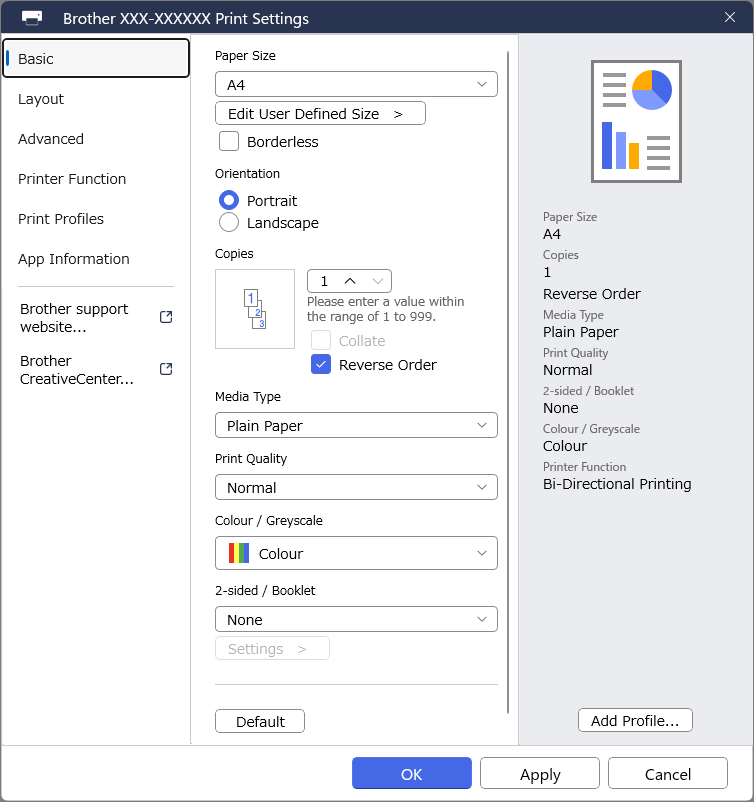
The app features a clean, well-organized interface that feels more like a well-lit workspace than a technical dashboard. Color-coded icons and straightforward labels make navigation feel intuitive—imagine walking into a well-organized toolbox ready for action. The app responds smoothly with rapid loading times; even first-time users will find the learning curve gentle, thanks to guided tutorials and clear prompts. Whether you're a tech novice or a seasoned user, operating this app feels akin to chatting with a knowledgeable friend who knows your printer inside out.
Core Functions: Making Printer Management a Breeze
Seamless Printer Connection and Setup
One of the standout features of the Brother Print Support App is its ability to simplify the initial connection process. Instead of diving into Windows' cumbersome print settings or manually inputting IP addresses, the app guides you through a step-by-step wizard. It auto-detects nearby Brother printers—whether connected via USB or over a network—making setup feel like a friendly walk in the park rather than assembling IKEA furniture. This feature particularly appeals to users who desire a quick, fuss-free start.
Intelligent Troubleshooting & Maintenance
When printers throw a tantrum—like paper jams or outdated firmware—the app steps in as a helpful coach. Its automated diagnosis tool scans for common issues, explains them in plain language, and offers straightforward solutions. For instance, if your printer is paper-jamming, the appDisplay provides clear instructions to resolve the problem without calling support. Additionally, the firmware update feature ensures your printer remains in prime condition, which can often be overlooked—think of it as a health check-up for your device.
Monitoring & Managing Your Printer Fleet
For households or offices with multiple Brother devices, this app becomes a command center. It provides real-time status updates, alerts for low supplies, and print queue management—all from a single window. This proactive approach helps prevent unexpected downtime, letting you stay on top of printer health as if you had a personal assistant watching over your devices.
What Sets It Apart from Similar Tools?
Compared to other printer utility apps, Brother's software distinguishes itself through its user-centric design and automation. Its advanced automatic detection and troubleshooting capabilities cut through the usual technical jargon, favoring straightforward instructions and visual guidance. Another unique point is its maintenance suite, which offers proactive firmware updates and cleaning options—not just reactive fixes—ensuring your printer stays at peak performance without requiring deep technical know-how.
Final Thoughts: A Handy Companion for Brother Printer Users
All in all, the Brother Print Support App for Windows is a solid, thoughtfully-designed utility that bridges the gap between complex printer management and everyday convenience. Its most notable strengths—automatic detection and seamless troubleshooting—make it especially worthwhile for users who seek a reliable, no-fuss solution to keep their printers operating smoothly. I'd recommend this app to anyone who wants to avoid the tediousness often associated with printer setup and maintenance, and prefers a friendly, guided experience. Whether you're a casual user, a small business owner, or someone with a few devices in an office, this app is a helpful, timesaving tool that complements your Brother printer setup beautifully.
Pros
- User-Friendly Interface
- Enhanced Printer Compatibility
- Remote Printing Features
- Easy Printer Management
- Regular Updates
Cons
- Initial Setup Complexity
- Limited Customization Options
- Occasional Connectivity Issues
- Slow Response Time
- Limited Support for Older Devices











