

- Category Utilities & tools
- Available on PC
- OS Windows 10 version 17763.0 or higher
- languages English (United States)
An Efficient and Elegant Desktop Calendar for Windows
If you're looking for a sleek, reliable way to organize your schedule directly on your desktop, Desktop Calendar by Weila Studio offers an inviting solution that seamlessly blends usability with intuitive design. Think of it as your personal digital planner, always just a glance away, yet unobtrusive enough to sit comfortably on your desktop without overwhelming your workspace.
About the App: Setting the Stage
Desktop Calendar is a Windows application specifically crafted to help users manage their appointments, reminders, and daily tasks effortlessly. Developed by Weila Studio, the app targets busy professionals, students, and anyone who prefers having their schedule front and center without juggling multiple apps or cluttering their screens.
- Key Features: Customizable calendar views, easy event entry, reminder alerts, and seamless synchronization with other calendar services.
- Target Users: Professionals, students, and everyday users seeking an efficient desktop scheduling tool that's easy to navigate and visually appealing.
Design and User Experience: Simple Elegance Meets Functionality
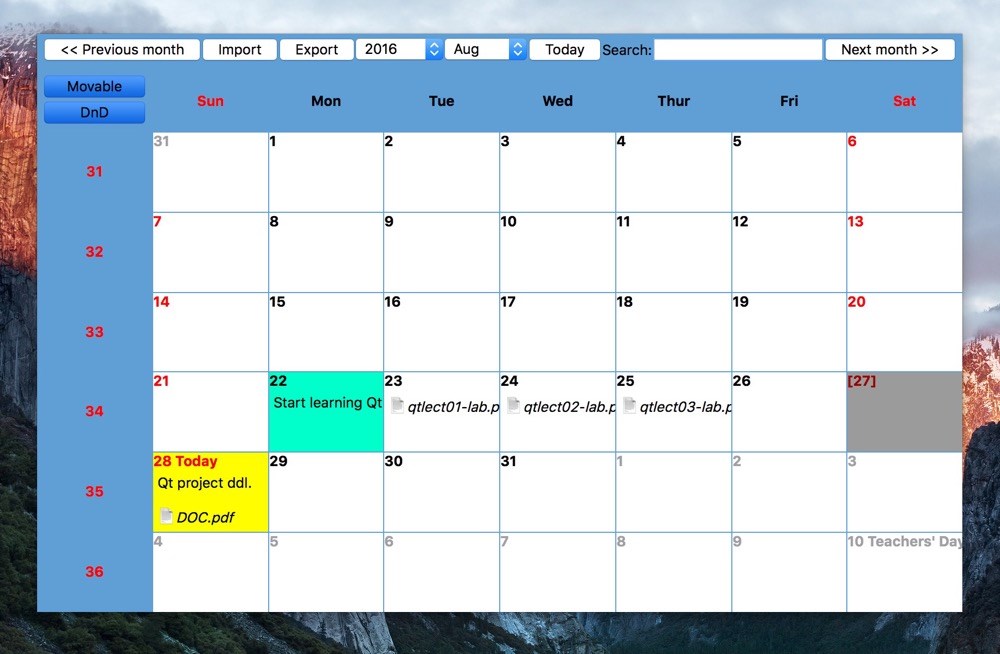
Right from the first launch, Desktop Calendar welcomes you with a clean, modern interface that's akin to a well-organized workspace—calm colors and minimal clutter set the tone. Its design feels thoughtfully crafted, making it feel like an extension of your desktop rather than a bulky add-on. Navigation is straightforward, and the learning curve is gentle—even less tech-savvy users can master it within minutes. The smoothness of transitions and responsiveness adds to the perceived polish, making interactions feel natural and frustration-free.
Core Features: The Heart of Desktop Calendar
Versatile Calendar Views and Customizations
One of the standout features is its flexible view options. Whether you prefer a daily agenda, weekly overview, or a monthly glance, Desktop Calendar adapts to fit your needs. Customizations like color-coding events or adding icons make it easy to distinguish different task types at a glance. It's like having a personalized digital bulletin board that adapts to your style, helping you stay organized without feeling overwhelmed.
Intuitive Event Management and Notifications
Adding events is as simple as clicking and typing—no complicated workflows here. The app supports recurring events, reminders, and priority flags, making routine scheduling effortless. Moreover, timely notifications subtly alert you without causing disruptions—think of them as friendly nudges, gently reminding you of upcoming meetings or deadlines. This feature ensures you never miss an important appointment, keeping your day flowing smoothly.
Seamless Synchronization and Data Handling
Perhaps most impressive is how Desktop Calendar syncs effortlessly with other calendar services, such as Outlook or Google Calendar. This interoperability transforms it into a central hub for your scheduling needs, consolidating various sources into one easy-to-access desktop view. The synchronization process is quick and reliable, ensuring your calendar stays updated across all platforms without fuss.
Comparing and Standing Out in a Crowd
While there are many calendar utilities out there, Desktop Calendar's particular strength lies in its balance of simplicity and depth. Unlike minimalist apps that forgo features or overly complex solutions that intimidate new users, this app offers a tidy and customizable interface that caters to both casual and power users. Its dedicated desktop presence means you avoid switching between multiple windows or apps—everything you need is right on your desktop in a neatly organized overlay. This is ideal for users who want quick access and straightforward management without the clutter of full-fledged project management tools.
Final Thoughts: Is It Worth a Try?
If your goal is an unobtrusive yet powerful scheduling companion for Windows, Desktop Calendar by Weila Studio merits serious consideration. Its most distinctive attributes—namely, its sleek interface, customizable views, and effortless synchronization—make it stand out among similar utilities. I'd recommend it especially for users who prefer having their schedule in sight but not on their face—a digital pad that keeps your day flowing with minimal fuss. Whether for personal organization or light professional use, this app offers a practical, well-designed solution for staying on top of your commitments.
Pros
- User-friendly interface
- Customizable calendar views
- Syncs seamlessly with Microsoft Outlook and other Microsoft services
- Affordable or free with basic features
- Supports notifications and reminders
Cons
- Limited customization options for calendar colors
- Occasional sync delays with cloud services
- Lacks built-in task management features
- Limited widget customization options
- Some users report occasional crashes on specific devices











