

- Category Utilities & tools
- Available on PC
- OS Windows 10 version 14393.0 or higher
- languages Chinese (Simplified), Chinese (Traditional Chinese), Chinese (Traditional, Hong Kong SAR), English (United States), French, German, Norwegian (Bokmål)
Introducing EarTrumpet for Windows: A Modern Take on Volume Management
Looking for a smarter, more intuitive way to control your audio experience on Windows? EarTrumpet by File-New-Project offers a sleek, user-friendly alternative to the standard volume mixer, bringing more precision and clarity to your sound management.
Who's Behind the Sound? Developer Insights
Developed by the independent team File-New-Project, EarTrumpet is a dedicated utility crafted specifically for Windows users seeking enhanced audio control. The team's focus is on creating lightweight, efficient apps that improve everyday user interactions with core Windows functions.
Key Features That Make EarTrumpet Stand Out
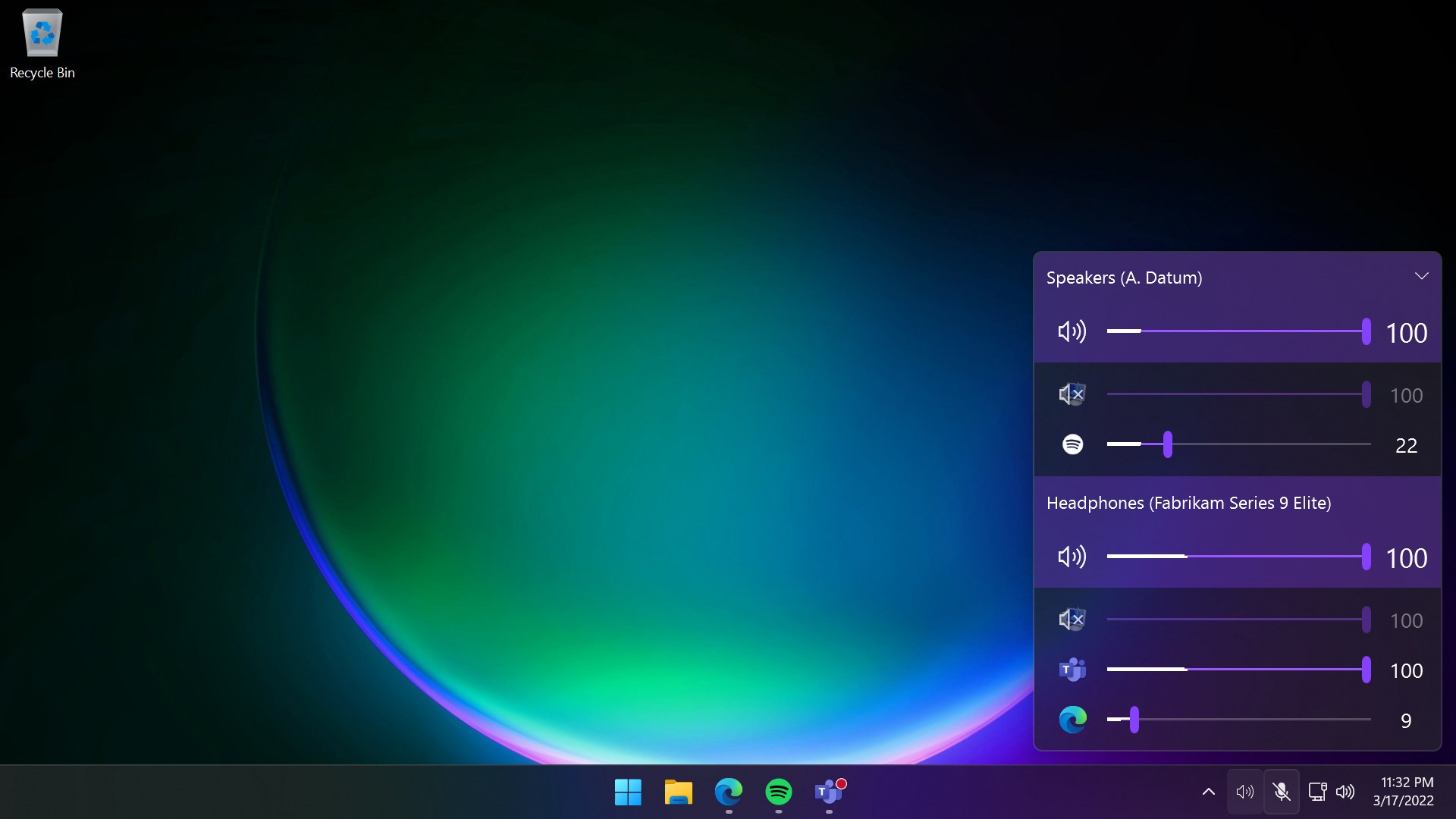
- System Tray Volume Mixer with App-Specific Control: Unlike the traditional mixer, EarTrumpet elegantly consolidates all app volumes into a single interface, making it easier to fine-tune individual application sounds.
- Persistent and Accessible UI: The app stays in the system tray, allowing quick access to volume adjustments without disrupting your workflow.
- Seamless Integration & Customization: It offers a modern, customizable interface that adapts neatly to your desktop environment, providing a more tactile and responsive experience.
- Better Multi-Application Handling: Perfect for multi-taskers controlling multiple volumes simultaneously — gamers, streamers, or office workers can all benefit from its intuitive layout.
A Fresh and Intuitive User Experience
From the moment you launch EarTrumpet, it's like stepping into a well-orchestrated control room—sleek, minimalistic, but packed with insights. Its interface resembles a clean, modern dashboard, steering clear of clutter and presenting volume controls for each running app in colorful, easy-to-understand sliders.
Adjusting sound levels feels as smooth as slicing through butter—drag your finger across sliders with fluid precision, and see the immediate visual feedback. The app's responsiveness and the way it consolidates multiple controls into a single, unified window cut down on unnecessary clicks, making volume adjustments more natural and immediate.
Learning curve? Nearly non-existent. Even first-time users will find it intuitive—like having a dedicated sound engineer right at your fingertips, guiding your audio balancing efforts. Its persistent tray icon ensures that you're always a click or two away from adjusting audio, just like tuning an instrument until it sings exactly as you want.
What Makes EarTrumpet Truly Unique?
The key differentiator lies in its focus on app-specific volume controls paired with a sleek, modern interface. Traditional Windows volume mixers can be cumbersome, especially when handling multiple applications or background processes. EarTrumpet simplifies this by providing a clear visual overview and instant tuning. Unlike generic utilities, it integrates seamlessly with Windows, respecting system settings and ensuring stability, while offering a more tailored experience. Its design feels more like a premium car dashboard—easy to read, customizable, and designed for quick adjustments—rather than a clunky control panel.
Should You Give It a Try? Recommendations & Usage Tips
Based on its thoughtful design and practical features, EarTrumpet is highly recommended for anyone demanding refined control over their audio environment—whether you're a gamer, a streamer, or someone balancing multiple applications at work. Its simplicity and responsiveness make routine volume adjustments a breeze, and its app-specific controls help prevent audio conflicts.
For users already comfortable with Windows' default mixer, EarTrumpet offers a much-needed upgrade—streamlining operations and enhancing usability. It's a lightweight addition that complements your existing setup without demanding significant learning or system resources.
In summary, if you seek a clean, efficient, and personalized way to manage application sound levels with immediate, tactile feedback, EarTrumpet is a robust tool worth integrating into your Windows toolkit. Think of it as your personal sound engineer, always ready to fine-tune your listening experience with precision and style.
Pros
- Intuitive Volume Control
- Low System Resource Usage
- User-Friendly Interface
- Supports Multiple Audio Devices
- Seamless Integration with Windows
Cons
- Limited Customization Options
- Occasional Audio Glitches
- No Built-in Support for Advanced Equalizer
- Limited Language Support
- Requires Windows 10 or higher











