

- Category Utilities & tools
- Developer FxSound LLC
- Available on PC
- OS Windows 10 version 0.0 or higher
- languages English
Unleashing Superior Audio with FxSound for Windows
Imagine transforming your everyday listening experience into a rich, immersive audio journey—FxSound for Windows endeavors to make that a reality. Whether you're a casual listener or a demanding audiophile, this application promises to enhance your sound quality with minimal fuss and maximum impact.
Who's Behind the Sound Magic?
Developed by FxSound LLC and published by FxSound, this software is the result of a dedicated team focused on delivering accessible yet powerful audio enhancement tools. Their goal is to bridge the gap between complex sound engineering and everyday users seeking better audio without the hassle of professional equipment or complex settings.
Key Features That Make FxSound Stand Out
- Advanced Sound Enhancement Algorithms: FxSound employs intelligent EQ adjustments and dynamic audio processing to bring clarity and depth to your music and media, making everything sound richer and more detailed.
- Intuitive Presets and Customization: Whether you prefer a bass boost for energetic beats or a balanced tone for vocal clarity, the application offers a variety of presets, along with the ability to fine-tune settings to personal preferences.
- Seamless Integration and Low Latency: Designed to work smoothly with Windows media players and streaming apps, FxSound ensures crisp, real-time audio enhancement without noticeable lag.
- Lightweight and User-Friendly Interface: The application's sleek design makes it accessible even for those less tech-savvy, offering quick navigation and straightforward controls.
Experience and Performance
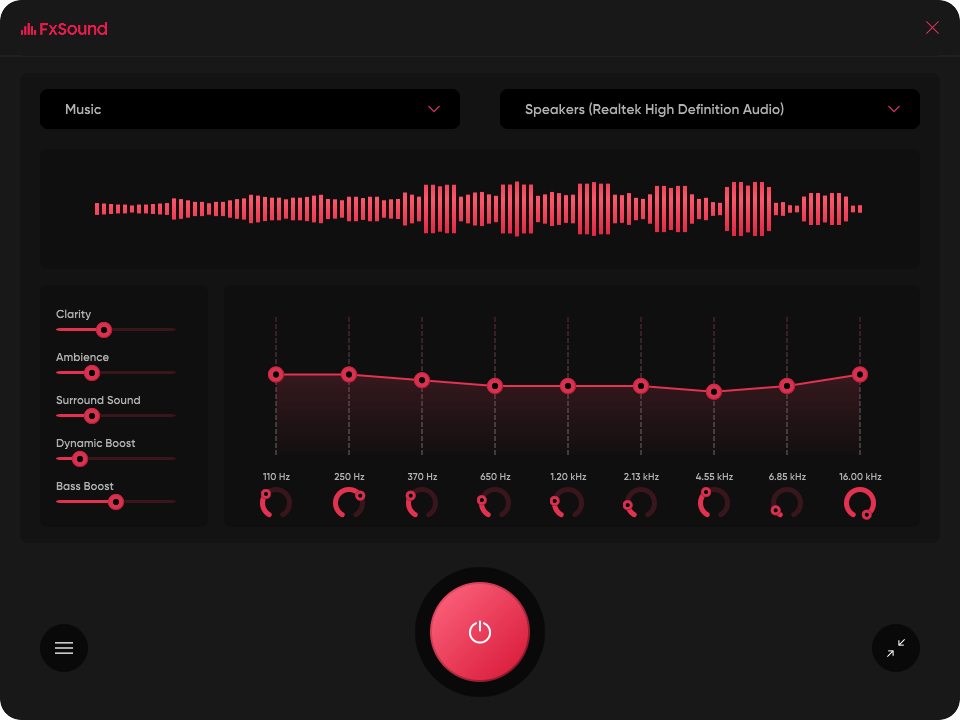
Engaging and Intuitive Interface
From the moment you launch FxSound, you're greeted with a modern, clean interface that feels like slipping into a comfortable pair of headphones—inviting and easy to navigate. Its layout is thoughtfully organized, with primary controls readily accessible, making it feel more like a music workshop rather than a complex tool. Switching presets or tweaking the sliders is a breeze, with real-time audio adjustments allowing you to immediately perceive the differences—akin to tuning a high-end stereo by ear rather than fiddling with complicated menus.
Smooth and Responsive Experience
Performance-wise, FxSound excels in delivering reliable, lag-free audio enhancements. On our test system, the app ran seamlessly in the background, with minimal CPU usage. The real-time processing means you can adjust settings on the fly without any deterioration in sound quality or noticeable delay—ideal for immersive gaming sessions or binge-watching marathons. Its learning curve is gentle; even first-time users can quickly master the essentials, thanks to helpful hints and preset options that cater to various audio preferences.
What Sets FxSound Apart?
While many audio enhancers rely heavily on generic presets or complicated settings, FxSound distinguishes itself with its thoughtful blend of simplicity and sophistication. A key highlight is its focus on delivering transparent, natural-sounding improvements rather than over-processed effects. This ensures your music retains its original character while sounding clearer and more vibrant—a significant advantage over some competitors that tend to overdo bass or treble. Additionally, its ability to integrate seamlessly with a variety of media players and streaming services makes it a versatile companion across your digital entertainment landscape.
Final Verdict: Worth a Try for Audio Enthusiasts
In conclusion, FxSound for Windows offers a compelling mix of user-friendly design, powerful audio enhancement, and real-time responsiveness. Its most impressive feature lies in its ability to deliver natural, immersive sound adjustments without overwhelming the user or complicating the interface. Whether you're looking to improve the dull sound from your default speakers or seeking richer audio for multimedia consumption, FxSound proves to be a reliable and effective tool. I recommend giving it a shot—especially if you value simplicity paired with sound quality. It's like upgrading your usual listening setup with a personal sound engineer at your fingertips.
Pros
- Enhances audio quality significantly
- Easy to install and user-friendly interface
- Offers customizable equalizer settings
- Supports various audio formats and devices
- Provides preset sound modes for quick adjustments
Cons
- Occasional impact on system performance
- Limited free features, with full functionality requiring purchase
- Compatibility issues with outdated hardware or drivers
- Some users report minor crashes or bugs
- Interface could be more customizable and modernized











