

- Category Utilities & tools
- Available on PC
- OS Windows 10 version 14393.0 or higher
- Keyboard Integrated Keyboard
- Mouse Not specified
- languages English (United States)
Unlock Seamless Remote Access with LogMeIn123 for Windows
If you've ever wished for a magic portal to access your computers from anywhere, LogMeIn123 offers you just that — a straightforward, reliable way to connect remotely without fuss. Developed by GoTo Inc., this application is a handy tool designed to bridge the gap between you and your distant devices, making remote support or access as simple as opening a door.
About the App: Fast Facts in a Nutshell
LogMeIn123 for Windows is a remote access utility that enables users to connect to their computers securely from any location. Created by GoTo Inc., a trusted name in remote connectivity solutions, the app emphasizes ease of use and quick setup.
- Core Features: Streamlined remote access, secure connection protocols, quick setup process, and support for unattended access.
- Target Users: IT professionals, remote workers, technical support teams, and everyday users needing quick access to their PCs outside the office or home environment.
A User-Friendly Passport to Remote Control
Imagine needing to troubleshoot a client's computer or access your home files while on the go — LogMeIn123 acts as your dependable digital key. Its no-nonsense interface feels like chatting with an old friend: intuitive, reassuring, and designed for efficiency.
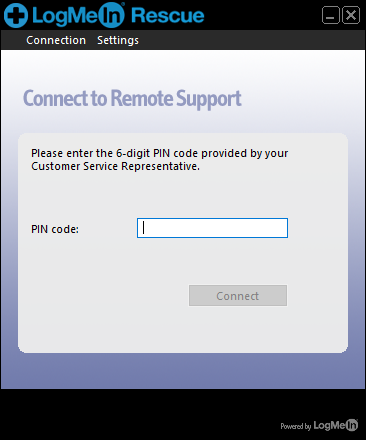
When first launched, the application greets users with a minimalistic design that simplifies the connection process. No complex configurations or confusing menus — just enter your session code, and you're in. Think of it as a secure, fast-lane express, guiding your digital visits seamlessly.
Core Functionality 1: Instant Remote Access
At the heart of LogMeIn123 is its ability to quickly establish remote sessions. Once the host device generates a unique access code, simply inputting that code grants you control as if you're sitting right in front of the machine. This feature is perfect for quick troubleshooting without having to install bulky software or set up complicated VPNs. The connection remains stable and responsive, ensuring smooth interactions even over less-than-ideal networks.
Core Functionality 2: Secure and Reliable Connection
Security is the backbone of any remote access tool, and LogMeIn123 doesn't disappoint. It utilizes encrypted connections to keep your data safe from prying eyes. Plus, since the app doesn't require users to create an account or store sensitive information, it minimizes privacy concerns while maintaining reliability. For support teams or individuals handling sensitive data, this focus on security elevates its suitability in professional contexts.
Core Functionality 3: Support for Unattended Access
Unlike some remote utilities that require a user to be present on both ends, LogMeIn123 supports unattended access once properly configured. This means you can set up your device for remote entry in advance, making it a dependable companion for routine tasks, scheduled maintenance, or emergency fixes. It's akin to leaving the key under the doormat but protected behind a digital lock.
Design, Usability, and Unique Advantages
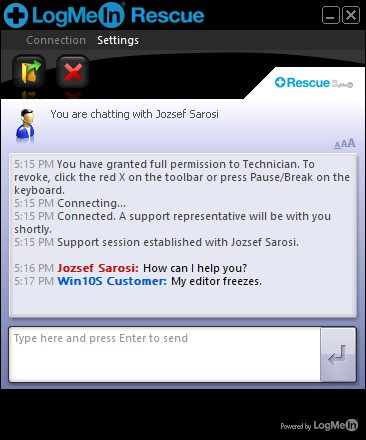
The interface of LogMeIn123 is akin to a well-organized toolbox: clean, uncluttered, and intuitive. The minimalist design contributes to a shallow learning curve, meaning even non-tech-savvy users can pick it up quickly. The application's responsiveness is noteworthy — transitions are smooth, and commands are executed promptly, creating a sense of reliability and efficiency.
Compared to other remote utilities like TeamViewer or AnyDesk, LogMeIn123's most distinctive edge lies in its simplicity and security-oriented approach. It offers a focused experience without unnecessary bells and whistles, making it ideal for users who value straightforwardness over elaborate features. Plus, its tight security measures ensure peace of mind during remote sessions, especially important in professional environments handling sensitive data.
Final Verdict: A Solid Tool with Plenty of Practicality
To sum up, LogMeIn123 for Windows is a practical and reliable remote access solution suitable for a range of users — from casual users needing quick access to professionals requiring secure, unattended connections. While it doesn't overload users with features, what it offers is executed with clarity and care, making it an excellent choice for those seeking a simple yet effective remote control utility.
My recommendation? If your needs are straightforward remote access and security, give LogMeIn123 a try. It's a trustworthy digital doorway that opens with speed and safety, making remote work less of a hassle and more of a convenience.
Pros
- User-friendly interface
- Reliable remote access
- Cross-platform compatibility
- Strong security features
- Easy installation process
Cons
- Limited free features
- Occasional connectivity issues
- Battery consumption on mobile devices
- Limited customization options
- Customer support responsiveness











