

- Category Utilities & tools
- Developer DADEM
- Available on PC
- OS Windows 10 version 17763.0 or higher
- languages Chinese (Simplified), Czech, English (United States), Hungarian, Italian, Japanese, Portuguese (Portugal), Sinhala, Spanish (Spain), Turkish
Introducing Loomy Screen Recorder for Windows: Your Friendly Screen Capture Companion
Imagine having a reliable, easy-to-use tool that captures your screen with precision and clarity — Loomy Screen Recorder by DADEM fits that wish perfectly. Designed to streamline your recording needs, it offers a neat balance of simplicity and powerful features, making it ideal whether you're a casual user or a professional content creator.
About the Developer and Key Features
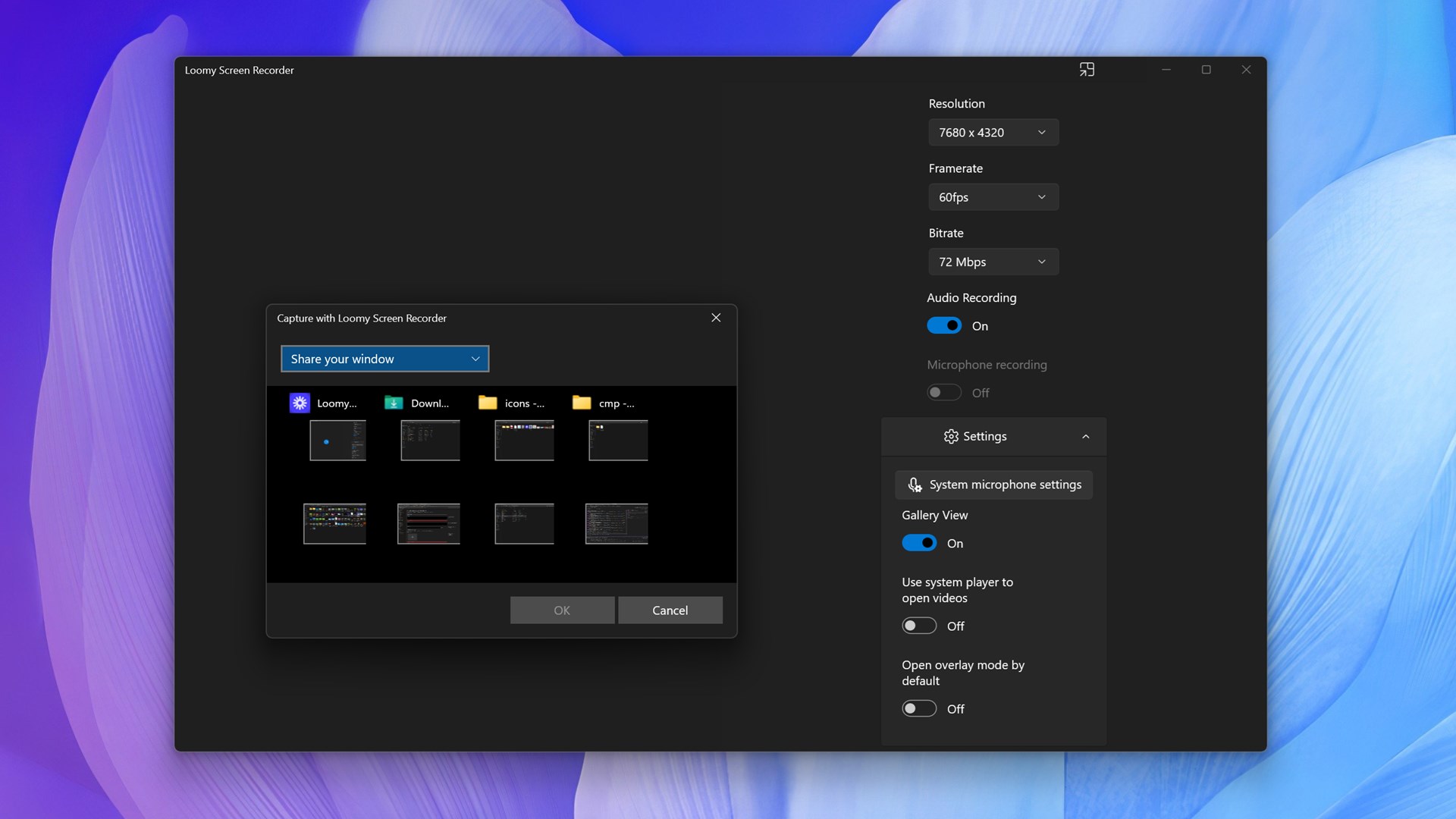
Developed and published by DADEM, Loomy Screen Recorder for Windows is crafted with the aim to provide seamless screen recording experience. Its standout features include high-quality video captures, customizable recording options, and an intuitive user interface that caters to users of all experience levels. Whether you're preparing a tutorial, capturing gameplay, or saving a webinar, Loomy makes the process straightforward and efficient.
- High-Resolution Recording: Capture your screen in crisp detail, supporting high-definition formats to ensure your recordings look professional.
- Flexible Capture Modes: Record full screen, specific regions, or windows — giving you control over what you want to showcase.
- User-Friendly Interface: An intuitive design that minimizes the learning curve, allowing you to start recording within seconds.
- Lightweight and Unobtrusive: The app runs smoothly without hogging system resources, perfect for multitasking environments.
Targeted primarily at students, teachers, gamers, and content creators, Loomy caters to anyone needing quick, reliable screen recordings without the fuss.
Vivid Experience: First Impressions and User Interface
Launching Loomy Screen Recorder feels like opening a familiar toolbox — straightforward, clean, and ready to work. The interface boasts sleek icons and minimal clutter, much like a well-organized workspace where every tool is within easy reach. Navigation is effortless, making it as simple as clicking 'Record' to start capturing your screen. The app's responsiveness is impressive; no lag or stutter, even during more demanding recordings. Transitioning between different modes or adjusting settings is a breeze, denoting a thoughtful design that respects user convenience. For new users, the learning curve is gentle, akin to riding a smooth bicycle after mastering basic controls, allowing quick adaptation and productive output from the get-go.
Powerful Core Features: What Sets Loomy Apart
1. Precise Region Selection and Customization
One of Loomy's standout features is its ability to pinpoint specific screen regions with pixel-perfect accuracy. Whether you're highlighting a corner on your monitor or focusing on a particular window, the flexible cropping tools make this effortless. This level of granularity proves especially useful for creating tutorials or presentations where only parts of the screen matter. Additionally, users can save customized recording presets, streamlining repetitive tasks and boosting efficiency.
2. High-Quality Output with Minimal Overhead
Unlike some competitors that compromise on video quality to maintain performance, Loomy prioritizes clarity without sacrificing speed. Supporting resolutions up to 4K (depending on hardware), it ensures your finished videos look sharp and professional. The app's lightweight operation means it doesn't strain your system, allowing you to record smoothly during gaming or intensive workflows. This balance between quality and performance is a rare gem in the realm of screen recorders, making Loomy suitable even for resource-sensitive setups.
3. Seamless Sharing and Exporting Options
After recording, sharing your content is made effortless with Loomy's integrated export options. It supports a variety of formats compatible with popular platforms, and the files are optimized for quick uploads. This reduces the hassle of converting or compressing videos later, allowing you to focus more on creating and sharing rather than technical fiddling.
Comparative Edge and Final Recommendations
What truly distinguishes Loomy Screen Recorder is its blend of simplicity and precision, especially its ability to accurately capture selected regions without overwhelming the user with complicated menus. When compared to other utilities—many of which are either too basic or overly complex—Loomy strikes a commendable balance, thanks largely to its intuitive design and customizable options. Its high-resolution support and efficient performance position it slightly above average, especially for users who value quality and ease of use.
I would recommend Loomy to anyone seeking a straightforward, reliable screen recording tool that doesn't require a steep learning curve. It's perfect for educators who need quick tutorials, gamers who want to share highlights, or professionals documenting workflows. While it may not include advanced editing features, its focus on quality and usability makes it a go-to choice for capturing crisp, targeted recordings without unnecessary fuss.
Overall, Loomy Screen Recorder stands out as a practical, effective tool that delivers on its promise. If you're in the market for a lightweight but powerful screen recorder that respects your time and system, Loomy deserves a serious look. It's like having a trusty camera operator who always gets the shot just right, every time.
Pros
- Intuitive User Interface
- High-Quality Video Output
- Multiple Recording Options
- Built-in Annotation Tools
- Fast Export and Sharing
Cons
- Limited Editing Features
- Occasional Export Failures
- Limited Customization Options
- Requires Consistent Internet Connection for Cloud Features
- Resource Usage Can Be High on Older PCs











