

- Category Utilities & tools
- Available on PC, Surface Hub, HoloLens
- OS Windows 10 version 17134.0 or higher
- Keyboard Integrated Keyboard
- Mouse Integrated Mouse
- Memory 1 GB
- languages English (United States)
MSI Center for Windows: A Comprehensive Hub for PC Optimization and Monitoring
If you're someone who likes to keep your gaming rig or workstation running at peak performance, MSI Center for Windows positions itself as an all-in-one control panel—think of it as the cockpit of your flying machine, giving you seamless command over your system's internals.
Developed by MICRO-STAR INTERNATIONAL CO., LTD
MSI's dedicated utility app is crafted by the renowned Taiwanese gaming and hardware giant, MSI, focusing on delivering robust management tools tailored for MSI hardware users. Their experience in gaming hardware design translates into an app that's both powerful and user-friendly.
Top Highlights of MSI Center
- Centralized System Management: It consolidates system monitoring, tweaking, and updating into one unified interface, saving time and reducing hassle.
- Smart Performance Tweaks: Users can automatically optimize gaming or work modes based on activity, balancing performance and thermals efficiently.
- Hardware Control and Monitoring: Real-time stats and control over RGB lighting, fan speeds, and hardware temperatures allow for a customized PC experience.
- Driver & Software Updates: Keeps your system in tip-top shape with easy-to-access updates tailored for MSI components.
Engaging and User-Friendly Interface
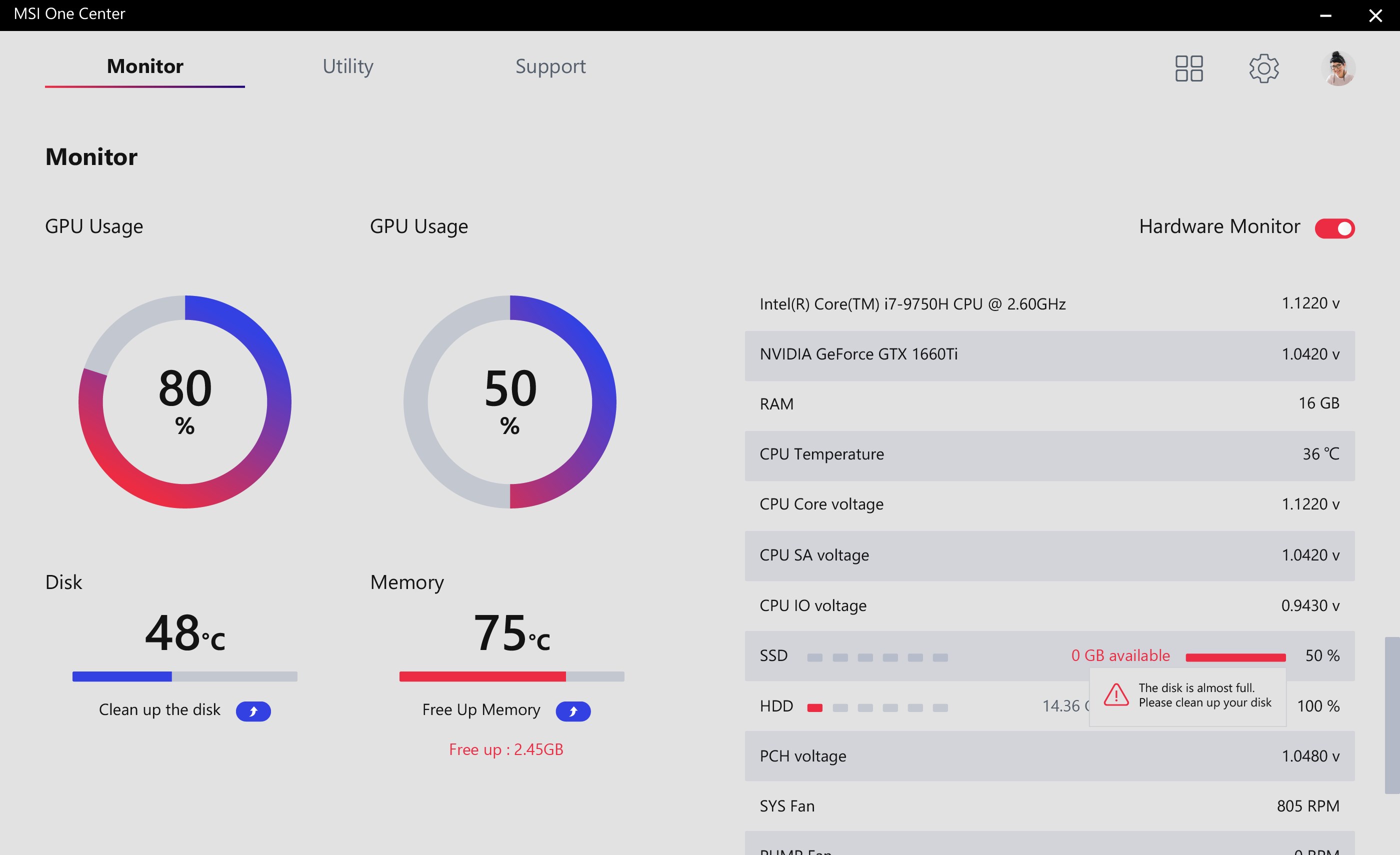
Imagine stepping into a sleek, cockpit-like environment where every switch, dial, and indicator is intuitively laid out. MSI Center's interface strikes a balance between visually appealing design and functional clarity. The dark-themed layout with easily navigable tabs makes it feel like managing a high-tech spaceship—professional yet approachable. Transitioning between system health check, performance tuning, and lighting controls is seamless, with quick access to each feature. The responsiveness is impressive; even as you toggle complex controls, the app remains fluid, with minimal lag, which is especially critical during intense gaming sessions or rendering tasks.
Deep Dive into Core Functionalities
System Monitoring and Customization
Launching MSI Center reveals a dashboard where real-time data about CPU temperatures, GPU loads, RAM usage, and fan speeds are displayed like vital signs on a medical monitor. This live data empowers users to diagnose system issues proactively. Beyond monitoring, you can customize RGB lighting effects for MSI hardware, tailoring aesthetics to match your mood or gaming setup. This level of hardware control is particularly valuable for gamers and enthusiasts seeking a personalized, immersive experience.
Performance Optimization and Gaming Mode
The app's intelligent performance mode is akin to a car's sport button—it tunes your system for maximum output or energy efficiency with just a click. Users can choose predefined profiles or set automated triggers based on the application in use. For instance, launching a game can automatically boost CPU and GPU performance profiles, while switching back to office work resets to power-saving modes. This adaptive behavior ensures optimal resource utilization without manual tweaking, making it easy even for less tech-savvy users to enhance their experience.
Driver and Firmware Updates Made Simple
Keeping drivers up-to-date often feels like a chore, but MSI Center simplifies this process. The app scans your system for outdated drivers and firmware, then provides straightforward update options. It's like having a tech-savvy assistant ensuring your system's components stay in sync, thereby improving stability and performance—especially important after major Windows updates or hardware upgrades.
Comparative Edge and Unique Selling Points
What sets MSI Center apart from other utility tools? Primarily, its deep integration with MSI hardware is a significant advantage. While many generic system monitors exist, MSI Center's ability to intricately control RGB lighting, fan curves, and hardware profiles specific to MSI components makes it a tailored experience. Moreover, its performance tuning features are more advanced than generic utilities, providing an optimized, risk-mitigated environment for gamers and enthusiasts alike. The app's intuitive design reduces the learning curve, transforming what could be a complex dashboard into a friendly command center.
Recommendation and Usage Suggestions
Overall, MSI Center for Windows earns a firm recommendation, particularly for MSI hardware owners, gamers, and power users looking for a consolidated management tool. It's not just an aesthetic control panel; it's a practical utility that enhances system stability, performance, and aesthetics with minimal fuss. Beginners will appreciate its straightforward setup and clear controls, while advanced users can leverage its detailed monitoring and tweaking features.
If you're keen on effectively managing your MSI-based system—be it for gaming, content creation, or general productivity—this app is a valuable addition to your toolkit. Just remember to update it regularly to access the latest features and improvements. With MSI Center running in the background, your PC becomes a finely-tuned machine, ready to perform at its best whenever you need it.
Pros
- User-friendly interface
- Comprehensive system monitoring
- Customizable performance modes
- Firmware and driver updates
- Gaming optimization features
Cons
- Occasional software crashes
- Limited support for older MSI devices
- Slow update deployment
- Heavy resource usage on startup
- Limited customization options for advanced users











