

- Category Utilities & tools
- Available on PC
- OS Windows 10 version 17763.0 or higher
- languages English (United States)
An Efficient and User-Friendly Auto Clicker for Windows
OP Auto Clicker - Auto Tap for Windows is a straightforward automation tool designed to simplify repetitive clicking tasks, ideal for gamers, testers, or anyone needing reliable automation on their Windows device.
Basic Information and Core Highlights
This application is developed by the team known simply as Auto Clicker, and it resides within the Microsoft Store ecosystem, ensuring a level of security and ease of installation. The key features that set OP Auto Clicker apart include its customizable clicking patterns, lightweight footprint, and intuitive interface. It allows users to simulate mouse clicks at specific positions or within selected areas, streamlining workflows that demand precision and speed. Its target audience encompasses gamers seeking to automate in-game actions, software testers conducting repetitive clicks, or regular users wanting to minimize manual effort for routine tasks.
Vivid Introduction: Making Automation Simple and Delightful
Imagine you're in a marathon of grinding through endless clicking—your hand starts to cramp, and the repetitive motion dulls your focus. OP Auto Clicker steps into your scene like a reliable assistant, taking over those monotonous clicks so you can stay sharp. Its minimalist design ensures you're not bogged down with complex settings; instead, it offers a smooth experience that feels like dancing with your mouse, perfectly choreographed to your needs. Whether you're hacking away at a game or testing a software interface, this tool feels like a trusted sidekick, silently working behind the scenes while you focus on the bigger picture.
Customizable Click Patterns and Scheduling
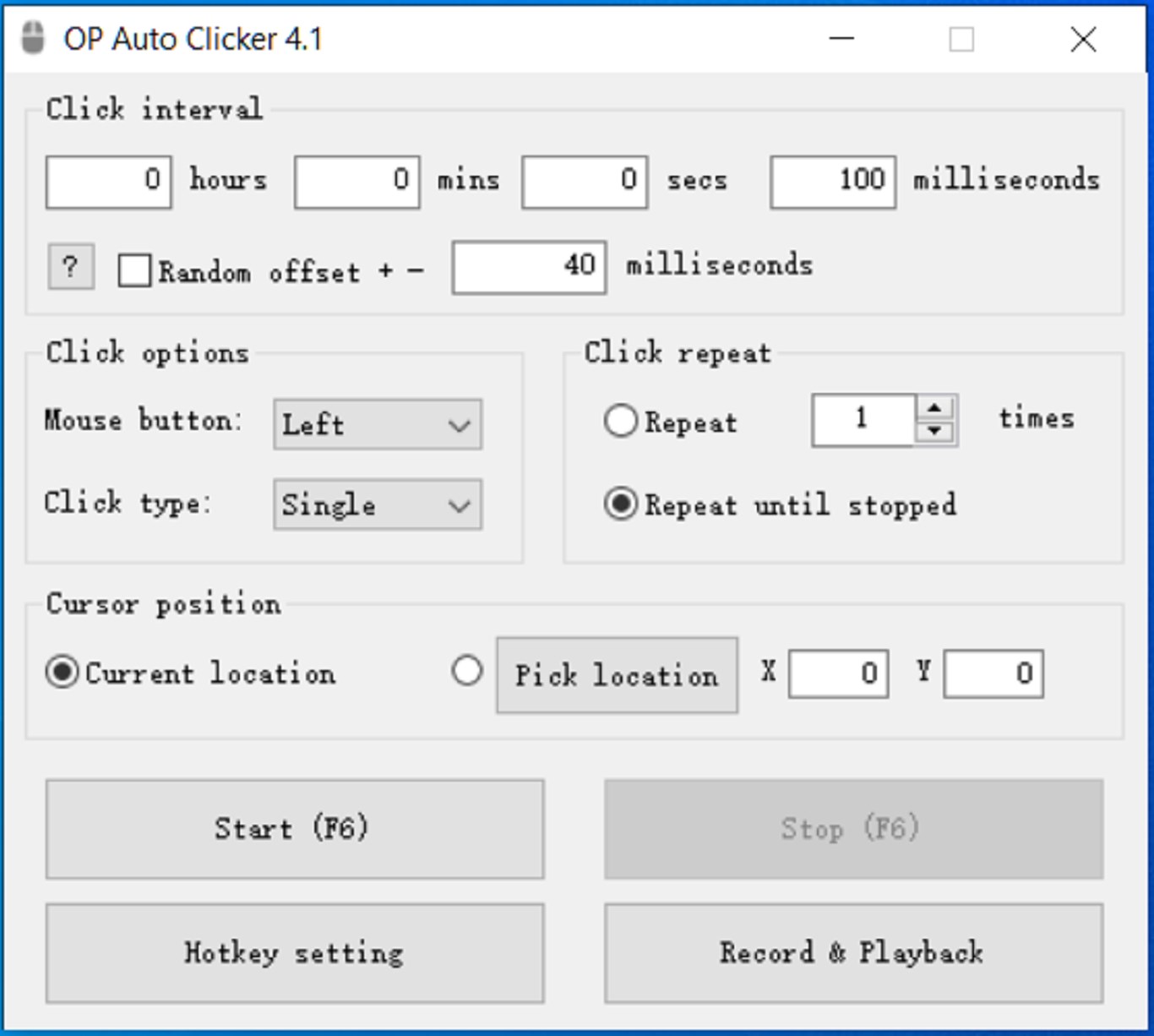
One of OP Auto Clicker's standout features is its highly customizable click pattern options. Users can configure repeat intervals, click types (single, double, or right-click), and adjust the number of repetitions—all accessible through an uncluttered interface. This makes it particularly powerful for gaming, where timing and precision are crucial. Moreover, the application allows scheduling of click sequences with precise delay controls, enabling automation that's as flexible as your imagination. This is the feature that truly elevates OP Auto Clicker beyond basic clickers—think of it as setting up a programmable robot that understands your rhythm.
Seamless User Experience and Design
The interface of OP Auto Clicker is like a neat, well-organized toolbox—clean, simple, and easy to navigate. Setting up click points involves just a few clicks, with options to choose specific coordinates manually or directly from the screen by clicking. The operation is remarkably smooth; the application runs silently in the background without lag or performance dips, which is vital during gaming or intensive testing sessions. The learning curve is gentle—users can get familiar within minutes, making it accessible even for those unfamiliar with automation tools. This simplicity ensures that users spend less time fiddling with settings and more time experiencing the benefits of automation.
Unique Advantages in a Crowded Market
Compared to other utilities & tools in its category, OP Auto Clicker shines with its focus on precision and user-centric design. Unlike some clickers that bombard users with overly complex options or require scripting knowledge, this app keeps everything straightforward yet highly customizable. Its ability to remember multiple click points and patterns sets it apart, making it suitable for complex automation sequences without demanding programming skills. Additionally, its minimal resource consumption means it won't bog down your system during prolonged use—a subtle but crucial advantage for those running multiple applications simultaneously. In essence, it offers a balanced blend of power and simplicity that appeals to both casual users and more advanced automation enthusiasts.
Conclusion and Recommendations
Overall, OP Auto Clicker - Auto Tap for Windows is a dependable tool that delivers on its promise of simplifying repetitive clicking tasks. Its intuitive design, customizable features, and efficient performance make it a noteworthy choice in its niche. I recommend it to gamers, testers, or even casual users who want to add a layer of automation without the hassle of complex setups. While it's not a replacement for advanced scripting solutions, it excels as a straightforward, reliable, and user-friendly clicker. If you're looking for an app that feels like an invisible assistant, quietly working in the background, OP Auto Clicker is definitely worth trying out.
Pros
- User-friendly interface
- Highly customizable tapping options
- Multiple automation modes
- Lightweight and efficient
- Free to download and use
Cons
- Limited advanced features in free version
- Possible sensitivity issues with different screen resolutions
- Lack of detailed usage tutorials
- Potential detection in some anti-cheat environments
- Limited support for scripting complex automation











