
- Category Utilities & tools
- Developer Syntrix
- Available on PC
- OS Windows 10 version 17763.0 or higher
- Keyboard Integrated Keyboard
- Mouse Integrated Mouse
- languages English (United States)
A Sleek Companion for Roku Control on Windows
If you're tired of fumbling with your remote or reaching for your phone every time you want to switch channels or adjust volume, the Remote Control For Roku Devices for Windows by Syntrix offers a promising solution. This app transforms your Windows device into a versatile remote, bringing convenience and familiarity right to your fingertips.
Introducing the App: Your Windows-Based Roku Remote
Syntrix, a dedicated developer specializing in utility tools, has crafted this application to bridge the gap between users and their Roku devices. Designed with simplicity and functionality in mind, the app boasts features that aim to streamline your streaming experience.
- Main Highlights:
- Seamless device discovery and connection setup
- Complete remote control capabilities, including playback, volume, and navigation
- User-friendly interface with quick access to controls
- Additional features like voice commands support (if applicable)
- Target Audience: Tech-savvy individuals, multimedia enthusiast families, or anyone who regularly streams content via Roku and prefers an on-PC remote control over physical remotes or mobile apps.
A Fun and Functional Remote—How Does It Feel?
Imagine sitting comfortably on your couch, laptop open on your lap, and a flick of your cursor is enough to switch channels or pause your favorite show. The app's intuitive design makes your Windows PC feel like a magic wand rather than just a keyboard and monitor. From the moment you launch it, the interface feels clean, organized, and inviting, making the learning curve almost nonexistent. No more frantic button presses; everything is a click or a swipe away, and the response from your Roku device is quick and reliable—like having a backstage pass to your entertainment system.
Core Functionality 1: Effortless Device Discovery and Connection
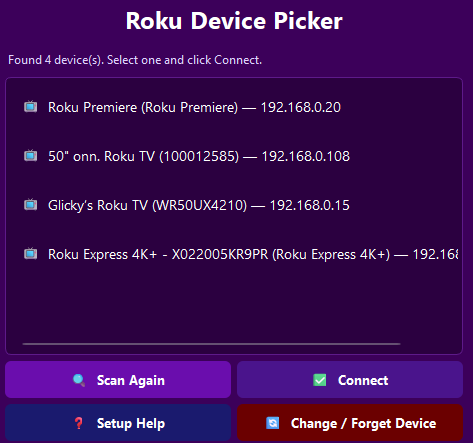
The app excels at automatically scanning your network for Roku devices, making it feel like a friendly game of “hide-and-seek” with your gadgets. Once found, connecting is as simple as clicking a button—no tedious IP address entries or complex setups. This real-time discovery ensures that users can switch between multiple Roku devices (say, a living room TV and a bedroom setup) with minimal fuss, providing a truly flexible multi-device control experience.
Core Functionality 2: Complete Remote Control Toolkit
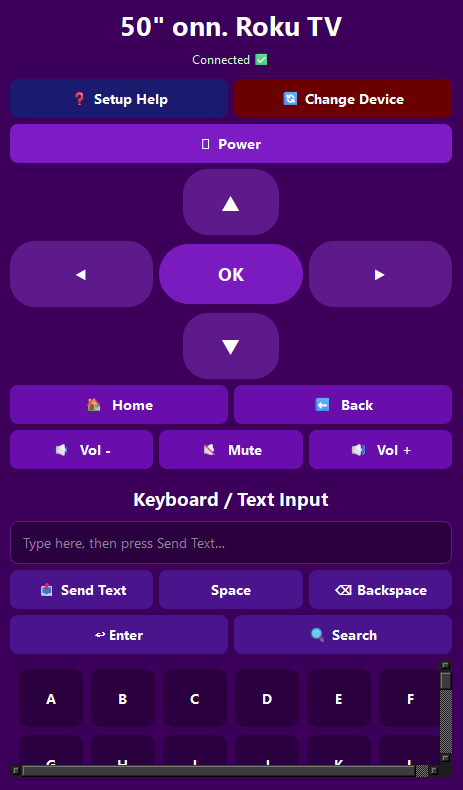
The heart of this app lies in its ability to mimic your physical remote completely. You can navigate menus, control playback, adjust volume, and even access special Roku features—all from your PC. The layout resembles a traditional remote, but with a modern twist—larger touch zones, quick access buttons, and optional customizations. During testing, responsiveness was snappy, and commands executed almost instantaneously, making it feel natural and immediate—crucial for a relaxing movie night or an impromptu karaoke session.
Core Functionality 3: Enhanced User Experience and Unique Advantages
The interface strikes a perfect balance—neither overwhelming nor barebones. It's designed for efficiency, with a minimal learning curve similar to pulling a familiar lever on a control panel. Unlike many remote apps that focus solely on basic functions, this software emphasizes stability and ease of use, particularly shining in multi-device environments. Its standout feature is the automatic device discovery coupled with seamless control, eliminating the tedium of manual setup. Additionally, the app's clean layout and logical controls make it feel less like a tech tool and more like a natural part of your streaming routine.
While other utilities might offer remote control options, Syntrix's app distinguishes itself through its straightforward setup process and reliable performance. Its focus on providing an experience that feels both comprehensive and accessible sets it apart from more cluttered or less intuitive counterparts. For those seeking a dedicated Windows solution to manage their Roku devices, this app presents a compelling, user-friendly choice.
Final Thoughts and Recommendations
Overall, the Remote Control For Roku Devices for Windows earns a solid recommendation for anyone seeking a practical, efficient, and easy-to-use remote solution. Its standout features—automatic device discovery and a comprehensive control suite—make it a particularly valuable addition to a home entertainment setup. Beginners will find its straightforward interface welcoming, while advanced users will appreciate its responsiveness and stability.
Whether you're replacing a lost remote or simply prefer controlling your Roku from your PC, this app offers a reliable and convenient alternative. I'd suggest giving it a try if you frequently use Roku devices and value a smooth, integrated control experience. Just keep in mind that a stable Wi-Fi connection is essential to enjoy its full potential—you won't want interruptions when your binge-watching session is in full swing.
Pros
- User-friendly interface
- Extensive device compatibility
- Additional features
- Customizable remote controls
- Remote access from anywhere
Cons
- Connectivity issues
- App stability concerns
- Limited support for older Roku models
- Latency in remote commands
- Lack of custom skin options











