
- Category Utilities & tools
- Developer S $ S Computing
- Available on PC
- OS Windows 10 version 0.0 or higher
- Keyboard Integrated Keyboard
- Mouse Integrated Mouse
- Memory 300 MB
- languages Danish, Dutch, English, French, German, Greek, Japanese, Korean, Polish, Portuguese, Russian, Slovenian, Spanish, Swedish, Italian
Seamless Image Editing for Windows Users: An In-Depth Review of SewWhat-Pro
If you're in search of an efficient, easy-to-use tool for editing, repairing, and manipulating embroidery files on your Windows PC, SewWhat-Pro might just become your new trusted companion. Its straightforward interface and focused features cater specifically to those who work with embroidery designs, offering a streamlined experience that balances simplicity with powerful capabilities.
About SewWhat-Pro: The Basics
- SewWhat-Pro is a dedicated embroidery file processing application designed to assist users in editing, converting, and repairing embroidery art files.
- Developed by S & S Computing, a company specializing in embroidery software solutions, the app ensures professional-grade tools are accessible to both enthusiasts and serious hobbyists.
- Key features include robust editing tools for customizing embroidery designs, file format conversions supporting various embroidery machine formats, and advanced repair functions to fix common file errors. The software also offers importing and exporting functionalities, making it easier for users to work with multiple formats seamlessly.
- Its primary target audience encompasses embroidery hobbyists, small business owners, and professional embroidery designers who need dependable software to manage their embroidery files efficiently.
Engaging and Intuitive at Your Fingertips
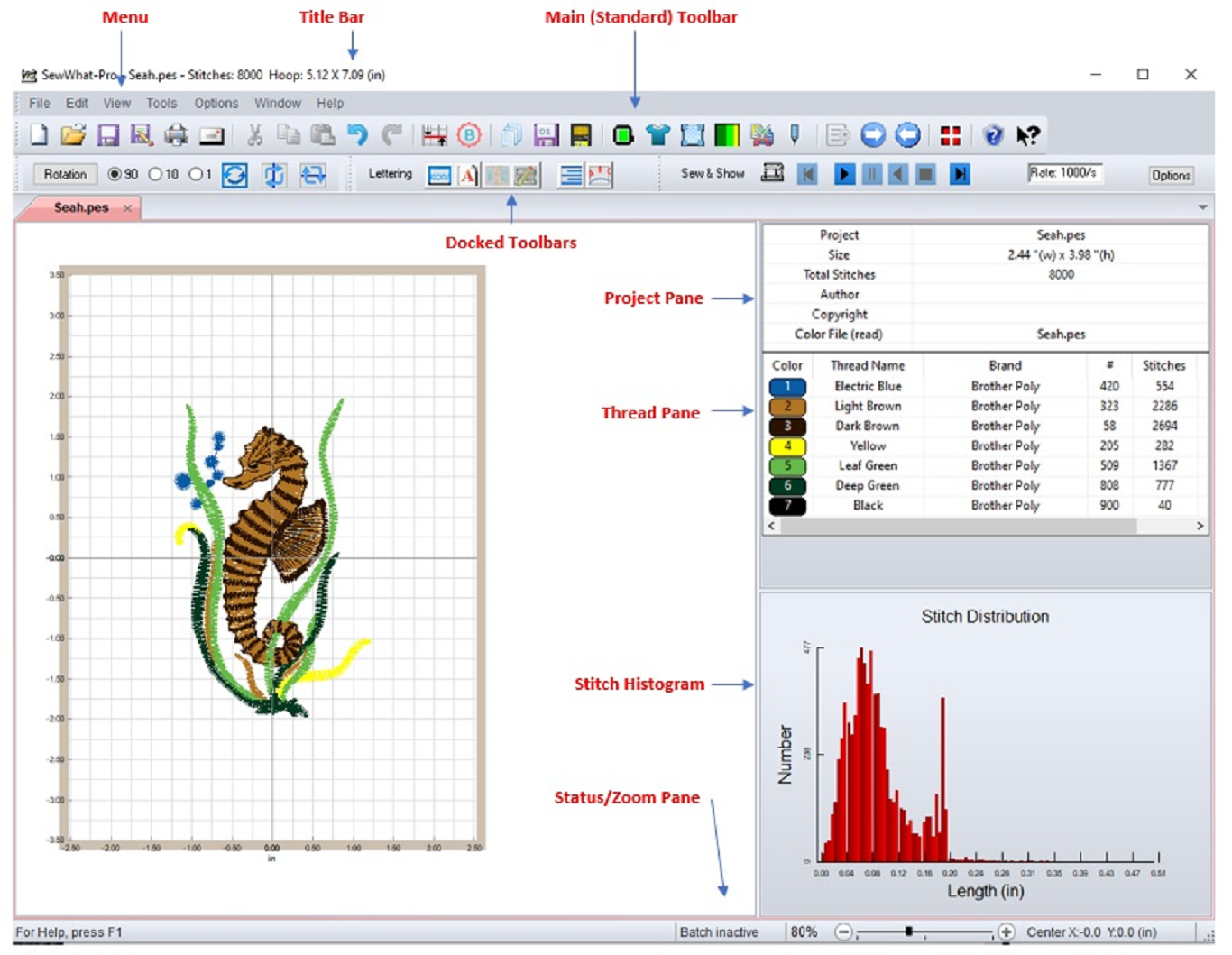
Stepping into SewWhat-Pro feels like walking into a well-organized craft shop; everything is where you expect, and tools are ready to bring your embroidery vision to life. The interface is clad in a clean, straightforward layout that invites users to explore its features without feeling overwhelmed. Whether you're importing complex file formats or repairing a corrupted design, the app proves to be both friendly and functional, making embroidery editing accessible even for beginners.
Core Features: Precision Editing and Repair
Design Editing and Customization
SewWhat-Pro's editing suite is surprisingly comprehensive for such a focused tool. Users can easily resize, rotate, move, and colorize embroidery objects with a few clicks—almost like adjusting pieces on a virtual fabric canvas. Its precise stitch editing tools let users fine-tune individual stitches or entire design elements, allowing for detailed customization. This feature is particularly useful when you want to tweak a design tailored for a specific fabric or machine, ensuring your final product looks just right.
File Conversion and Compatibility
The software excels in converting embroidery files across various formats like DST, PES, JEF, and more—it's akin to speaking multiple embroidery languages fluently. This capability significantly simplifies workflows for those working with different embroidery machines or sharing designs between users. The seamless import/export process ensures designers and hobbyists won't get bogged down in format incompatibilities, boosting productivity and reducing frustration.
Repair and Error Handling
One of SewWhat-Pro's most distinctive features is its ability to repair corrupted or flawed embroidery files. Imagine trying to sew a delicate fabric and discovering a tear—this software acts as your digital patch, analyzing and fixing common file errors to save your design from becoming useless. Its intelligent repair algorithms identify problematic stitches, remove duplicates, and streamline the design, which is invaluable for maintaining professional quality without the need for complex external tools.
User Experience and Differentiators
The app scores highly in user experience with a clean, logical interface that reduces the learning curve. Despite its comprehensive toolset, it avoids overwhelming the user, offering contextual menus and step-by-step guidance where necessary. Smooth operation and quick response times make editing sessions efficient and enjoyable. For those familiar with embroidery software, SewWhat-Pro's unique focus on file repair and cross-format compatibility sets it apart from more general embroidery utilities. Its ability to repair corrupted files quickly and convert between multiple formats with minimal fuss are real game-changers, especially for professionals managing multiple clients or projects.
Final Verdict: A Practical Choice for Embroidery Enthusiasts
All in all, SewWhat-Pro strikes a commendable balance between user-friendliness and powerful features. Its core strengths—especially the intelligent repair tool and versatile format support—make it an excellent investment for anyone serious about embroidery design management. While it may not have the broad range of advanced features found in high-end CAD embroidery software, it excels at what it sets out to do: streamline your workflow and ensure your designs are perfect every time.
Highly recommended for hobbyists and small business owners who need reliable, straightforward embroidery file management. If you're looking for a tool that handles complex repair jobs and format conversions with ease, SewWhat-Pro is definitely worth trying out.
Pros
- Intuitive annotation tools
- Versatile image editing capabilities
- Supports multiple image formats
- Batch processing feature
- User-friendly interface
Cons
- Limited advanced editing tools
- Occasional stability issues
- Basic help documentation
- Limited output customization options
- Slow processing speed on large images











