

- Category Utilities & tools
- Available on PC
- OS Windows 10 version 14316.0 or higher
- languages English (United States)
A Friendly Dive into SQLite Viewer & Editor for Windows
If you're delving into data management or just need a straightforward way to view and edit SQLite databases on Windows, this tool from Central Software offers a promising solution. Designed to simplify database interactions, it aims to be your reliable companion in navigating complex data files without the hassle of cumbersome interfaces.
Essential Details at a Glance
This application positions itself as a dedicated SQLite viewer and editor tailored for Windows users seeking an intuitive yet powerful tool. Developed by Central Software, a team committed to creating user-friendly utility tools, the app boasts several key features:
- Intuitive database browsing with a clear, hierarchical view
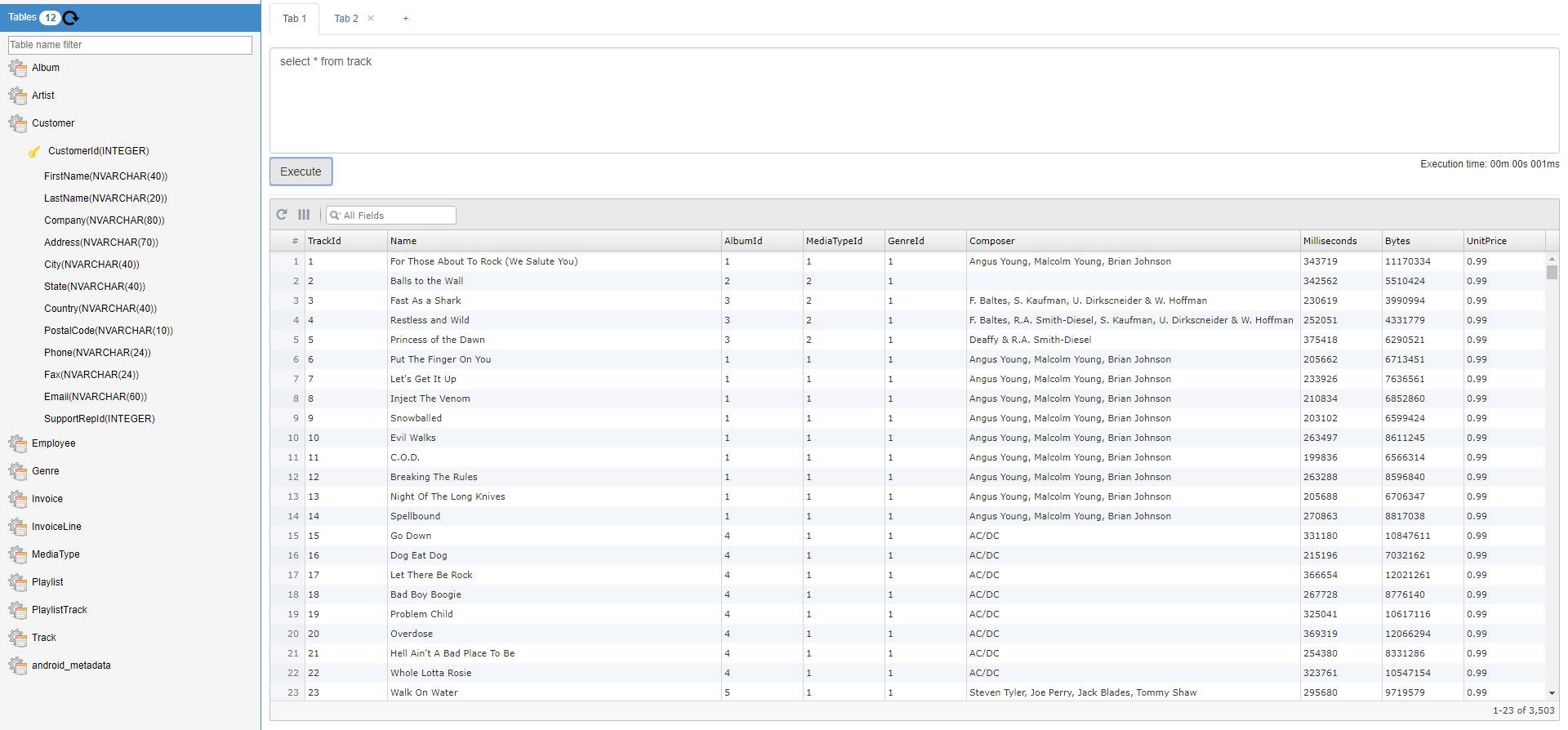
- SQL query execution with real-time results
- Data editing capabilities directly within the interface
- Support for multiple database files simultaneously
Its target audience spans developers, database administrators, analysts, and anyone needing quick, reliable access to SQLite databases without deploying complex database management systems.
A BrightSpot in Data Management - A Personal Perspective
Imagine you're lost in a treasure trove of data, searching for a swift method to peek inside a stubborn SQLite file. That's where this app shines—offering a user-friendly portal that reduces the tediousness of database management to a few clicks. Whether you need a simple read or a quick edit, it's akin to having a mini database command center right on your desktop, making data manipulation feel less like a chore and more like a breeze.
Streamlined and Visual Interface for Quick Navigation
The app's interface feels clean and approachable, reminiscent of opening a well-organized filing cabinet. The left pane displays your database and tables in a clear tree structure, allowing effortless navigation. The main window then presents data in a familiar grid layout, making it easy to interpret results. Such visual clarity minimizes the learning curve, particularly for users new to database management. Its responsive design ensures that switching between tables and executing queries happen seamlessly, like flipping through pages of a well-loved book.
Core Functionalities: Power and Simplicity
- Database Browsing and Data Editing: The app enables users to open multiple SQLite files simultaneously, each presented in an organized manner. You can instantly browse through tables and directly modify records—no need to run complex commands or switch to separate editors. This makes the process akin to editing a spreadsheet but with the underlying structure preserved, ensuring data integrity.
- Embedded SQL Query Console: For those familiar with SQL, a built-in query editor provides a playground for complex operations. Results update in real-time, giving instant feedback much like a live conversation with your database. This feature empowers advanced users to perform bulk updates, joins, or aggregate functions directly from the interface.
- Batch Operations and Multiple File Support: Managing several databases at once is simplified, especially when comparing or transferring data. You can load multiple files, switch between them effortlessly, and perform batch edits—all within a unified workspace.
User Experience and Unique Selling Points
The app offers a smooth experience with minimal lag, validating its efficient core engine. The learning curve is gentle, even for those new to database tools, thanks to the straightforward UI and clear icons. Unlike many utilities that add layers of confusing features, this tool sticks to essential functions, making it less intimidating and more practical for day-to-day tasks. What sets it apart from competitors is its combination of real-time SQL execution integrated within a simple interface, and the ability to handle multiple databases simultaneously without sluggishness. Its focus on providing an accessible yet capable environment makes it suitable for both casual users and more advanced database professionals.Final Thoughts: A Practical Choice for SQLite Enthusiasts
Overall, SQLite Viewer & Editor for Windows presents a solid mix of ease of use, functional depth, and thoughtful design. Its most striking feature—the intuitive interface combined with real-time SQL execution—serves as a game-changer for quick database inspections and modifications. While it might lack some heavyweight features of professional database management suites, it excels as a lightweight, efficient, and user-friendly tool.
If you're looking for a reliable, no-fuss app to handle your SQLite databases—whether for quick edits, data inspection, or small-scale development—this app is certainly worth trying out. It's like having a friendly data concierge guiding you through your database journey. I'd recommend it to anyone who values simplicity combined with practical power, elevating database management from a daunting task to a manageable routine.
Pros
- Intuitive User Interface
- Fast Database Loading
- Powerful Query Support
- Edit and Save Data Seamlessly
- Cross-Platform Compatibility
Cons
- Limited Import/Export Options
- Occasional Crashes with Large Databases
- Lack of Advanced Data Visualization
- Basic User Documentation
- Limited Support for Other Database Types











