

- Category Utilities & tools
- Available on PC
- OS Windows 10 version 18362.0 or higher
- Keyboard Not specified
- Mouse Not specified
- languages English (United States)
Unveiling the Power of Sysinternals Suite for Windows
If you're someone who navigates the complex world of Windows troubleshooting, system analysis, or security, then the Sysinternals Suite is like your trusted toolbox—compact, versatile, and packed with essential instruments. Developed by Microsoft itself, this collection of utilities offers a window into the intricate workings of your Windows system, empowering both IT pros and tech enthusiasts alike to diagnose, fine-tune, and secure their machines with confidence.
A Closer Look: Basic Information and Core Features
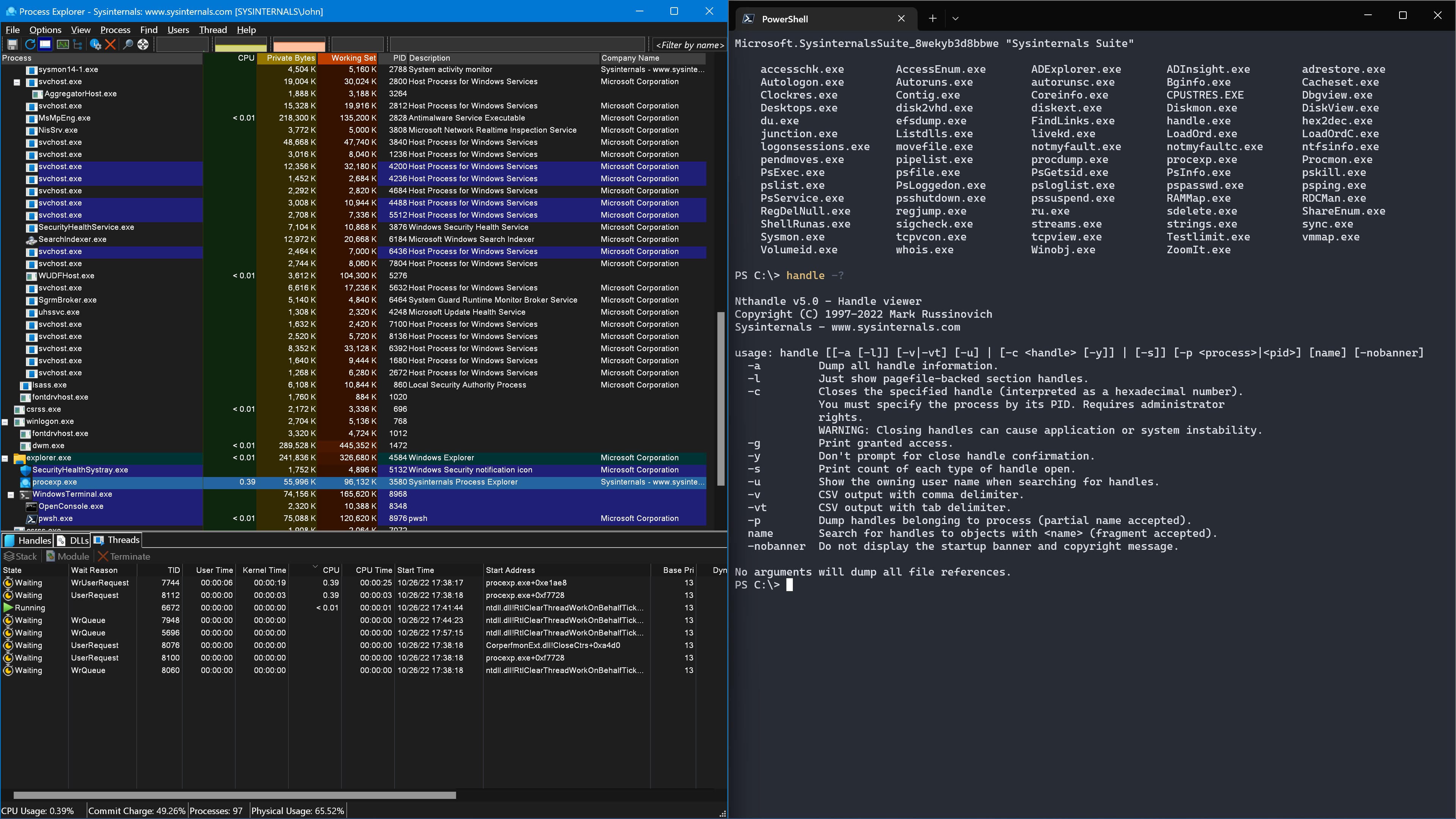
The Sysinternals Suite for Windows is a comprehensive set of system utilities designed to simplify complex monitoring and troubleshooting tasks. From process management to network diagnosis, it covers a broad spectrum of system insights at your fingertips.
Development Team
Developed and maintained by Microsoft Corporation, the suite benefits from the trust and expertise of a technology giant committed to providing advanced yet accessible tools to users worldwide.
Main Highlights
- Comprehensive System Monitoring: Deep dives into processes, memory, and startup components.
- Advanced Troubleshooting: Tools to identify problematic apps, services, and drivers.
- Security and Analysis: Utilities that reveal hidden malware or malicious behavior.
- Portable and User-Friendly: Lightweight design that does not require installation, making it easy to run from any device.
Target Audience
This suite is ideal for IT professionals, system administrators, cybersecurity experts, power users, and tech-savvy enthusiasts eager to understand their Windows environment better or resolve stubborn issues efficiently.
A Dynamic Toolbox for Windows Diagnostics
Imagine having a set of precision instruments that can help you uncover hidden system secrets—this is precisely what the Sysinternals Suite offers. Its tools turn the convoluted maze of Windows internals into a navigable map, enabling you to troubleshoot with confidence and precision. But what makes it so special? Let's explore the standout features.
Process Explorer and Process Monitor: Your System's X-ray
Process Explorer acts like a high-powered magnifying glass into active processes, revealing detailed information about their hierarchical structure, loaded DLLs, and resource consumption. It's akin to having a detailed blueprint of your system's operations. Paired with Process Monitor, which logs real-time file system, registry, and network activity, users can pin down what exactly is causing issues. These tools are particularly valuable when dealing with stubborn malware or debugging complex software conflicts.
What sets these apart is their depth of detail combined with an intuitive, visual interface. Unlike generic task managers, Process Explorer and Monitor illuminate the internal workings of processes in a way that's accessible yet thorough, making troubleshooting more straightforward and less guesswork-laden.
Autoruns and TCPView: Mastering Startup and Network Insights
Autoruns presents a comprehensive snapshot of every program and service configured to start automatically with Windows, providing an eagle-eye view of the startup sequence. It's like having a backstage pass to your system's opening act. The utility enables you to disable unwanted or suspicious entries swiftly, helping to improve boot times and tighten security.
Meanwhile, TCPView visualizes all active network connections, showing you who's talking to your PC and on what ports—think of it as your network's command center. These tools are invaluable for security audits and performance tuning, offering granular control over what runs and connects in the background.
User Experience: Navigating Complexities with Ease
The suite's tools are generally straightforward to access and operate, often with simple interfaces that pack a punch. While some utilities may have a slight learning curve due to their depth, the overall experience is smooth, especially with the wealth of online documentation and community support. Portable by design, they can be run from a USB stick without installation, ideal for quick diagnostics on multiple machines.
What Makes It Uniquely Stand Out?
Compared to other utilities and tools, Sysinternals' most distinctive advantage is its integration of advanced, Microsoft-driven tools that are both robust and user-centric. Its real strength lies in providing deep, raw system data in an accessible manner, eliminating the need for multiple third-party applications. The suite's tools are highly regarded in the IT community for their reliability and detailed insights, making them a preferred choice for intensive diagnostics and system analysis.
Final Recommendations: Who Should Use It and Why
I'd recommend the Sysinternals Suite for anyone who wishes to wield a professional-level toolkit for Windows troubleshooting without the overhead of complex enterprise software. Whether you're maintaining a business's network, investigating suspicious activity, or just curious about what's happening behind the scenes of your PC, these utilities are invaluable. For casual users, some tools might seem daunting at first, but with patience, they unlock a wealth of system understanding that's difficult to find elsewhere.
In conclusion, the Sysinternals Suite isn't just a collection of utilities; it's a diagnostic artillery that can turn complicated system mysteries into solved puzzles. I'd rate it as a must-have for serious Windows users, with the caveat that mastering its depth requires some learning but pays off significantly in enhanced control and insight.
Pros
- Comprehensive Set of Utilities
- Lightweight and Fast
- Portable and Easy to Use
- Real-time Monitoring
- Highly Configurable
Cons
- Learning Curve for Beginners
- Lack of Official User Documentation
- No Integrated Support for Remote Systems
- Potential Compatibility Issues with Newer Windows Versions
- Minimal User Interface Enhancements











