


- Category Utilities & tools
- Developer Cainey Studio
- Available on PC
- OS Windows 10 version 14316.0 or higher
- languages English (United States)
An Immersive Portal to Virtual Reality Films and Experiences
Vision VR Player for Windows stands out as a comprehensive media player designed specifically for VR content, allowing users to seamlessly enjoy 3D and 360-degree videos on their PCs. Crafted by Cainey Studio, this application offers an intuitive platform to explore stunning VR experiences without the need for dedicated headsets or complex setups, making it an accessible gateway into immersive media.
Meet the Developer: Cainey Studio's Passion for VR Media
Cainey Studio is an innovative developer dedicated to delivering high-quality multimedia tools tailored for virtual reality enthusiasts. Their focus on creating user-friendly applications exemplifies their commitment to democratizing immersive media consumption. With Vision VR Player, they've combined technical finesse with ease of use, ensuring that both casual users and serious VR fans can dive into 3D content effortlessly.
Core Features that Elevate Your VR Experience
Support for a Wide Range of VR Video Formats and Devices
One of the key strengths of Vision VR Player is its broad compatibility. It supports various VR video formats, including 3D SBS (Side-by-Side), OU (Over-Under), and 180°/360° videos, ensuring users can access content from multiple sources. Whether you're viewing on a desktop monitor or projecting onto a VR headset, the application's versatility allows for flexible playback options. This feature removes the hassle of needing specific hardware or conversion tools, making it an all-in-one media hub.
Intuitive and Customizable Viewing Environment
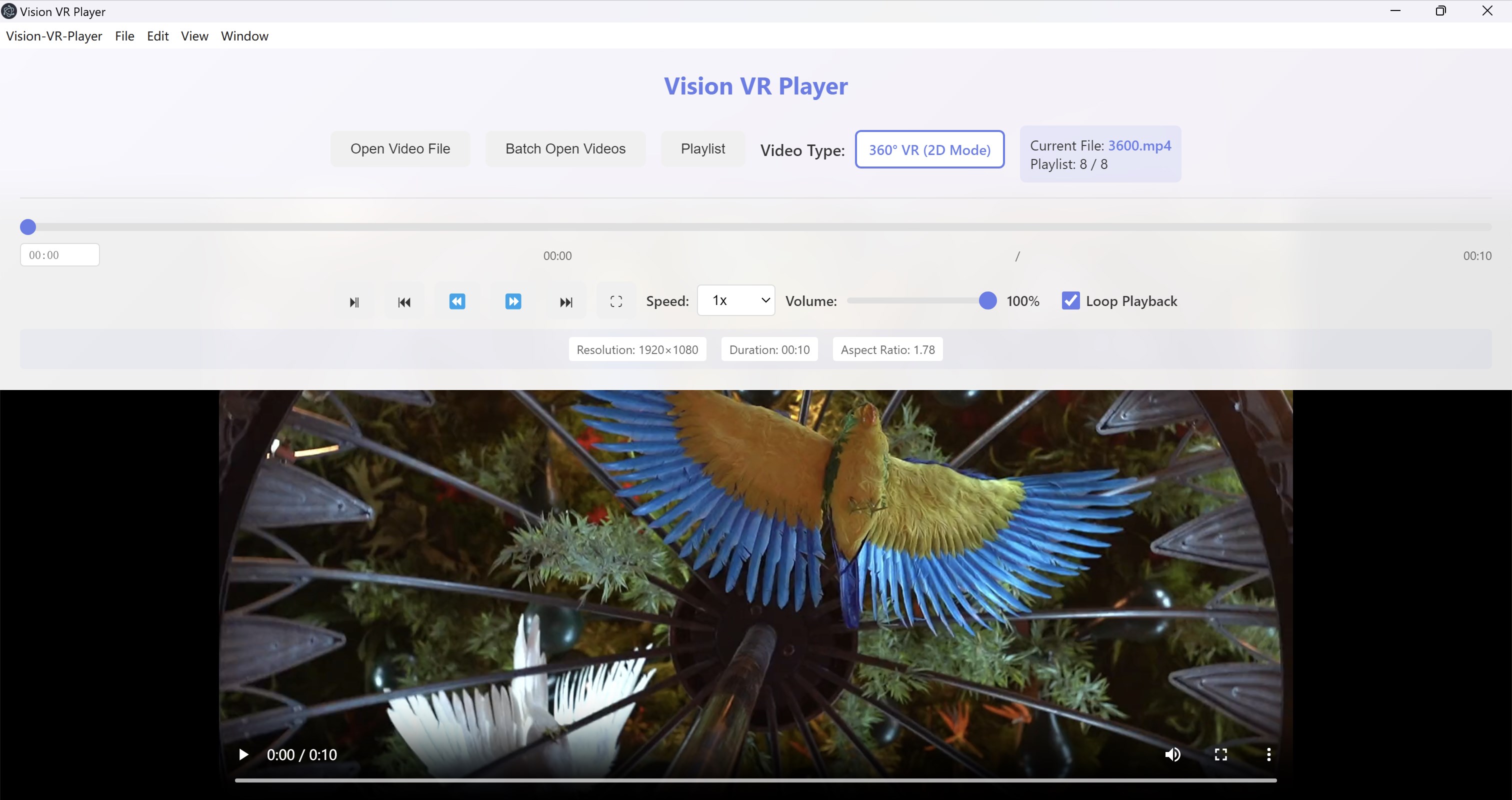
The app offers an immersive environment that can be easily tailored to your preferences. Users can adjust projection modes, change view angles, or set immersive parameters with simple controls. Scene navigation is smooth, akin to turning the pages of a well-loved comic book, allowing users to focus on content without distractions. The interface is designed with clarity in mind, so even newcomers can get started quickly without feeling overwhelmed.
Easy File Management and Playback Controls
Managing your media library is straightforward within Vision VR Player. Drag-and-drop functionality or folder browsing helps locate videos swiftly. Playback controls are responsive and unobtrusive—pause, rewind, adjust volume, or switch scenes with minimal effort. The app also supports playlist creation, enabling continuous episodes or themed content to play seamlessly, much like having your own personalized VR cinema.
User Experience: Seamless, Accessible, and Enjoyable
The interface strikes a balance between simplicity and functionality. It features a clean design with sizable icons and clear labeling, reducing the usual clutter seen in many multimedia tools. This thoughtful layout means less time fussing with settings and more time immersed in the virtual world. Responsiveness during playback is commendable; transitions between scenes and controls feel fluid, supporting a comfortable viewing experience.
Learning curve is gentle. Most users can pick up the app within minutes, thanks to logical menu arrangements and helpful prompts. Navigating through different video formats or adjusting settings is intuitive, akin to a familiar GPS guiding you effortlessly through a complex cityscape. While some advanced features exist for power users—like stereoscopic adjustments—they don't impede ease of use for beginners.
What Makes Vision VR Player Stand Out?
Compared to other VR media players, its key differentiators are its extensive format support and the flexibility of viewing setups. Many tools require specific hardware or complicated configurations, but Vision VR Player offers a plug-and-play experience that adapts to your existing setup—be it a mouse-controlled desktop or a VR headset. Its ability to handle diverse video formats ensures that users aren't limited by compatibility or file types, making it a truly versatile companion for any VR content collection.
Moreover, the app's lightweight footprint and straightforward interface make it accessible, even for users who aren't tech-savvy. Its focus on core playback features without unnecessary bloat allows for a smooth and distraction-free experience, akin to having a private virtual cinema at your fingertips.
Final Verdict: A Solid Choice for Virtual Reality Content Enthusiasts
If you're eager to explore VR videos and immersive media on your Windows PC without investing in a high-end headset or complicated software, Vision VR Player is highly recommended. Its support for a broad range of formats, easy-to-use interface, and flexible viewing options make it an appealing choice for casual viewers and dedicated VR fans alike. While it may lack advanced editing or streaming features, its strength lies in delivering reliable, accessible playback in a user-friendly package.
For those who desire a straightforward yet powerful VR media solution, I'd suggest giving Vision VR Player a try—your virtual cinema awaits, right on your desktop.
Pros
- User-Friendly Interface
- High-Quality Visuals
- Wide Content Library
- Smooth Performance
- Regular Updates
Cons
- Limited Device Compatibility
- Occasional App Crashes
- Navigation Can Be Confusing at First
- Limited Customization Options
- Requires Stable Internet Connection for Streaming











