

- Category Utilities & tools
- Available on PC
- OS Windows 10 version 19041.0 or higher
- languages English (United States)
An In-Depth Look at Windows File Recovery for Windows: A Reliable Tool for Data Restorers
In an age where accidental deletion or disk corruption can feel like a nightmare, having a dependable recovery tool is essential. Windows File Recovery offers a straightforward solution to retrieve lost data directly from your Windows system, promising both simplicity and effectiveness.
Basic Information: Who, What, and Why?
Windows File Recovery is a utility developed by Microsoft Corporation designed to help users recover accidentally deleted or lost files from local storage devices. Its key strengths lie in supporting various file types, scanning options, and integration within the Windows ecosystem.
Developer and Main Features
- Developer: Microsoft Corporation
- Primary Features:
- Supports recovery of a wide range of file types including documents, photos, videos, and more.
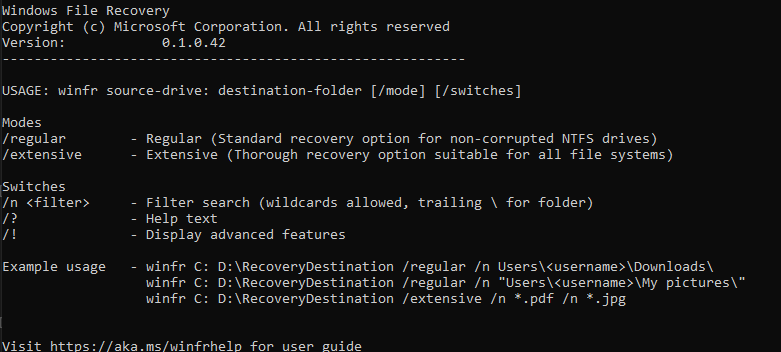
- Dual recovery modes: Basic and Extensive, catering to different data loss scenarios.
- Supports recovery from various storage devices such as internal and external drives, including formatted or corrupted disks.
- Command-line interface allows for advanced use, suitable for tech-savvy users and professional data recovery specialists.
- Target Users: Windows users who have lost files due to accidental deletion, formatting, or system errors, including both casual users and IT professionals seeking a tool that integrates seamlessly with Windows.
Engaging and Functional: An App That Works Like a Digital Lifesaver
Imagine losing a precious family photo collection or an important work document—panic sets in, yet Windows File Recovery offers a calm, systematic way to sift through the digital debris and rescue what matters. Its straightforward approach makes data recovery feel less like navigating a maze and more like following a well-marked trail.
Powerful Recovery in Action
Multiple Recovery Modes: From Quick Fix to Deep Dive
The standout feature of Windows File Recovery is its dual mode operation. The 'Default' mode acts like a sprinter, quick to find recently deleted files on NTFS, FAT, exFAT, or ReFS file systems—perfect for those accidental deletions. When files are more elusive, 'Segment' or 'Extent' modes act like a detective, performing a more thorough scan to recover data from damaged or formatted drives. This layered approach ensures that no matter how grave the data loss, there's a mode tailored to the scenario.
Advanced User Control via Command Line
While many recovery tools boast GUI simplicity, Windows File Recovery embraces the command line, enabling precise, customizable scans. Think of it as giving you the keys to a high-performance vehicle; for experienced users, this means better control and potentially higher recovery success rates. For beginners, a bit of learning curve might be involved, but Microsoft provides documentation to ease the journey.
User Interface and Experience: Functional Yet Slightly Technical
As a command-line tool, Windows File Recovery has a minimalist interface—characterized by plain, text-based prompts. This might feel intimidating at first but offers a clarity that graphical interfaces often can't match. For users accustomed to Windows commands, this design is straightforward. Those preferring graphical environments might find it less intuitive, but the comprehensive help commands and clear instructions mitigate this challenge.
What Sets It Apart?
Compared to other utilities & tools in the data recovery space, Windows File Recovery's most distinctive edge is its deep integration with Windows itself and its adoption of a versatile, multi-scenario recovery approach. Unlike many third-party recovery tools that may focus solely on specific file types or use complex GUIs, this utility offers a balanced mix: high flexibility, powerful recovery modes, and tight Windows integration. Additionally, as a free Microsoft offering, it stands out for users seeking a no-cost, reliable solution without resorting to less trustworthy freeware.
Final Verdict: A Solid Choice for Tech-Savvy and Professional Users
If you're comfortable with command-line operations and seek a robust, no-cost recovery tool directly from the Windows manufacturer, Windows File Recovery is worth exploring. Its most distinctive features—multi-scenario recovery modes and deep system integration—make it especially suitable for those with more technical experience aiming to perform precise data recoveries. For casual users unfamiliar with command-line prompts, it might seem less user-friendly than graphical alternatives, but the effectiveness and reliability it offers are hard to beat.
Overall, I recommend it as a go-to utility when data recovery needs require deeper troubleshooting, with the caveat that some familiarity with command-line interfaces will enhance the experience. For quick, straightforward recoveries, other GUI tools might be more accessible, but for those who appreciate control and depth, Windows File Recovery stands out as a reliable friend in digital emergencies.
Pros
- Effective Data Recovery
- Supports Multiple Recovery Modes
- Free to Use
- Command-line Interface
- Regular Updates
Cons
- Steep Learning Curve
- Limited Support for Certain File Types
- No User-friendly GUI
- Limited Recovery Options on APFS or other Filesystems
- Recovery Speed Can Be Slow











