

- Category Utilities & tools
- Available on PC
- OS Windows 10 version 17763.0 or higher
- Keyboard Integrated Keyboard
- Mouse Integrated Mouse
- Memory 2 GB
- languages English (United States)
Introduction: A Friendly Hand to Fix Windows Troubles
If you've ever stared at your computer screen in confusion, wondering why your Windows isn't cooperating, then Windows Troubleshooter for Windows by MyTechnician might just be your new best friend. Designed to streamline system diagnostics and repair, this app promises to make fixing Windows issues a less daunting task. Whether you're a casual user frustrated by frequent glitches or a tech enthusiast looking for a reliable troubleshooting tool, this application aims to demystify the often complex process of system maintenance.
Core Features That Stand Out
Seamless Troubleshooting with Automated Diagnostics
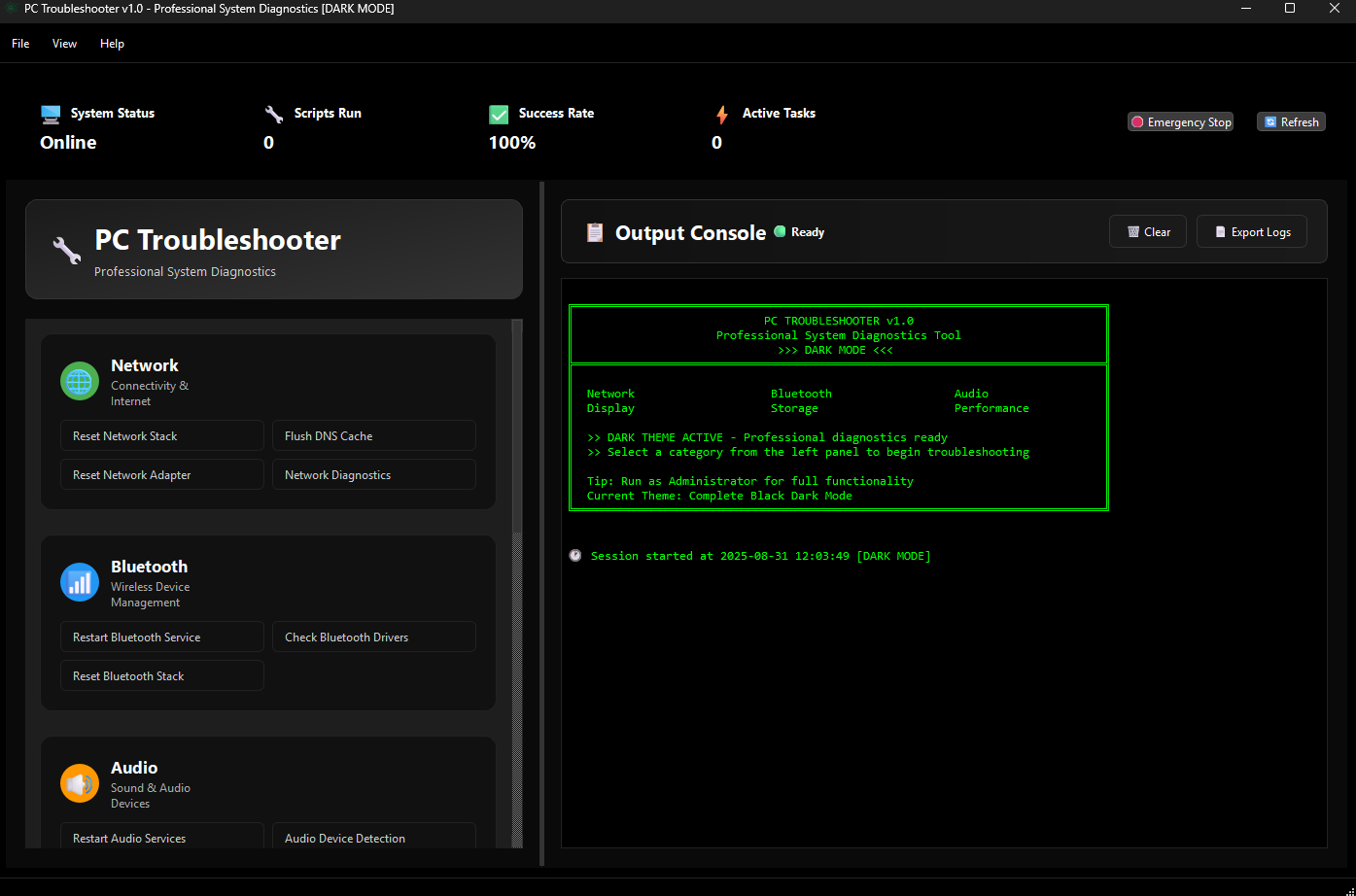
The most compelling aspect of Windows Troubleshooter for Windows is its automated diagnostics. The app scans your system for common errors—ranging from network issues to system configuration problems—and provides clear, step-by-step solutions. Its intelligent scanning engine is like having a seasoned technician on call, pinpointing issues efficiently without requiring extensive technical knowledge from the user. This feature greatly reduces the time and effort needed to resolve persistent problems, transforming what used to be a laborious process into a quick, user-friendly experience.
One-Click Repairs and Fix-It Wizards
Imagine having a toolbox where pressing a single button can fix several issues at once—that's what the One-Click Repair feature offers. Once the diagnostics identify a problem, the app presents a straightforward fix-it wizard that guides users through repairing common Windows errors. This eliminates the need for manual tweaks or command-line interventions, making system repairs accessible even to less tech-savvy users. The intuitive design ensures that repairs are quick, safe, and effective, restoring your system's health with minimal fuss.
Detailed Reports and Troubleshooting History
For users who like to keep track of system health or troubleshoot recurring issues, the detailed reports generated by this app are especially valuable. These reports lay out what problems were detected, what actions were taken, and recommendations for future prevention. This transparency builds trust and helps users understand their system better, akin to having a diagnostic report after a medical exam. Additionally, reviewing the history allows for easier identification of persistent problems, enabling a more proactive approach to system maintenance.
User Experience and Design: Friendly, Intuitive, Reliable
The interface of the Windows Troubleshooter is clean and straightforward, much like walking into a well-organized toolbox—everything in its place, easy to locate. The design employs a familiar Windows-style aesthetic, making navigation a breeze for users accustomed to the operating system. The flow from diagnostics to repair is streamlined, with clear prompts guiding users through each step. In terms of operation speed, the app performs diagnostics swiftly without lag, and repairs are executed promptly, ensuring minimal downtime. Even those new to troubleshooting will find the learning curve gentle, thanks to clear explanations and guided processes.
What Makes This Troubleshooter Stand Out?
Compared to other utilities and troubleshooting tools, this app's strongest points are its automation and detailed reporting features. Many diagnostic tools require manual input or complex configurations, but MyTechnician's app automates much of the process, saving time and reducing errors. The ability to generate comprehensive troubleshooting reports also sets it apart, giving users actionable insights and a better understanding of their system health. This focus on user empowerment, combined with reliable performance, makes it a valuable addition to any Windows user's toolkit.
Final Verdict: A Practical Companion for Windows Users
Overall, Windows Troubleshooter for Windows by MyTechnician earns high marks for its efficiency, user-friendly design, and unique features like automated diagnostics and comprehensive reports. It's especially recommended for users seeking a straightforward way to keep their Windows systems healthy without diving into complex technical procedures. While it may not replace more advanced, manual troubleshooting tools for tech experts, it certainly fills a vital gap for everyday users who want quick, effective solutions. For anyone keen on maintaining a smooth-running Windows experience, this app deserves a spot in your system utility collection.
Pros
- User-Friendly Troubleshooting Interface
- Automatic Detection of Common Issues
- Integration with Windows System Settings
- Regular Updates from Microsoft
- Guided Solutions Reduce Need for Technical Support
Cons
- Limited Troubleshooting Scope
- Occasional False Positives
- Dependence on Internet Connection
- Inconsistent Issue Recognition
- Limited Customization Options











